
How to Set The Time on Your Casio Watch
Are you tired of struggling to set the time on your Casio watch? Do you find yourself getting frustrated with the complex instructions and endless menus? Well, you’re in luck! In this article, we’ll guide you through the simple steps to set the time on your Casio watch, regardless of the model.
Understanding Your Watch
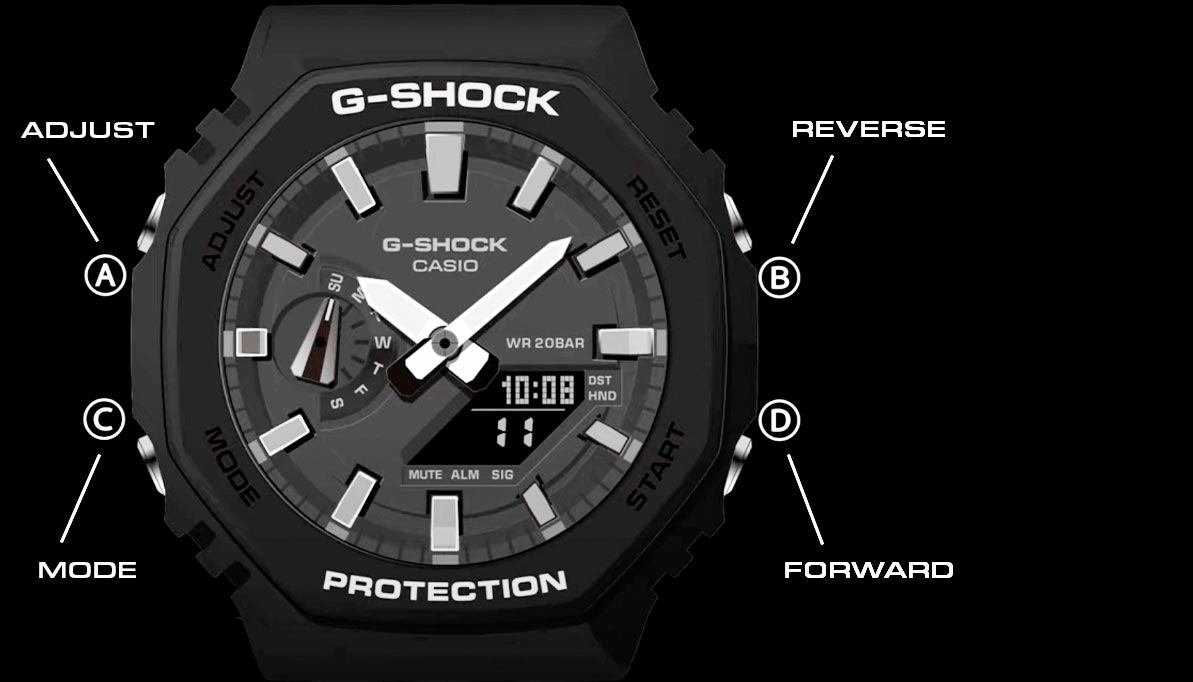
Before we dive into the instructions, it’s essential to understand your watch. Take a closer look at the buttons and features available on your device. You may have already noticed some buttons, such as the Light button or the Fashions button. Don’t worry if you’re not sure what they do; we’ll explain each one in detail.
Step-by-step Instructions
Here’s how to set the time on your Casio watch:
How to Set The Time on a Casio G-shock
The Casio G-Shock is one of the most popular watches from the brand. To set the time, follow these simple steps:
- Press and hold the ADJUST button for about two seconds.
- Release the button and press the FASHIONS button to access the settings menu.
- Select the mode by pressing the FASHIONS button again.
- Use the START-STOP button to adjust the hours and minutes.
- Press and hold the FASHIONS button to save your changes.
How to Set The Time on a Casio Vintage La670w
The Casio Vintage LA670W is another popular model from the brand. To set the time, follow these steps:
- Press the START-STOP button to access the settings menu.
- Select the mode by pressing the FASHIONS button.
- Use the START-STOP button to adjust the hours and minutes.
- Press the TIMER button to save your changes.
How to Set The Time on a Casio B640w
The Casio B640W is a sleek and modern watch from the brand. To set the time, follow these steps:
- Press the ADJUST button to access the settings menu.
- Select the mode by pressing the FASHIONS button.
- Use the START-STOP button to adjust the hours and minutes.
- Press the TIMER button to save your changes.
How to Set The Time on a Casio Pro Trek
The Casio Pro Trek is a rugged and reliable watch from the brand. To set the time, follow these steps:
- Press and hold the ADJUST button for about two seconds.
- Release the button and press the FASHIONS button to access the settings menu.
- Select the mode by pressing the FASHIONS button again.
- Use the START-STOP button to adjust the hours and minutes.
- Press and hold the FASHIONS button to save your changes.
How to Set The Time on a Casio A158w
The Casio A158W is a stylish and functional watch from the brand. To set the time, follow these steps:
- Press the LIGHT button to access the settings menu.
- Select the mode by pressing the FASHIONS button.
- Use the START-STOP button to adjust the hours and minutes.
- Press the TIMER button to save your changes.
Conclusion
Setting the time on your Casio watch is a straightforward process that requires attention to detail. By following these simple steps, you’ll be able to set the time with ease and confidence. Remember to consult your user manual if you’re unsure about any aspect of the process.
Frequently Asked Questions (FAQs)
- Q: What if I’m Still Having Trouble Setting The Time on my Casio Watch?
A: Consult your user manual or contact a qualified watch repair technician for assistance. - Q: Can I Reset The Time on my Casio Watch to a Different Format?
A: Yes, you can adjust the format of the clock display by accessing the settings menu and selecting the desired option. - Q: How do I Access The Settings Menu on my Casio Watch?
A: Press and hold the ADJUST button for about two seconds or select the mode by pressing the FASHIONS button. - Q: What if I Accidentally Reset The Time on my Casio Watch?
A: Don’t worry! Simply repeat the steps to set the time, and you’ll be back on track in no time. - Q: Can I Customize The Settings Menu on my Casio Watch?
A: Yes, some models allow you to customize the settings menu by adjusting the display options or adding new features.
Final Tips
Remember to handle your watch with care and avoid exposing it to extreme temperatures or humidity levels. Regularly cleaning and maintaining your watch will ensure that it continues to run smoothly and accurately for years to come.
We hope this article has been helpful in setting the time on your Casio watch. If you have any further questions, please don’t hesitate to ask!


