
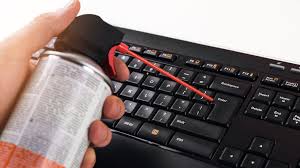
How to Clean Your PC Keyboard: A Step-by-step Guide
Are you tired of a dirty and dusty keyboard? Do you struggle with stubborn stains and grime buildup on your keyboard keys? Cleaning your PC keyboard can be a daunting task, but don’t worry, we’ve got you covered. In this article, we’ll guide you through the process of cleaning your PC keyboard, whether it’s fixed or portable.
The Importance of Cleaning Your PC Keyboard
Your keyboard is one of the most used components on your computer, and it’s essential to keep it clean and free from dust, dirt, and other debris. A dirty keyboard can lead to:
- Accurate typing issues
- Key malfunctioning
- Computer crashes
- Health risks (bacteria and viruses)
Materials Needed
To clean your PC keyboard, you’ll need the following materials:
- A compressed air canister (optional)
- A soft cloth or microfiber cloth
- A cotton swab or brush
- Water
- Mild soap or dish soap
- A toothbrush (optional)
Step 1: Prepare Your Keyboard
Before cleaning your keyboard, make sure to:
- Turn off your computer and unplug the power cord.
- Remove any attachments or peripherals connected to the keyboard.
- Flip over the keyboard and remove any dust or debris that may have accumulated under it.
How to Clean a Fixed PC Keyboard
To clean a fixed PC keyboard, follow these steps:
- Use Compressed Air: Hold the compressed air canister upright and spray the air directly onto the keys, making sure to get into all the nooks and crannies.
- Wipe Down The Keys: Use a soft cloth or microfiber cloth to wipe down each key, paying special attention to the areas around the keys and any crevices where dirt may accumulate.
- Clean The Keyboard Tray: Use a damp cloth to clean the keyboard tray, making sure to remove any dust or debris that may have accumulated.
How to Clean a Portable PC Keyboard
To clean a portable PC keyboard, follow these steps:
- Use Compressed Air: Hold the compressed air canister upright and spray the air directly onto the keys, making sure to get into all the nooks and crannies.
- Wipe Down The Keys: Use a soft cloth or microfiber cloth to wipe down each key, paying special attention to the areas around the keys and any crevices where dirt may accumulate.
- Clean The Keyboard Tray: Use a damp cloth to clean the keyboard tray, making sure to remove any dust or debris that may have accumulated.
Step 2: Disinfect Your Keyboard
Disinfecting your keyboard is an essential step in keeping it clean and germ-free. Follow these steps:
- Mix Water And Soap: Mix equal parts water and soap in a bowl.
- Soak The Keys: Dip each key into the soapy mixture, making sure to get all sides of the keys.
- Wipe Down The Keys: Use a soft cloth or microfiber cloth to wipe down each key, paying special attention to the areas around the keys and any crevices where dirt may accumulate.
Tips And Variations
- For tougher stains, mix baking soda and water to create a paste. Apply the paste to the affected area and let it sit for 10-15 minutes before wiping clean.
- If you have a mechanical keyboard, use a toothbrush to gently scrub between the keys.
- To disinfect your keyboard without soap or water, use a disinfectant spray specifically designed for electronics.
Conclusion
Cleaning your PC keyboard is an essential task that requires attention and care. By following these steps and using the right materials, you can keep your keyboard clean, functional, and germ-free. Remember to always unplug your computer and keyboard before cleaning, and never use harsh chemicals or abrasive materials that may damage the keys or other components.
Frequently Asked Questions
- Q: How Often Should I Clean my PC Keyboard?
A: It’s recommended to clean your PC keyboard every 2-3 months, depending on usage. - Q: What Materials do I Need to Clean my PC Keyboard?
A: You’ll need a compressed air canister (optional), a soft cloth or microfiber cloth, cotton swabs or brushes, water, mild soap or dish soap, and a toothbrush (optional). - Q: Can I Use Bleach to Disinfect my PC Keyboard?
A: No, it’s not recommended to use bleach as it may damage the keys or other components. - Q: How do I Clean my Portable PC Keyboard?
A: Follow the same steps as for a fixed PC keyboard.
Recommended Products
- Compressed air canister (e.G., Nilox, Spray Aria Compressed)
- Soft cloth or microfiber cloth (e.G., Panni of Cleaning in Microfibra – Package of 5)
- Cotton swab or brush
- Water and mild soap or dish soap
- Toothbrush


