
How to Update Mp3 Tags: A Comprehensive Guide
Are you tired of dealing with outdated or missing metadata on your MP3 files? Look no further! In this article, we’ll show you how to update MP3 tags using various software solutions, both online and offline.
Why is it Important to Update Mp3 Tags?
Updating MP3 tags is crucial for several reasons:
- Ensuring accurate identification of music tracks
- Improving searchability on platforms like Google and YouTube
- Enhancing the overall user experience when listening to or sharing music
Software Solutions For Updating Mp3 Tags (PC And Mac)
Here are some popular software solutions for updating MP3 tags, compatible with both PC and Mac:
Windows Media Player (Windows)
- Open Windows Media Player on your PC.
- Select the song you want to update by clicking on it in the library.
- Right-click on the song and select “Properties.”
- In the Properties window, click on the “Summary” tab.
- Update the title, artist, album, and other metadata as needed.
Music/itunes (macOS/Windows)
- Open Itunes or Music on your Mac or PC.
- Select the song you want to update by clicking on it in the library.
- Right-click on the song and select “Get Info.”
- In the Get Info window, click on the “Info” tab.
- Update the title, artist, album, and other metadata as needed.
Idte-id3 Tag Editor (Windows)
- Download And Install the IDTE-ID3 Tag Editor software from the official website.
- Launch the software and add your MP3 file by clicking on “File” > “Add File.”
- In the Tag Editor window, update the metadata as needed.
- Save your changes by clicking on “File” > “Save.”
Other Solutions For Updating Mp3 Tags (PC And Mac)
In addition to the above software solutions, you can also use online services like:
- Vlc: A media player that allows you to edit metadata while playing music.
- Musicbrainz Picard: A free software that helps update metadata from a large database.
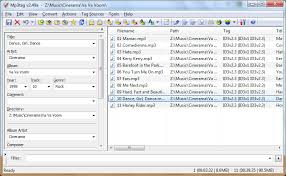
- Mp3tag: A program for Windows and macOS that enables editing, deleting, and adding tags.
How to Update Mp3 Tags Online
If you don’t want to download any software, you can use online services like:
- Tagmp3: A web-based tool that allows you to edit metadata directly from the browser.
- Converter Audio of 123apps: A service that offers conversion and editing capabilities for audio files.
How to Update Mp3 Tags on Android And Ipad
For mobile devices, you can use apps like:
- Automatic Tag Editor (Android): An app that allows you to update metadata automatically or manually.
- Evertag: Metadati Musical (iOS/iPadOS): An app that enables editing metadata for MP3 files.
Conclusion
Updating MP3 tags is a straightforward process, and with the software solutions and online services mentioned in this article, you can easily ensure your music library remains accurate and up-to-date.
Faqs
- Q: Why should I update my MP3 tags?
A: Updating MP3 tags ensures accurate identification of music tracks, improves searchability on platforms like Google and YouTube, and enhances the overall user experience when listening to or sharing music. - Q: What software solutions can I use to update MP3 tags on PC and Mac?
A: You can use Windows Media Player, Music/iTunes, IDTE-ID3 Tag Editor, VLC, MusicBrainz Picard, MP3TAG, and other online services for updating MP3 tags on both PC and Mac. - Q: How do I update MP3 tags online?
A: You can use web-based tools like Tagmp3 or Converter Audio of 123apps to edit metadata directly from the browser. - Q: What apps can I use to update MP3 tags on Android and iPad?
A: You can use Automatic Tag Editor (Android) and Evertag: Metadati Musical (iOS/iPadOS) for updating MP3 tags on mobile devices.
I hope this comprehensive guide has helped you understand the importance of updating MP3 tags and provided you with a clear understanding of how to do so using various software solutions, both online and offline.


