
How to Log Out of Instagram: A Step-by-step Guide
Are you tired of being connected to your Instagram account all the time? Do you want to take a break from the social media platform without permanently deleting your account? Look no further! In this article, we’ll guide you through the process of logging out of Instagram on various devices.
Why Log Out of Instagram?
Logging out of Instagram can be beneficial in several ways. It allows you to disconnect from the platform and take a break from social media. You might want to log out if you’re experiencing FOMO (fear of missing out) or if you need some time to focus on other activities.
How to Log Out of Instagram on Android And Iphone
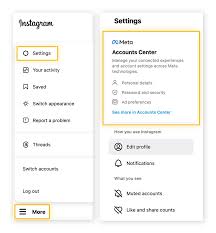
To log out of Instagram on your smartphone, follow these steps:
- Open the Instagram app on your device.
- Tap on the profile icon in the bottom right corner.
- Swipe up to access the settings menu.
- Tap on “Log Out” at the bottom of the screen.
- Confirm that you want to log out by tapping “Yes, I’m sure.”
How to Log Out of Instagram on Computer
To log out of Instagram on your computer, follow these steps:
- Open the Instagram website in your browser.
- Click on the profile icon in the top right corner.
- Click on “Settings” from the dropdown menu.
- Scroll down to the “Account” section and click on “Log Out”.
- Confirm that you want to log out by clicking “Yes, I’m sure”.
How to Log Out of Instagram on All Devices
To log out of Instagram on all devices connected to your account, follow these steps:
- Open the Instagram app on one of your devices.
- Tap on the profile icon in the bottom right corner.
- Swipe up to access the settings menu.
- Tap on “Settings” and then tap on “Account”.
- Scroll down to the “Security” section and tap on “Devices”.
- Tap on the device you want to log out of and then tap on “Log Out”.
How to Temporarily Deactivate Your Instagram Account
If you’re not ready to delete your account but still want to take a break, you can temporarily deactivate it. To do this:
- Open the Instagram app on one of your devices.
- Tap on the profile icon in the bottom right corner.
- Swipe up to access the settings menu.
- Tap on “Settings” and then tap on “Account”.
- Scroll down to the “Security” section and tap on “Deactivation or Elimination”.
- Tap on the toggle switch next to “Temporarily deactivate my account”.
How to Permanently Delete Your Instagram Account
If you’re sure you want to delete your account, follow these steps:
- Open the Instagram app on one of your devices.
- Tap on the profile icon in the bottom right corner.
- Swipe up to access the settings menu.
- Tap on “Settings” and then tap on “Account”.
- Scroll down to the “Security” section and tap on “Deactivation or Elimination”.
- Tap on the toggle switch next to “Permanently delete my account”.
How to Log Out of Multiple Accounts
If you have multiple accounts connected to your Instagram account, follow these steps:
- Open the Instagram app on one of your devices.
- Tap on the profile icon in the bottom right corner.
- Swipe up to access the settings menu.
- Tap on “Settings” and then tap on “Account”.
- Scroll down to the “Security” section and tap on “Multiple accounts”.
- Select the account you want to log out of.
How to Remove a Shadowban From Instagram
If you’re concerned about being shadowbanned, follow these steps:
- Open the Instagram app on one of your devices.
- Tap on the profile icon in the bottom right corner.
- Swipe up to access the settings menu.
- Tap on “Settings” and then tap on “Account”.
- Scroll down to the “Security” section and tap on “State of account”.
Conclusion
Logging out of Instagram can be a simple process, but it’s essential to understand the different options available to you. Whether you want to take a break from social media or delete your account permanently, we’ve got you covered.
Faqs
- Q: How do I Log Out of Instagram?
A: To log out of Instagram on Android and iPhone, follow the steps outlined above. - Q: Can I Log Out of Multiple Accounts at Once?
A: Yes, if you have multiple accounts connected to your Instagram account, you can log out of them simultaneously by following the steps outlined above. - Q: How do I Remove a Shadowban From Instagram?
A: Unfortunately, there’s no direct way to remove a shadowban from Instagram. However, you can check your account status and take corrective actions if necessary. - Q: Can I Temporarily Deactivate my Instagram Account?
A: Yes, you can temporarily deactivate your Instagram account by following the steps outlined above. - Q: How do I Permanently Delete my Instagram Account?
A: To permanently delete your Instagram account, follow the steps outlined above. - Q: What Happens if I Delete my Instagram Account?
A: If you delete your Instagram account, all your data will be deleted, and you won’t be able to access your account again. - Q: Can I Log Out of Instagram on a Computer?
A: Yes, you can log out of Instagram on a computer by following the steps outlined above. - Q: How do I Remove Multiple Accounts Connected to my Instagram Account?
A: To remove multiple accounts connected to your Instagram account, follow the steps outlined above.
Remember to always be cautious when logging out of or deleting your Instagram account, as this may affect your online presence and relationships with others on the platform.


