
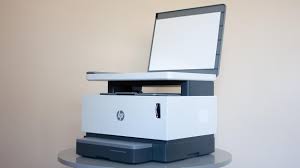
The HP Neverstop Printer: A Game-changer For Small Businesses And Home Offices?
As a pragmatic person, I always look for ways to optimize costs without sacrificing quality. When it comes to printing documents, I’ve found that traditional printers can be a drain on the wallet, especially when it comes to toner cartridges. That’s why I was excited to try out the HP Neverstop Laser 1202nw printer, which promises to revolutionize the way we print.
Characteristics of The Product
Before diving into my experience with the printer, let me give you a brief overview of its key features:
- Multifunctional: The HP Neverstop Laser 1202nw is a laser printer that can also scan and copy documents.
- Compact Design: It has dimensions of 28.70 Cm x 38.05 Cm x 29.34 Cm, making it perfect for small offices or home use.
- Integrated Scan: The printer comes with an integrated scanner, which allows for quick and easy scanning of documents.
- Display Lcd: It features a display LCD with icons, making it easy to navigate and monitor the printer’s status.
- Connectivity Options: You can connect the printer to your network via Ethernet or Wi-Fi.
Configuration And Setup
Configuring the HP Neverstop Laser 1202nw was a breeze. I simply extracted the printer from its package, connected it to my network using Wi-Fi, installed the drawer for the card, and ran the initial setup wizard on my smartphone. The entire process took around five minutes, and I was ready to go!
Print And Functionality Smart
One of the standout features of the HP Neverstop Laser 1202nw is its advanced printing capabilities. Using the HP Smart app, you can print documents directly from your smartphone or tablet, without the need for cables or a separate printer driver.
- Smartprinting: With HP Smart, you can print photos and documents from your mobile device, as well as scan and copy documents using the integrated scanner.
- Smart Scanning: You can use the app to scan documents and save them directly to cloud services like Dropbox or Google Drive.
- Smart Activity: The printer comes with a built-in “Smart Task” feature that allows you to automate workflows by creating custom tasks based on your printing needs.
Toner Refill
One of the most impressive features of the HP Neverstop Laser 1202nw is its innovative toner refill system. Using the “siringone” (a small container filled with toner), you can refill the printer’s toner in just a few seconds, without any mess or fuss.
Conclusion
In conclusion, I’m thoroughly impressed with the HP Neverstop Laser 1202nw printer. Its compact design, advanced printing capabilities, and innovative toner refill system make it an ideal choice for small businesses and home offices. While it may not be perfect (there’s no ADF or rear automatic document feeder), the benefits far outweigh any minor drawbacks.
Frequently Asked Questions
- What is The HP Neverstop Laser 1202nw Printer?
The HP Neverstop Laser 1202nw is a multifunctional laser printer that can print, scan, and copy documents. - How do I Configure The Printer?
To configure the printer, simply connect it to your network using Wi-Fi or Ethernet, install the drawer for the card, and run the initial setup wizard on your smartphone. - What is The Toner Refill System Like?
The toner refill system uses a small container filled with toner (the “siringone”) that can be refilled in just a few seconds, without any mess or fuss. - Can I Print From my Mobile Device?
Yes, using the HP Smart app, you can print documents and photos directly from your smartphone or tablet, without the need for cables or a separate printer driver. - Is The Printer Compact?
The HP Neverstop Laser 1202nw has dimensions of 28.70 Cm x 38.05 Cm x 29.34 Cm, making it perfect for small offices or home use. - Does The Printer Come With a Display Lcd?
Yes, the printer features a display LCD with icons, making it easy to navigate and monitor the printer’s status. - Can I Connect The Printer to my Network Via Ethernet or Wi-fi?
Yes, you can connect the printer to your network using either Ethernet or Wi-Fi. - What is The Recommended Print Resolution?
The recommended print resolution for the HP Neverstop Laser 1202nw is 600 x 600 dpi.
I hope this review has helped you make an informed decision about whether or not to purchase the HP Neverstop Laser 1202nw printer.


