
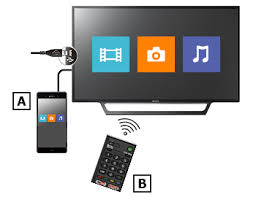
How to Connect Your Smartphone to Your TV Using a Cable
Are you tired of struggling to connect your smartphone to your TV? Do you want to enjoy seamless streaming without worrying about lag or lost connections? Look no further! In this article, we’ll guide you through the process of connecting your smartphone to your TV using a cable.
What You Need to Know Before Connecting Your Smartphone to Your TV
Before we dive into the nitty-gritty details, it’s essential to know that some applications, such as pay-TV services, may not allow transmission from your smartphone to your TV. In such cases, you may encounter issues even with a cable connection.
Connecting Your Smartphone to Your TV Using Hdmi Cable
One of the most common ways to connect your smartphone to your TV is using an HDMI cable. This solution is ideal for Android devices and iPhones (for iPhone 5 and later models).
To get started:
- Ensure that your smartphone has a Micro-USB port or USB-C port, depending on the type of adapter you need.
- Purchase an HDMI cable compatible with your smartphone’s output (e.G., Micro-HDMI to HDMI).
- Connect the other end of the HDMI cable to your TV’s HDMI input.
- Turn on both devices and select the correct HDMI input on your TV.
Connecting Your Smartphone to Your TV Using Usb-c Cable
If you have a smartphone with a USB-C port (most recent models), you can use a USB-C to HDMI adapter to connect it to your TV. This solution is ideal for Android devices, as most modern smartphones support this technology.
To get started:
- Purchase a USB-C to HDMI adapter compatible with your smartphone’s output.
- Connect the other end of the adapter to your TV’s HDMI input.
- Turn on both devices and select the correct HDMI input on your TV.
Connecting Your Smartphone to Your TV Using Mhl Cable
MHL (Mobile High-Definition Link) is a technology that allows you to connect your smartphone to your TV using a micro-USB cable. This solution is ideal for Android devices, as most recent models support this technology.
To get started:
- Ensure that your smartphone has an MHL-compatible port.
- Purchase an MHL cable compatible with your smartphone’s output (e.G., Micro-HDMI to HDMI).
- Connect the other end of the MHL cable to your TV’s HDMI input.
- Turn on both devices and select the correct HDMI input on your TV.
Connecting Your Smartphone to Your TV Using Slimport Cable
SlimPort is a technology that allows you to connect your smartphone to your TV using a micro-USB cable. This solution is ideal for Android devices, as most recent models support this technology.
To get started:
- Ensure that your smartphone has an MHL-compatible port.
- Purchase a SlimPort cable compatible with your smartphone’s output (e.G., Micro-HDMI to HDMI).
- Connect the other end of the SlimPort cable to your TV’s HDMI input.
- Turn on both devices and select the correct HDMI input on your TV.
Connecting Your Smartphone to Your TV Using Huawei Cable
If you have a Huawei smartphone, there are several solutions available to connect it to your TV using a cable.
- Use an MHL-compatible cable (micro-HDMI to HDMI).
- Employ a USB-C to HDMI adapter compatible with your smartphone’s output.
- Check if your smartphone supports SlimPort technology and use a SlimPort cable.
Connecting Your Smartphone to Your TV Using Iphone Cable
If you have an iPhone 5 or later model, you can connect it to your TV using an Apple Lightning to AV digital adapter.
To get started:
- Purchase an Apple Lightning to AV digital adapter.
- Connect the other end of the adapter to your TV’s HDMI input.
- Turn on both devices and select the correct HDMI input on your TV.
Conclusion
Connecting your smartphone to your TV using a cable is easier than you think! With this guide, you can enjoy seamless streaming without worrying about lag or lost connections. Remember to check compatibility with your device before making a purchase, and don’t hesitate to reach out if you have any questions.
Frequently Asked Questions (FAQs)
- Q: Can I Connect my Smartphone to my TV Using Wi-fi?
A: Yes, but make sure both devices are connected to the same network and select the correct input on your TV. - Q: Will Connecting my Smartphone to my TV Affect Its Battery Life?
A: It depends on the type of connection you use; however, most modern smartphones support low-power modes to minimize battery drain. - Q: Can I Connect Multiple Devices at Once?
A: Yes, but ensure that your TV has enough HDMI inputs and select the correct input for each device. - Q: Will Connecting my Smartphone to my TV Void Its Warranty?
A: It’s unlikely, but check with your manufacturer to confirm.


