
How to Clean Your Smartphone Speaker: A Step-by-step Guide
Are you tired of dealing with a dirty smartphone speaker? Do you want to improve the sound quality of your device without spending a fortune on expensive earphones or headphones? Look no further! In this article, we will guide you through a simple and effective process to clean your smartphone speaker.
The Importance of Cleaning Your Smartphone Speaker
Your smartphone speaker is a breeding ground for bacteria and dust. These particles can accumulate over time, causing the sound quality to deteriorate and potentially damaging your device’s internal components. By cleaning your smartphone speaker regularly, you can:
- Improve sound quality
- Prevent damage to your device’s internal components
- Reduce the risk of bacterial growth and infections
Gather Your Cleaning Essentials
Before you start cleaning your smartphone speaker, make sure you have the following essential items:
- A cotton swab or a small brush
- A toothbrush (optional)
- Adhesive tape (such as Scotch Tape)
- A soft cloth
- A can of compressed air (optional)
Step 1: Turn Off Your Smartphone
The first step is to turn off your smartphone and remove the case. This will prevent any accidental shutdowns or electrical shocks during the cleaning process.
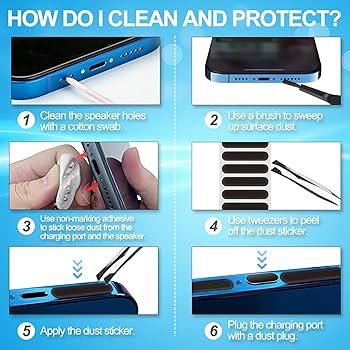
Step 2: Remove Debris With a Cotton Swab
Use a cotton swab to gently sweep away any loose debris from the speaker grille. Be careful not to push too hard, as this can damage the speaker’s internal components.
Step 3: Use Adhesive Tape to Remove Stubborn Dirt
If there are still stubborn dirt particles stuck in the speaker grille, use adhesive tape (such as Scotch Tape) to pick them up. Press the tape onto the affected area and then pull it off. Repeat this process until all the dirt is removed.
Step 4: Use a Toothbrush For Tough Grime
For tougher grime or stubborn stains, you can use a toothbrush with soft bristles. Dip the brush in water and gently scrub away the grime. Be careful not to push too hard, as this can damage the speaker’s internal components.
Step 5: Use Compressed Air (Optional)
If there are still some dirt particles stuck in the speaker grille after using adhesive tape or a toothbrush, you can use compressed air to blow them out. Hold the can upright and spray the compressed air into the speaker grille while gently moving it back and forth.
Step 6: Dry The Speaker
Once you have removed all the debris, use a soft cloth to wipe away any remaining dust particles. This will help prevent further buildup of dirt in the future.
Tips And Precautions
- Avoid using soap, water, or harsh chemicals when cleaning your smartphone speaker, as these can damage the device’s internal components.
- Don’t push too hard with the cotton swab or toothbrush, as this can damage the speaker’s internal components.
- If you’re unsure about any aspect of the cleaning process, consult your device’s user manual for guidance.
Alternative Cleaning Methods
If you don’t have a cotton swab or adhesive tape handy, you can try using other methods to clean your smartphone speaker. Some alternatives include:
- Using a Soft-bristled Brush: A soft-bristled brush can be used to gently sweep away debris from the speaker grille.
- Cleaning With a Damp Cloth: For tougher grime or stubborn stains, you can use a damp cloth to wipe away the dirt.
Apps For Cleaning Smartphone Speakers
There are also various apps available that can help clean your smartphone speaker. Some popular options include:
- Super Speaker Cleaner (Android): This app uses sinusoidal sounds to vibrate the speaker and dislodge any debris.
- Clean Tune (iOS): This app reproduces sounds with a defined frequency to clean the speaker automatically.
- Fix My Speakers (Web): This website allows you to clean your smartphone speaker using pre-recorded sounds.
Conclusion
Cleaning your smartphone speaker is an essential step in maintaining your device’s overall health and sound quality. By following these simple steps, you can remove debris and grime from the speaker grille and prevent damage to your device’s internal components. Remember to always be gentle when cleaning your smartphone speaker, as harsh chemicals or excessive force can cause permanent damage.
Faqs
Q: How often should I clean my smartphone speaker?
A: It’s recommended to clean your smartphone speaker every 2-3 months, depending on usage and environmental conditions.
Q: What should I use to clean my smartphone speaker?
A: Use a cotton swab or adhesive tape for loose debris, a toothbrush with soft bristles for tougher grime, and compressed air (optional) for stubborn dirt particles.
Q: Can I use soap or harsh chemicals to clean my smartphone speaker?
A: No, it’s not recommended to use soap or harsh chemicals when cleaning your smartphone speaker, as these can damage the device’s internal components.
Q: Are there any apps available that can help clean my smartphone speaker?
A: Yes, there are various apps available that can help clean your smartphone speaker. Some popular options include Super Speaker Cleaner (Android), Clean Tune (iOS), and Fix My Speakers (Web).
Q: How do I prevent damage to my smartphone’s internal components when cleaning the speaker?
A: Always be gentle when cleaning your smartphone speaker, using a soft cloth or cotton swab for loose debris, and avoiding excessive force or harsh chemicals.
Q: Can I use compressed air on my smartphone speaker?
A: Yes, you can use compressed air (optional) to blow away stubborn dirt particles. Hold the can upright and spray the compressed air into the speaker grille while gently moving it back and forth.


