
How to Recover Deleted Whatsapp Conversations: A Step-by-step Guide
Are you wondering how to recover deleted WhatsApp conversations on your Android or iPhone device? Look no further! In this article, we will guide you through the process of recovering deleted WhatsApp chats using various methods.
Why Do You Need to Recover Whatsapp Conversations?
Maybe you accidentally deleted a crucial conversation, or perhaps your phone was stolen or lost. Whatever the reason, losing WhatsApp conversations can be frustrating and even catastrophic in some cases. That’s why we’re here to help you recover them.
Method 1: Using Whatsapp’s Backup Feature (Android)
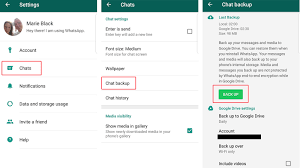
The first method involves using WhatsApp’s built-in backup feature on Android devices. Here’s how to do it:
- Open WhatsApp and go to Settings
- Tap on “Chat” and then “Backup”
- Choose whether to save your chat data automatically or manually
- If you choose to save it automatically, you can select the frequency of backups (daily, weekly, or monthly)
- You can also opt for encrypted backups, which require a password for recovery
Once you’ve set up the backup feature, WhatsApp will start saving your conversations automatically. To recover deleted conversations using this method:
- Open WhatsApp and go to Settings
- Tap on “Chat” and then “Backup”
- Tap on “Restore chat” and select the backup file you want to restore
Method 2: Using Whatsapp’s Backup Feature (iPhone)
On iPhone devices, the process is similar:
- Open WhatsApp and go to Settings
- Tap on “Chat” and then “Backup”
- Choose whether to save your chat data automatically or manually
- If you choose to save it automatically, you can select the frequency of backups (daily, weekly, or monthly)
- You can also opt for encrypted backups, which require a password for recovery
To recover deleted conversations using this method:
- Open WhatsApp and go to Settings
- Tap on “Chat” and then “Backup”
- Tap on “Restore chat” and select the backup file you want to restore
Method 3: Using Third-party Apps (Android)
If you don’t have a backup of your WhatsApp conversations, there are third-party apps available that can help you recover them. One such app is Undeleter – Recover Files & Messages:
- Download and install the app
- Grant the necessary permissions to access your device’s storage
- Tap on “Restore” and select WhatsApp from the list of supported apps
- Wait for the app to scan your device’s memory and recover deleted conversations
Method 4: Using Icloud (iPhone)
If you have an iPhone, you can also use iCloud to restore your WhatsApp conversations:
- Go to Settings > [Your Name] > iCloud
- Tap on “iCloud Backup” and select “Restore from this backup”
- Choose the most recent backup file that contains your WhatsApp conversations
- Wait for the backup file to be restored to your device
Method 5: Using Itunes (iPhone)
If you don’t have an iPhone, you can use iTunes to restore your WhatsApp conversations:
- Connect your iPhone to a computer with iTunes installed
- Open iTunes and select “Restore from this backup”
- Choose the most recent backup file that contains your WhatsApp conversations
- Wait for the backup file to be restored to your device
How to Transfer Whatsapp Conversations Between Android And Iphone Devices
If you want to transfer WhatsApp conversations between an Android device and an iPhone, you can use the following methods:
- Method 1: Using iOS: The app that allows transferring all data from Android to iPhone
- Method 2: Using third-party apps, such as Droid Transfer or PhoneTrans
Conclusion
Losing WhatsApp conversations can be frustrating, but with these methods, you can recover them. Remember to always backup your WhatsApp conversations regularly to avoid losing important information.
Frequently Asked Questions (FAQs)
- How do I Enable Whatsapp’s Backup Feature on Android?
To enable WhatsApp’s backup feature on Android, go to Settings > Chat > Backup and select the frequency of backups. - Can I Recover Deleted Whatsapp Conversations on Iphone Without a Backup?
Yes, you can use third-party apps like Undeleter – Recover Files & Messages or iCloud to restore your WhatsApp conversations. - How do I Transfer Whatsapp Conversations Between Android And Iphone Devices?
You can use the iOS: The app that allows transferring all data from Android to iPhone method or use third-party apps like Droid Transfer or PhoneTrans. - Will Using a Third-party App Compromise my Device’s Security?
Using a reputable third-party app should not compromise your device’s security, but always be cautious when downloading and installing new apps. - Can I Recover Whatsapp Conversations on Iphone Without Icloud Backup?
Yes, you can use iTunes to restore your WhatsApp conversations if you don’t have an iCloud backup.
Recommended Guides
- How to Transfer WhatsApp Conversations from Android to iPhone
- How to Recover Deleted WhatsApp Messages on Android
- How to Back Up WhatsApp Chats on iPhone


