
How to Connect Headphones to a Tv: A Step-by-step Guide
Are you tired of using your phone or tablet to watch movies on your TV? Do you want to enjoy a more immersive experience with your favorite shows and films? Connecting headphones to your TV is easier than you think. In this article, we’ll guide you through the process of connecting headphones to different types of TVs.
Understanding Your Tv’s Connectivity Options
Before we dive into the step-by-step instructions, it’s essential to understand the connectivity options available on modern TVs. Most modern TVs come with built-in Bluetooth capabilities, which allow you to connect wireless headphones to your TV. However, some TVs may require an external adapter or a separate audio device.
Connecting Headphones to a Smart TV
If you have a smart TV, such as an LG, Samsung, or Sony TV, connecting headphones is relatively straightforward. Here’s how:
- LG Tvs: On most LG TVs, press the “Home” button on your remote control and navigate to Settings > Audio > Bluetooth. Select your headphones from the list of available devices.
- Samsung Tvs: On most Samsung TVs, press the “Home” button on your remote control and navigate to Settings > Sound > Bluetooth. Select your headphones from the list of available devices.
- Sony Tvs: On most Sony TVs, press the “Home” button on your remote control and navigate to Settings > Audio > Bluetooth. Select your headphones from the list of available devices.
Using a Bluetooth Adapter
If your TV doesn’t have built-in Bluetooth capabilities, you can use an external adapter to connect your headphones. Here’s how:
- Bluetooth Adapters: You can purchase a Bluetooth adapter online or at your local electronics store. These adapters usually come with instructions on how to pair them with your TV and headphones.
- Pairing Your Headphones: Follow the instructions provided with your Bluetooth adapter to pair it with your TV and headphones.
Using an Rca Cable
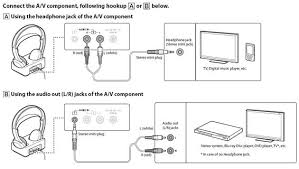
If you prefer a wired connection, you can use an RCA cable to connect your headphones to your TV. Here’s how:
- Rca Cables: You can purchase an RCA cable online or at your local electronics store.
- Connecting Your Headphones: Connect the RCA cable from your TV to the input on your headphones.
Troubleshooting Common Issues
If you encounter any issues while connecting your headphones to your TV, here are some troubleshooting tips:
- Bluetooth Connection Issues: If you’re experiencing issues with your Bluetooth connection, try restarting both your TV and headphones.
- Rca Cable Issues: If you’re experiencing issues with your RCA cable, try checking the connections for any loose wires or damaged cables.
Conclusion
Connecting headphones to your TV is a straightforward process that can enhance your viewing experience. By understanding your TV’s connectivity options and following our step-by-step guide, you’ll be able to enjoy your favorite shows and films with crystal-clear audio in no time.
Frequently Asked Questions (FAQs)
- Q: Do I Need Special Headphones For This?
A: No, you can use any type of headphones that are compatible with your TV. - Q: Can I Connect Multiple Headphones to my Tv?
A: Yes, most TVs allow you to connect multiple headphones at the same time. - Q: Do I Need a Separate Audio Device For This?
A: No, you don’t need a separate audio device. Your TV should have built-in Bluetooth capabilities or an RCA input that allows you to connect your headphones directly.
What’s Next?
Now that you’ve learned how to connect headphones to your TV, it’s time to explore other ways to enhance your viewing experience. Consider investing in a soundbar or a home theater system for an immersive audio experience.
[FAQ]
- What are some of the most common issues people encounter when trying to connect their headphones to their TV?
- Bluetooth connection issues
- RCA cable issues
- How can I troubleshoot these issues?
- Restart your TV and headphones if you’re experiencing Bluetooth connection issues
- Check for loose wires or damaged cables if you’re experiencing RCA cable issues
- Can I connect multiple headphones to my TV at the same time?
- Yes, most TVs allow you to connect multiple headphones simultaneously


