
How to Read Messages on Meetic: A Step-by-step Guide
Are you interested in meeting new people through online dating? Look no further than Meetic, one of the most popular dating services in Italy! But have you ever wondered how to read messages on Meetic? In this article, we’ll take a step-by-step approach to guide you through the process.
Why Should You Read Messages on Meetic?
Before we dive into the details, let’s talk about why reading messages on Meetic is essential. When you’re using online dating services, communication is key. By reading messages from other users, you can build relationships and get to know people who share similar interests. It’s a great way to start conversations and potentially find someone special.
What You Need to Know Before Reading Messages on Meetic
Before we proceed, let’s cover some essential information:
- To read messages on Meetic, you need to have an active subscription. Yes, you read that right! While it’s possible to create a free account, reading messages and initiating conversations require a paid subscription.
- The cost of the subscription varies depending on the plan you choose. You can opt for a 1-month, 3-month, or 6-month subscription, each with its own pricing.
- As a subscriber, you’ll have access to ad-free browsing, discover who has seen your profile, and see who has expressed interest in you.
How to Read Messages on Meetic Using Your Smartphone
Now that we’ve covered the basics, let’s dive into the step-by-step guide:
- Download The Meetic App: If you haven’t already, download the Meetic app from the Google Play Store or Apple App Store.
- Log in to Your Account: Enter your login credentials to access your profile.
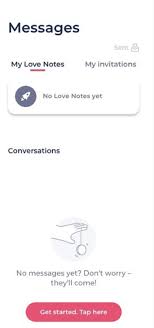
- Access The Messages Section: Tap on the Messages icon to see a list of conversations.
- Choose The Conversation You Want to Read: Select the conversation you’re interested in reading.
- Read Messages: You can now read all the messages exchanged between you and the other user.
How to Read Messages on Meetic Using Your Computer
If you prefer using your computer, here’s how to do it:
- Visit The Meetic Website: Go to the official Meetic website.
- Log in to Your Account: Enter your login credentials to access your profile.
- Access The Messages Section: Click on the Messages icon to see a list of conversations.
- Choose The Conversation You Want to Read: Select the conversation you’re interested in reading.
- Read Messages: You can now read all the messages exchanged between you and the other user.
Can I Read Messages on Meetic Without Subscription?
Unfortunately, the answer is no. To read messages on Meetic, you need to have an active subscription. While it’s possible to access your profile without a subscription, reading messages and initiating conversations require a paid plan.
Conclusion
Reading messages on Meetic is an essential part of online dating. By following these step-by-step guides, you can navigate the process with ease. Remember, communication is key, so don’t be afraid to initiate conversations and get to know new people!
Frequently Asked Questions (FAQs)
- What is The Cost of a Meetic Subscription?
The cost of a Meetic subscription varies depending on the plan you choose. You can opt for a 1-month, 3-month, or 6-month subscription, each with its own pricing. - Do I Need to Have a Subscription to Read Messages on Meetic?
Yes, to read messages on Meetic, you need to have an active subscription. While it’s possible to create a free account, reading messages and initiating conversations require a paid plan. - Can I Use Meetic Without Advertising Announcements?
As a subscriber, you’ll have access to ad-free browsing, discover who has seen your profile, and see who has expressed interest in you. - How do I Initiate Conversations on Meetic?
To initiate conversations on Meetic, you need to have an active subscription. Once you’ve subscribed, you can access the Messages section and start conversations with other users. - Can I Read Messages on Meetic Without Downloading The App?
Yes, you can read messages on Meetic using your computer by visiting the official website and logging in to your account.
Disclaimer
This article is for informational purposes only and should not be considered as professional advice. Always follow safety guidelines when interacting with strangers online!


