
How to Open Mov Files on Pc, Mac, Android, And Iphone: A Step-by-step Guide
Are you tired of struggling with MOV files that won’t open on your device? Look no further! In this comprehensive guide, we’ll walk you through the simple steps to open MOV files on PC, Mac, Android, and iPhone.
What Are Mov Files?
Before we dive into the nitty-gritty, let’s quickly define what MOV files are. MOV (Movie) is a file format used for storing video content. It’s commonly associated with Apple devices, but you can also open MOV files on other platforms.
Opening Mov Files on PC
If you’re using a Windows 10 or later operating system, opening MOV files is a breeze.
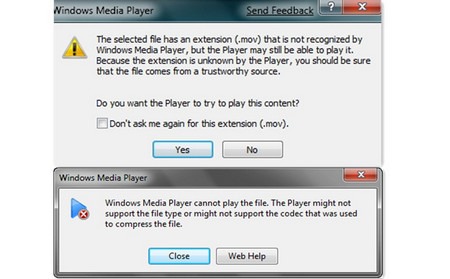
- Use The Native Player: If you have the native Windows Media Player installed, try playing your MOV file using this app.
- Download Vlc: If the above method doesn’t work, download and install VLC media player from the official website. This free and open-source player can handle a wide range of video formats, including MOV.
- Alternative Players: If you’re still having trouble, explore other players like Windows Media Center or KMPlayer.
Opening Mov Files on Mac
As an Apple fan, you’ll be happy to know that opening MOV files is straightforward on your Mac.
- Quicktime Player: By default, QuickTime Player can open and play MOV files. Simply double-click the file, and it will start playing.
- Alternative Players: If QuickTime Player isn’t working for you, try other players like VLC or Movist.
Opening Mov Files on Android
If you’re using an Android device, here’s how to access your MOV files:
- Gallery App: The Gallery app can play MOV files natively. Look for the file in the Collected section and tap on it.
- Vlc Player: If the above method doesn’t work, download the VLC player from the Google Play Store and open your MOV file using this app.
Opening Mov Files on Iphone
Don’t worry if you’re an iPhone user; opening MOV files is still a snap!
- Photos App: The Photos app can play MOV files natively. Look for the file in the Album section and tap on it.
- Alternative Players: If the above method doesn’t work, try other players like VLC or iMovie.
Tips And Tricks
- Make sure your device has enough storage space to open large MOV files.
- Clear cache and data from your player app if you’re experiencing issues.
- Consider converting your MOV file to a more compatible format using online tools or software.
Conclusion
Opening MOV files on PC, Mac, Android, and iPhone is relatively easy. With these step-by-step guides, you should be able to access your video content without any hassle. Remember to try the native player first, and if that doesn’t work, explore alternative options.
Frequently Asked Questions (FAQs)
- Q: What’s The Best Way to Open Mov Files?
A: The best way is to use the native player on your device or download VLC media player. - Q: Can I Convert my Mov File to Another Format?
A: Yes, you can convert your MOV file using online tools or software. - Q: Why Won’t my Mov File Open on my Android Device?
A: Try clearing cache and data from the Gallery app or download VLC player. - Q: Is There a Specific Player For Iphone to Open Mov Files?
A: Yes, try the Photos app first; if that doesn’t work, explore other players like VLC.
We hope this comprehensive guide has helped you overcome any issues with opening MOV files on your device. Happy watching!


