
Understanding Iphone Warranties: A Comprehensive Guide
Are you an iPhone user who wants to know more about your device’s warranty? Look no further! In this article, we will delve into the world of iPhone warranties, exploring what they cover, how to check them, and what options are available for extending or replacing your device.
What is Iphone Warranty?
When you purchase an Apple product, including an iPhone, it comes with a standard warranty that covers defects in materials and workmanship. This warranty typically lasts for one year from the date of purchase and can be extended to two years with AppleCare+.
Types of Iphone Warranties
There are several types of warranties available for iPhones:
- Standard Warranty: This is the basic warranty that comes with every iPhone, covering defects in materials and workmanship.
- Applecare+: This is an extended warranty that provides additional coverage for accidental damage, including theft and loss. It also includes two incidents of accidental damage per year.
How to Check Your Iphone Warranty
You can check your iPhone warranty in several ways:
- Settings App: Open the Settings app on your iPhone and navigate to General > About. Scroll down to see if there is an active warranty coverage.
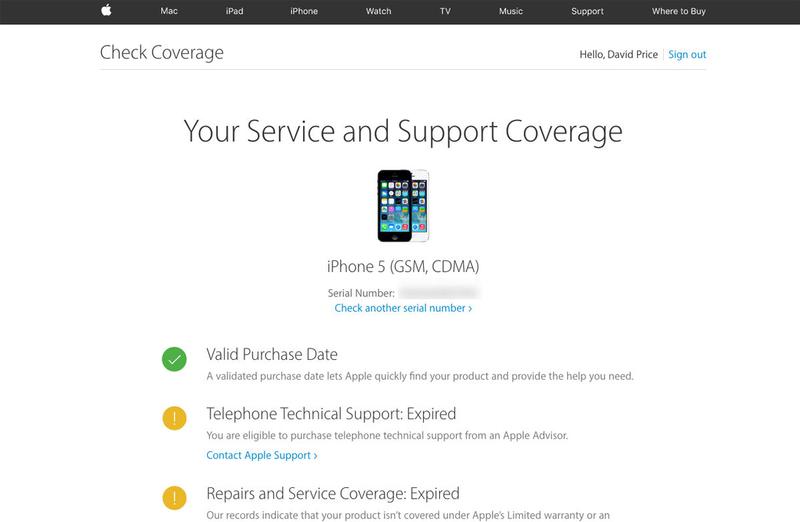
- Online Check: Visit Apple’s official website and use their online tool to check your warranty status using your device’s serial number or IMEI/MEID number.
- Apple Support App: Download the Apple Support app on your iPhone and sign in with your Apple ID. Go to My Devices > [Device Name] to see if there is an active warranty coverage.
What Does Iphone Warranty Cover?
IPhone warranties cover a range of issues, including:
- Defects in Materials And Workmanship: This includes problems with the device’s hardware or software.
- Accidental Damage: With AppleCare+, you get two incidents of accidental damage per year.
- Theft And Loss: If your iPhone is stolen or lost, AppleCare+ will help you replace it.
How to Extend Your Iphone Warranty
If you want to extend your iPhone warranty, consider the following options:
- Applecare+: This extended warranty provides additional coverage for accidental damage and theft.
- Extended Warranty From Apple: You can purchase an extended warranty directly from Apple, which will provide additional coverage beyond the standard one-year warranty.
Conclusion
In conclusion, understanding your iPhone warranty is crucial to protecting your investment. By knowing what’s covered and how to check it, you can make informed decisions about extending or replacing your device. Whether you’re looking for a standard warranty or an extended AppleCare+ plan, we hope this article has provided valuable insights into the world of iPhone warranties.
Frequently Asked Questions
Here are some frequently asked questions about iPhone warranties:
- What is Covered Under my Iphone Warranty?
- Your iPhone warranty covers defects in materials and workmanship.
- How do I Check if my Iphone Has an Active Warranty?
- You can check your iPhone’s warranty status by opening the Settings app, using Apple’s online tool, or downloading the Apple Support app.
- What is Applecare+?
- AppleCare+ is an extended warranty that provides additional coverage for accidental damage and theft.
We hope this article has provided valuable insights into the world of iPhone warranties. If you have any further questions, feel free to ask!


