
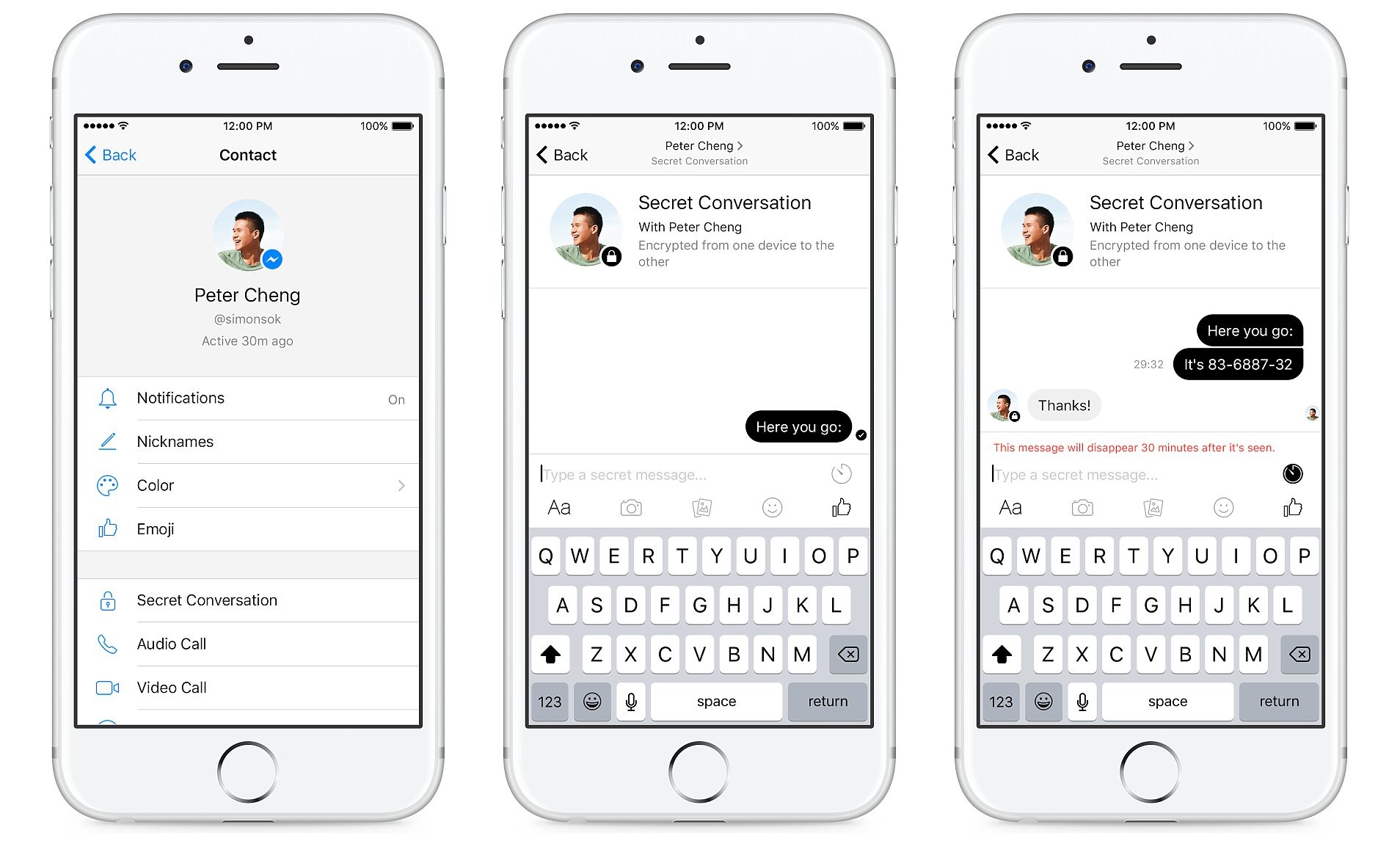
The Secret Conversations Feature on Messenger: A Guide
As a user of the popular messaging app Messenger, you may have come across the feature “Secret Conversations” or “End-to-End Encrypted Chats.” But how does it work? Is it truly secret, or is it just a marketing gimmick?
In this article, we’ll delve into the world of end-to-end encryption and explore the ins and outs of Messenger’s Secret Conversations feature. We’ll also discuss its benefits, limitations, and what to expect when using it.
What is End-to-end Encryption?
Before diving into Messenger’s Secret Conversations, let’s first understand what end-to-end encryption means. In simple terms, end-to-end encryption ensures that only the sender and recipient can read a message. This means that even the app itself cannot access or intercept messages.
How Does Messenger’s Secret Conversations Feature Work?
When you initiate a secret conversation on Messenger, it uses end-to-end encryption to protect your chats. Here’s how it works:
- Key Generation: When you start a secret conversation, Messenger generates two keys: One public key and one private key.
- Public Key Sharing: The public key is shared with the recipient of the chat.
- Private Key Storage: The private key is stored on your device, where only you can access it.
- Encryption: When you send a message in a secret conversation, it’s encrypted using the public key.
- Decryption: Only the recipient, who has the private key, can decrypt and read the message.
Using Secret Conversations on Messenger
To use the secret conversations feature on Messenger:
- Find The Person: Open Messenger and find the person you want to have a secret conversation with.
- Initiate Secret Conversation: Tap on their name or profile picture, then tap on the “Initiate Secret Conversation” option.
- Verify Encryption: You’ll see a confirmation message that the encryption is active for this chat.
Benefits of Using Secret Conversations
Using Messenger’s secret conversations feature offers several benefits:
- Security: Your chats are protected by end-to-end encryption, making it difficult for hackers or third parties to intercept your messages.
- Confidentiality: Only you and the recipient can read messages in a secret conversation.
- Trust: Secret conversations help build trust between users, as they know that their conversations are private.
Limitations of Using Secret Conversations
While Messenger’s secret conversations feature is secure, there are some limitations to consider:
- Availability: This feature might not be available on all devices or platforms.
- Compatibility Issues: Some users may experience compatibility issues when using secret conversations.
- Notification: You won’t receive notifications for messages in a secret conversation.
Using Secret Conversations on Desktop And Mobile
To use the secret conversations feature on desktop and mobile:
- Web Messenger: On Facebook’s website, click on the Messenger icon, then navigate to the chat with whom you want to have a secret conversation.
- Mobile App: On your mobile device, open the Messenger app, find the person, and initiate a secret conversation.
- Desktop App: On desktop, use the Messenger client for Windows or macOS.
Conclusion
Messenger’s Secret Conversations feature offers a secure way to communicate with friends and family. By understanding how it works and using it correctly, you can ensure that your chats remain private. However, as with any technology, there are limitations and potential compatibility issues to consider.
Frequently Asked Questions (FAQs)
- Q: Is Messenger’s Secret Conversations Feature Truly Secure?
A: Yes, the feature uses end-to-end encryption, making it difficult for hackers or third parties to intercept your messages. - Q: Can I Use Secret Conversations on All Devices And Platforms?
A: No, this feature might not be available on all devices or platforms. - Q: What Happens if I Lose Access to my Device?
A: If you lose access to your device, you won’t be able to decrypt messages in a secret conversation.


