
How Do I Know If My Sim Card Is 5G?
As technology continues to advance at a rapid pace, it’s essential to stay informed about the latest developments in the world of telecommunications. One of the most significant upgrades in recent years is the introduction of 5G networks, which promise faster speeds and lower latency compared to their 4G predecessors. But how do you know if your SIM card supports 5G connectivity?
In this article, we’ll explore the different methods for determining whether your SIM card is compatible with 5G technology. We’ll also delve into the importance of 5G connectivity and what it means for your mobile experience.
What Is 5G Connectivity?
Before we dive into the nitty-gritty of checking for 5G compatibility, let’s take a brief look at what this technology entails. 5G networks are designed to provide faster speeds, lower latency, and greater capacity than their 4G counterparts. This means that users can enjoy faster download and upload speeds, reduced wait times for video streaming, and improved overall mobile performance.
Why Is 5G Connectivity Important?
The significance of 5G connectivity cannot be overstated. As more devices become connected to the internet, the demand for faster and more reliable data transfer rates increases exponentially. With 5G networks, users can enjoy seamless video conferencing, faster cloud-based applications, and improved overall mobile performance.
Checking For 5G Compatibility on Android Devices
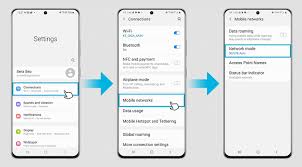
If you’re an Android user, checking for 5G compatibility is relatively straightforward. Here’s a step-by-step guide to help you determine whether your SIM card supports 5G connectivity:
- Ensure You’re in a 5G-Covered Area: Before attempting to check for 5G compatibility, ensure that you’re located in an area covered by 5G networks.
- Access Your Device’s Settings: Open your device’s settings menu and select the “Networks” or “Connections” option.
- Select Your Sim Card: Choose your SIM card from the list of available options.
- Check For 5G Connectivity: Look for the “5G” label next to your SIM card selection. If it appears, it means that your SIM card is compatible with 5G networks.
Checking For 5G Compatibility on Iphone Devices
If you’re an iPhone user, checking for 5G compatibility involves a slightly different process:
- Ensure You’re in a 5G-Covered Area: Before attempting to check for 5G compatibility, ensure that you’re located in an area covered by 5G networks.
- Access Your Device’s Settings: Open your device’s settings menu and select the “Mobile” or “Cellular” option.
- Select Your Sim Card: Choose your SIM card from the list of available options.
- Check For 5G Connectivity: Look for the “5G” label next to your SIM card selection. If it appears, it means that your SIM card is compatible with 5G networks.
Alternative Methods For Checking 5G Compatibility
If you’re unable to determine whether your SIM card supports 5G connectivity using the methods outlined above, don’t worry! There are alternative solutions available:
- Check Your Sim Card Details: Check the details printed on your SIM card or the packaging it came in.
- Contact Your Network Provider: Reach out to your network provider’s customer support for assistance with checking 5G compatibility.
The Importance of 5G Compatibility
As we’ve discussed, 5G connectivity offers numerous benefits, including faster speeds and lower latency. If you’re unable to check for 5G compatibility or don’t have a compatible SIM card, it may limit your mobile experience.
Conclusion
In conclusion, checking for 5G compatibility on your Android or iPhone device is relatively straightforward. By following the steps outlined above, you can determine whether your SIM card supports 5G connectivity and enjoy faster speeds and lower latency. Remember to ensure that you’re located in an area covered by 5G networks before attempting to check for compatibility.
Frequently Asked Questions
- What is 5G Connectivity?
- 5G connectivity refers to the use of 5th generation wireless network technology, which promises faster speeds and lower latency compared to its 4G predecessor.
- Why is 5G Connectivity Important?
- The significance of 5G connectivity lies in its ability to provide faster data transfer rates, reduced wait times for video streaming, and improved overall mobile performance.
- How do I Check For 5G Compatibility on my Android Device?
- To check for 5G compatibility on your Android device, access the “Networks” or “Connections” menu, select your SIM card, and look for the “5G” label next to it.
- How do I Check For 5G Compatibility on my Iphone Device?
- To check for 5G compatibility on your iPhone device, access the “Mobile” or “Cellular” menu, select your SIM card, and look for the “5G” label next to it.


