
How to Redeem Xbox Codes: A Step-by-step Guide
Are you excited to redeem your Xbox code and unlock new gaming experiences? Look no further! In this comprehensive guide, we will walk you through the process of redeeming your Xbox code on various platforms, including the Xbox console, browser, Microsoft Store, and more.
What is an Xbox Code?
An Xbox code, also known as a gift card or redemption code, is a unique 25-character alphanumeric code that can be used to purchase digital content, subscriptions, or virtual currency for your Xbox account. These codes are usually acquired through purchases online or in physical stores, and they can be redeemed on the Xbox console, browser, or Microsoft Store.
Redeeming an Xbox Code on The Console
To redeem an Xbox code directly on your console, follow these steps:
- Ensure that your Xbox is connected to the internet.
- Press the Xbox button on your controller to open the guide.
- Select the “Microsoft Store” option from the menu.
- Click on the “Riscatta” (Redeem) button.
- Enter the 25-character code in the designated field and press the A button on your controller.
- Follow the instructions on screen to complete the redemption process.
Redeeming an Xbox Code in a Browser
If you prefer to redeem your Xbox code online, follow these steps:
- Go to the Microsoft Store website and sign in with your Microsoft account.
- Click on the “Riscatta” (Redeem) button.
- Enter the 25-character code in the designated field and click on the “Ahead” button.
- Follow the instructions on screen to complete the redemption process.
Redeeming an Xbox Code From The Microsoft Store
To redeem an Xbox code directly from the Microsoft Store app on your Windows device, follow these steps:
- Open the Microsoft Store app and sign in with your Microsoft account.
- Click on the “Riscatta” (Redeem) button.
- Enter the 25-character code in the designated field and click on the “Ahead” button.
- Follow the instructions on screen to complete the redemption process.
Redeeming an Xbox Code From Your Phone
If you want to redeem your Xbox code directly from your smartphone or tablet, follow these steps:
- Open the Microsoft Store website on your device and sign in with your Microsoft account.
- Click on the “Riscatta” (Redeem) button.
- Enter the 25-character code in the designated field and click on the “Ahead” button.
- Follow the instructions on screen to complete the redemption process.
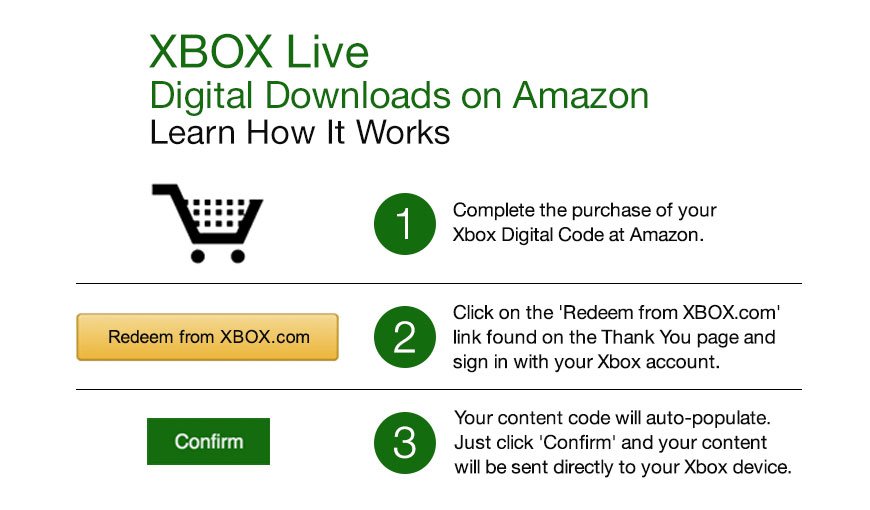
Using an Xbox Code From Amazon
If you acquired your Xbox code from Amazon, follow these steps:
- Go to the Microsoft Store website and sign in with your Microsoft account.
- Click on the “Riscatta” (Redeem) button.
- Enter the 25-character code in the designated field and click on the “Ahead” button.
- Follow the instructions on screen to complete the redemption process.
Using an Xbox Code For Fortnite
If you want to redeem your Xbox code specifically for Fortnite, follow these steps:
- Go to the Microsoft Store website and sign in with your Microsoft account.
- Click on the “Riscatta” (Redeem) button.
- Enter the 25-character code in the designated field and click on the “Ahead” button.
- Follow the instructions on screen to complete the redemption process.
Troubleshooting Common Issues
If you encounter any issues while redeeming your Xbox code, here are some common solutions:
- Make sure that your account is signed in with the correct Microsoft account associated with your Xbox console or device.
- Ensure that your Xbox console or device is connected to the internet.
- Check that the 25-character code is entered correctly and without any typos.
- If you’re still having trouble, try restarting your console or device and then attempting to redeem the code again.
Conclusion
Redeeming an Xbox code is a straightforward process that can be completed on various platforms. By following the step-by-step guides provided in this article, you should be able to successfully redeem your code and unlock new gaming experiences for your Xbox account. Happy gaming!


