
Actuating Facebook Notifications on Your Mobile: A Step-by-step Guide
Are you tired of missing out on important updates from your friends and favorite pages on Facebook? Do you want to receive notifications about birthdays, events, or new comments on your posts? Look no further! In this article, we will guide you through the process of actuating Facebook notifications on your mobile device.
Why Actuate Facebook Notifications?
Actuating Facebook notifications is a simple way to stay updated on everything that’s happening in the world of Facebook. Whether it’s a birthday notification for your friend or a new comment on your post, receiving notifications will keep you informed and engaged with the platform.
Step 1: Check Your Device Settings
Before we dive into actuating Facebook notifications, make sure that you have allowed notifications from the Facebook app in your device settings. On Android devices, go to Settings > Apps > Facebook > Notifications, and ensure that the toggle is turned on. On iOS devices, go to Settings > Notifications > Facebook, and make sure that the switch is enabled.
How to Actuate Facebook Notifications on Android Devices
To actuate Facebook notifications on your Android device, follow these steps:
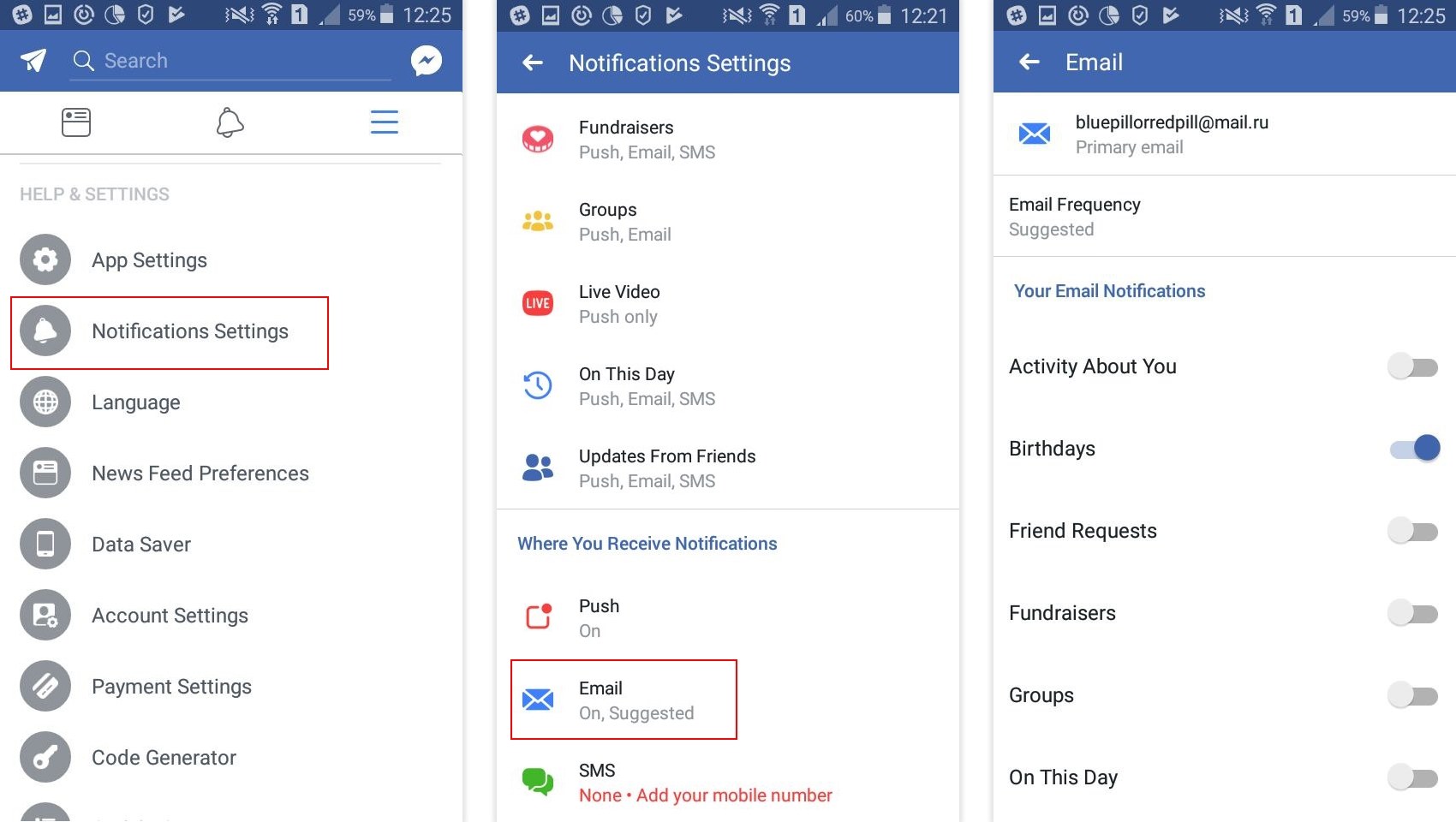
- Open the Facebook app and navigate to the menu by tapping on the three horizontal lines in the top-left corner.
- Tap on Settings And Privacy > Settings > Notifications.
- Scroll down to the section labeled “Where Get The Notifications” and ensure that the toggle next to “Push” is turned on.
- Choose which types of notifications you want to receive, such as comments, likes, or messages.
How to Actuate Facebook Notifications on Ios Devices
To actuate Facebook notifications on your iOS device, follow these steps:
- Open the Settings app and navigate to Notifications > Facebook.
- Ensure that the toggle next to “Allow Notifications” is turned on.
- Choose which types of notifications you want to receive, such as comments, likes, or messages.
Actuating Birthday Notifications
If you want to receive birthday notifications for your friends, follow these steps:
- Open the Facebook app and navigate to Settings And Privacy > Settings > Notifications.
- Scroll down to the section labeled “Birthdays” and ensure that the toggle is turned on.
- Choose which types of notifications you want to receive, such as messages or comments.
Actuating Dating Notifications
If you’re using Facebook Dating, follow these steps:
- Open the Facebook app and navigate to Settings And Privacy > Settings > Notifications.
- Scroll down to the section labeled “Dating” and ensure that the toggle is turned on.
- Choose which types of notifications you want to receive, such as matches or messages.
Actuating Sound Notifications
If you’re not receiving sound notifications from Facebook, follow these steps:
- Check if your device is set to silent mode.
- Go to Settings > Sounds And Vibration (on Android devices) or Settings > Sounds And Feedback (on iOS devices).
- Ensure that the volume bar next to “Notifications” is turned up.
Disabling Facebook Notifications
If you want to disable all Facebook notifications, follow these steps:
- Open the Facebook app and navigate to Settings And Privacy > Settings > Notifications.
- Scroll down to the section labeled “Push” and ensure that the toggle is turned off.
- Choose which types of notifications you want to disable.
Conclusion
Actuating Facebook notifications is a simple process that can help you stay updated on everything happening in your Facebook world. By following these steps, you’ll be able to receive birthday notifications, dating notifications, sound notifications, and more. Remember to check your device settings to ensure that you’re receiving notifications from the Facebook app.
Frequently Asked Questions
Q: How do I actuate Facebook notifications on my mobile device?
A: Follow the step-by-step guide provided in this article.
Q: Why am I not receiving birthday notifications from Facebook?
A: Ensure that the toggle next to “Birthdays” is turned on in your settings.
Q: Can I disable all Facebook notifications?
A: Yes, go to Settings And Privacy > Settings > Notifications, scroll down to the section labeled “Push“, and turn off the toggle.
Q: How do I enable sound notifications from Facebook?
A: Check if your device is set to silent mode, and ensure that the volume bar next to “Notifications” is turned up.
Q: Can I disable notifications for certain types of content on Facebook?
A: Yes, go to Settings And Privacy > Settings > Notifications, scroll down to the section labeled “Where Get The Notifications“, and choose which types of notifications you want to receive.
Q: How do I actuate Facebook Dating notifications?
A: Follow the steps provided in this article for actuating Facebook Dating notifications.
Q: Why am I not receiving sound notifications from Facebook on my mobile device?
A: Ensure that the toggle next to “Sounds” is turned on in your settings, and check if your device is set to silent mode.


