
Concealing an Album on Iphone: A Step-by-step Guide
Are you concerned about keeping your private photos and albums secure on your iPhone? You’re not alone! In this article, we’ll explore the best ways to conceal an album on iPhone, using both built-in features and third-party apps.
Why Conceal Albums on Iphone?
With the increasing use of smartphones, it’s becoming more common for people to store sensitive information, such as private photos and videos. However, with so many eyes on your device, it’s essential to keep these albums secure from prying eyes.
Method 1: Using The Photos App
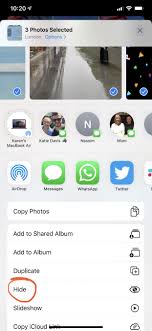
The built-in Photos app offers a convenient way to conceal albums on iPhone. Here’s how:
- Open the Photos app and navigate to the album you want to conceal.
- Tap on the “Album” tab at the bottom of the screen.
- Select the album you want to conceal.
- Tap on the “Edit” button (represented by a pencil icon).
- Tap on the “Conceal” option.
- Confirm that you want to conceal the album.
Once concealed, the album will be removed from your Photos app, but it can still be accessed through other means (more on this later).
Method 2: Using Google Photos
If you’re using Google Photos as your primary photo storage app, here’s how to conceal albums:
- Open Google Photos and navigate to the album you want to conceal.
- Tap on the three dots at the top right corner of the screen.
- Select “Hide” from the menu.
- Confirm that you want to hide the album.
Hidden albums will be removed from your Google Photos feed, but they can still be accessed through other means (more on this later).
Method 3: Using Third-party Apps
There are several third-party apps available that offer more advanced features for concealing albums on iPhone. Here are a few examples:
- Private Photo Vault: This app offers end-to-end encryption and password protection for your private photos.
- Best Secret Folder: This app allows you to create secret folders and albums that can be accessed only with a password.
These apps offer more advanced features than the built-in Photos app, such as password protection and end-to-end encryption.
Additional Tips
Here are some additional tips to keep in mind when concealing albums on iPhone:
- Make Sure to Update Your Device Regularly: Ensure you have the latest software updates installed on your iPhone to prevent any security vulnerabilities.
- Use Strong Passwords: Use unique and complex passwords for your accounts, especially when using third-party apps.
- Be Cautious With Public Wi-fi: Avoid accessing sensitive information or concealing albums when connected to public Wi-Fi networks.
Conclusion
Concealing an album on iPhone is a straightforward process that can be completed using either the built-in Photos app or third-party apps. By following these steps and tips, you can keep your private photos and albums secure from prying eyes.
Frequently Asked Questions (FAQs)
- Q: How do I Conceal an Album on Iphone?
A: To conceal an album on iPhone, navigate to the Photos app, select the album you want to conceal, and tap on the “Conceal” option. - Q: Can I Still Access Concealed Albums?
A: Yes, concealed albums can still be accessed through other means, such as using third-party apps or hacking into your device. - Q: How do I Unhide a Concealed Album?
A: To unhide a concealed album, navigate to the Photos app, select the album you want to unhide, and tap on the “Unconceal” option. - Q: Are Third-party Apps Secure?
A: While many third-party apps are secure, it’s essential to research and read reviews before using any new app. - Q: Can I Use Multiple Methods to Conceal Albums?
A: Yes, you can use both built-in features (such as the Photos app) and third-party apps to conceal albums on iPhone.
I hope this guide has been helpful in understanding how to conceal an album on iPhone!


