
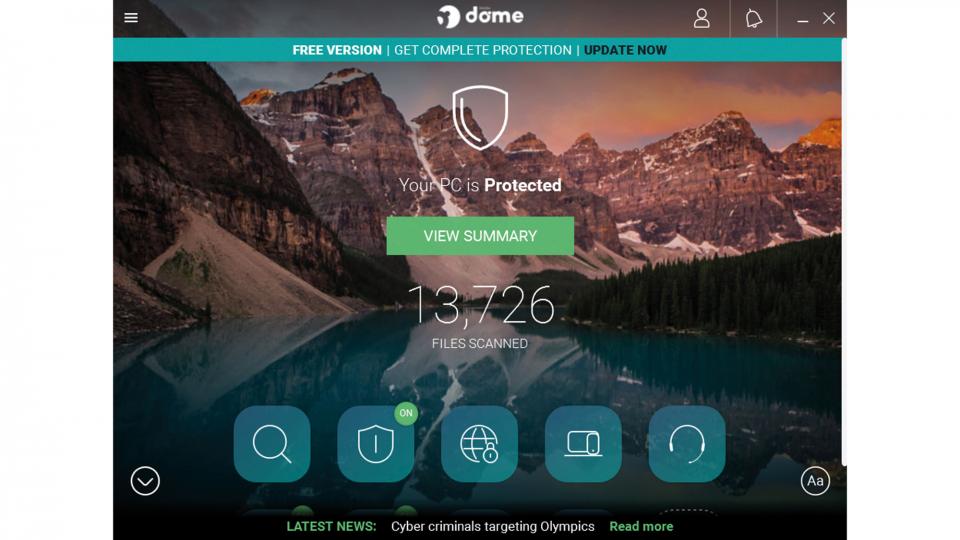
Panda Antivirus Free: A Comprehensive Guide
Are you looking for a reliable antivirus software that won’t slow down your PC? Look no further than Panda Antivirus Free! This user-friendly and effective solution is perfect for those who want to protect their devices without breaking the bank.
What is Panda Antivirus Free?
Panda Antivirus Free is a cloud-based antivirus program that provides top-notch protection against malware, viruses, and other online threats. It’s designed to be lightweight and won’t slow down your system, making it perfect for everyday use.
Key Features of Panda Antivirus Free
- Cloud-based Technology: Panda Antivirus Free utilizes cloud-based technology to provide real-time protection against threats.
- Lightweight And Fast: This antivirus software is designed to be fast and lightweight, ensuring that it won’t slow down your system.
- Comprehensive Protection: Panda Antivirus Free provides comprehensive protection against malware, viruses, and other online threats.
- Free Version Available: The free version of Panda Antivirus Free offers all the necessary features for everyday use.
Is Panda Antivirus Free Compatible With My Device?
Panda Antivirus Free is compatible with Windows XP SP3 and later versions, as well as Android devices running 6.0 Or later. Unfortunately, there is no version available for macOS, but we’ll cover that in a bit!
How to Install Panda Antivirus Free on Your PC
Installing Panda Antivirus Free on your PC is a breeze! Here’s how:
- Download The Software: Visit the official website and download the software.
- Run The Installer: Run the installer and follow the prompts.
- Accept The Terms: Accept the terms and conditions.
- Choose Your Settings: Choose your settings, including the language and destination folder.
- Start Scanning: Start scanning for threats.
Using Panda Antivirus Free on Android
Using Panda Antivirus Free on Android is just as easy! Here’s how:
- Download The App: Download the app from the Google Play Store.
- Install The App: Install the app and follow the prompts.
- Activate The App: Activate the app and start scanning for threats.
Is There a Version of Panda Antivirus Free Available For Macos?
Unfortunately, there is no version of Panda Antivirus Free available for macOS. However, we’ll cover that in a bit!
Panda Antivirus Free For Macos: What You Need to Know
While there isn’t a free version of Panda Antivirus Free available for macOS, you can try the 30-day trial of Panda Dome Essential. This will give you access to all the necessary features, including cloud-based protection and real-time scanning.
What’s The Cost of Panda Antivirus Free?
The best part about Panda Antivirus Free is that it’s completely free! You won’t need to pay a dime for this reliable antivirus software.
Panda Cloud Cleaner: What You Need to Know
In addition to Panda Antivirus Free, there’s also Panda Cloud Cleaner. This cloud-based solution allows you to scan your PC without installing any software. It’s perfect for those who want an easy and hassle-free way to protect their devices.
Conclusion
Panda Antivirus Free is a comprehensive and user-friendly antivirus solution that provides top-notch protection against malware, viruses, and other online threats. With its cloud-based technology and lightweight design, it’s the perfect choice for everyday use.
Frequently Asked Questions (FAQs)
- Is Panda Antivirus Free Compatible With my Device?
Panda Antivirus Free is compatible with Windows XP SP3 and later versions, as well as Android devices running 6.0 Or later. - How do I Install Panda Antivirus Free on my Pc?
To install Panda Antivirus Free on your PC, download the software, run the installer, accept the terms, choose your settings, and start scanning for threats. - Is There a Version of Panda Antivirus Free Available For Macos?
Unfortunately, there is no free version of Panda Antivirus Free available for macOS. - What’s The Cost of Panda Antivirus Free?
The best part about Panda Antivirus Free is that it’s completely free! - How do I Use Panda Cloud Cleaner?
To use Panda Cloud Cleaner, download the client, run the installer, and start scanning for threats without installing any software. - Can I Cancel my Subscription to Panda Dome Essential?
Yes, you can cancel your subscription at any time. - Is Panda Antivirus Free Available in a Paid Version?
Yes, there is a paid version of Panda Antivirus available, offering extra features and functionality. - How do I Contact Support For Panda Antivirus Free?
I hope this article has provided you with all the necessary information to make an informed decision about using Panda Antivirus Free on your devices. If you have any further questions or concerns, please don’t hesitate to reach out!


