
How to Compress Files And Folders: A Comprehensive Guide
Are you tired of running out of space on your USB drive or cloud storage? Do you want to organize your files and folders without taking up too much space? Look no further! In this article, we will guide you through the process of compressing files and folders using various software options available for Windows, macOS, Android, and iOS devices.
Why Compress Files And Folders?
Compressing files and folders is an essential skill in today’s digital age. With the increasing amount of data being created every day, it’s becoming more and more challenging to store everything on our devices or cloud storage. By compressing files and folders, you can free up space, reduce the size of your files, and make them easier to share with others.
Native Compression Tools For Windows And Macos
Before diving into third-party software options, let’s take a look at the native compression tools available for Windows and macOS:
Windows
- The built-in File Explorer has a “Compress to ZIP” option that allows you to compress files and folders into a ZIP file.
- You can also use the “7-Zip” tool, which is a free and open-source software that supports various compression formats.
Macos
- The built-in Finder app has a “Compress” option that allows you to create a compressed archive of files and folders.
- You can also use the “Keka” tool, which is a free and open-source software that supports various compression formats.
Third-party Compression Software For Windows And Macos
If you’re looking for more advanced features or support for additional compression formats, here are some third-party options to consider:
7-Zip (Windows)
- 7-Zip is a popular and highly-regarded compression software that supports various formats, including ZIP, 7z, XZ, BZIP2, GZIP, TAR, and WIM.
- It’s free, open-source, and available for Windows.
Keka (macOS)
- Keka is a powerful compression software specifically designed for macOS.
- It supports various formats, including ZIP, 7z, XZ, BZIP2, GZIP, TAR, and WIM.
- The free version is available with optional paid upgrades.
Compression Software For Android And Ios Devices
If you’re using an Android or iOS device, don’t worry! There are mobile apps available that can help you compress files and folders:
Rar (Android)
- RAR is a popular compression software specifically designed for Android devices.
- It supports various formats, including ZIP, RAR, TAR, GZ, BZIP2, XZ, 7z, ISO, and ARJ.
- The free version has ads; the paid subscription removes them.
Winzip (Android/iOS)
- WinZip is a widely-used compression software that supports various formats, including ZIP and RAR.
- It’s available for both Android and iOS devices.
- The free version has limitations; the paid subscription unlocks additional features.
Documents by Readdle (iOS/iPadOS)
- Documents by Readdle is an app specifically designed for organizing files on your iPad or iPhone.
- It supports various formats, including ZIP.
- The free version is available with optional upgrades to unlock additional features.
How to Compress Files And Folders Using Software
Compressing files and folders using software is relatively straightforward. Here’s a general step-by-step guide:
- Choose Your Compression Tool: Select the compression tool you prefer, whether it’s built-in or third-party.
- Select Files And Folders: Choose the files and folders you want to compress.
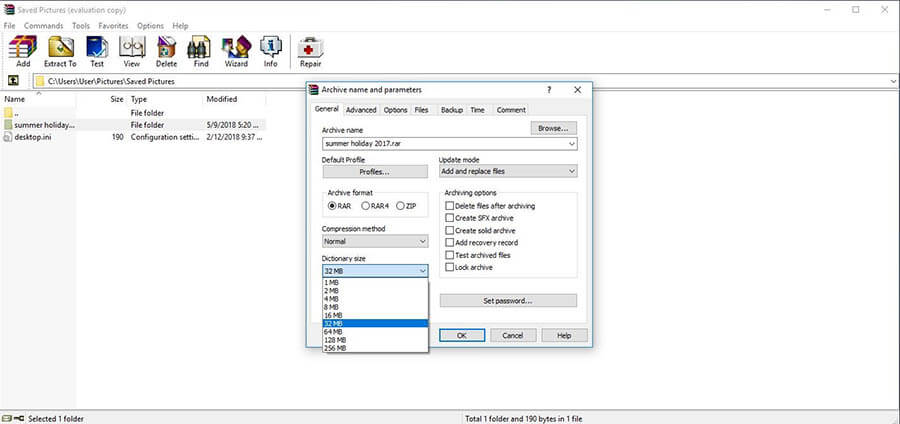
- Set Compression Options: Adjust the compression settings according to your needs (e.G., Level of compression, password protection).
- Create The Compressed File: Confirm the compression process to create a new compressed file.
Tips For Efficient File Compression
To get the most out of file compression, keep these tips in mind:
- Choose The Right Format: Select the best format for your needs (e.G., ZIP for sharing files, 7z for storing data).
- Adjust Compression Levels: Experiment with different compression levels to find the perfect balance between size and speed.
- Password Protect Compressed Files: Secure your compressed files by adding a password.
Conclusion
Compressing files and folders is an essential skill in today’s digital age. By using native tools or third-party software, you can efficiently compress files and folders on Windows, macOS, Android, or iOS devices. Remember to choose the right format for your needs, adjust compression levels accordingly, and password protect compressed files whenever possible.
Faqs
- What Are The Benefits of Compressing Files And Folders?
- Compressing files and folders reduces file size, frees up storage space, and makes sharing easier.
- How do I Compress Files Using Built-in Tools on Windows or Macos?
- Use File Explorer (Windows) or Finder (macOS) to create a ZIP file by right-clicking on the selected files or folder.
- What Are Some Popular Compression Software Options For Windows And Macos?
- 7-Zip, Keka, WinZip, and ZipGenius are highly-regarded compression software for Windows and macOS.
- Are There Mobile Apps Available For Compressing Files on Android And Ios Devices?
- Yes, RAR (Android), WinZip (Android/iOS), and Documents by Readdle (iOS/iPadOS) are popular mobile compression apps.
Feel free to ask more questions if you have any!


