
How to Turn On Sky Q Without Remote Control
Are you struggling to turn on your Sky Q decoder without a remote control? You’re not alone! Losing or breaking the remote can be frustrating, but don’t worry, we’ve got you covered. In this article, we’ll show you how to troubleshoot and fix the issue, and even provide some alternative methods for controlling your Sky Q decoder.
Troubleshooting: Is it a Remote Control Problem or a Decoder Issue?
Before we dive into the solutions, let’s first try to identify if the problem lies with the remote control itself or the Sky Q decoder. Try using the remote control on your TV to see if it works. If it does, the issue might be with the decoder. In this case, you can try restarting the device by unplugging it and plugging it back in after a few seconds.
Step-by-step Guide to Troubleshooting
Here’s a step-by-step guide to help you troubleshoot:
- Check if The Remote Control is Working on Your TV: If the remote works on your TV, but not with the Sky Q decoder, try restarting the decoder.
- Reset The Remote Control: Press and hold the “?” button on the remote until it blinks twice. This will reset the remote control.
- Check if The Batteries Are Dead: Try changing the batteries in the remote to see if that resolves the issue.
How to Turn On Sky Q Without Remote Control
If none of the above steps work, you can try turning on your Sky Q decoder without using a remote control. Here’s how:
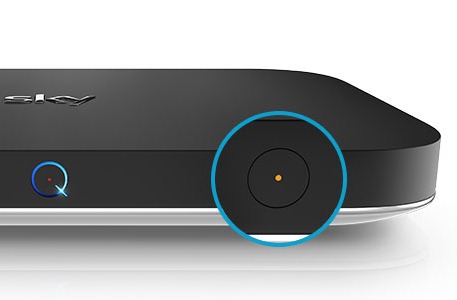
- Use The “power Button”: Locate the power button on the front or side of the Sky Q decoder and press it.
- Check For an Alternative Power Button: Some decoders have a secondary power button located near the power socket.
How to Control Your Sky Q Decoder Without Remote Control
While using a remote control is still the best way to control your Sky Q decoder, there are some alternatives you can use in a pinch:
- Use a Smartphone App: There are several apps available that allow you to control your Sky Q decoder with your smartphone. You’ll need to download and install one of these apps on your phone.
- Use The Sky Go App: If you have the Sky Go app installed on your phone, you can use it to schedule recordings and view content.
How to Replace Your Remote Control
If none of the above solutions work, or if you’ve lost or broken your remote control, it’s time to replace it! Here’s how:
- Contact Sky Customer Support: Call or email Sky’s customer support team to report your issue.
- Replace The Remote Control Online: If you’re unable to get in touch with Sky’s customer support team, you can order a new remote control online.
Conclusion
In conclusion, turning on and controlling your Sky Q decoder without a remote control is possible using some alternative methods. We hope this article has been helpful in troubleshooting and resolving the issue for you!
Faqs
Q: How do I Troubleshoot my Remote Control?
A: Try restarting the remote control by unplugging it and plugging it back in after a few seconds.
Q: What if I’ve Lost or Broken my Remote Control?
A: You can replace it online or contact Sky’s customer support team for assistance.
Q: How do I Use a Smartphone App to Control my Sky Q Decoder?
A: Download and install one of the apps available, then follow the instructions provided in the app.
Q: What if I Don’t Have a Smartphone App?
A: You can try using the Sky Go app or contact Sky’s customer support team for assistance.
Q: How do I Replace my Remote Control Online?
A: Visit Sky’s website and follow the instructions to order a new remote control.
Q: Can I Get a Free Replacement Remote Control?
A: Yes, if you’re eligible for a free replacement under Sky’s warranty policy.
Q: What if I’m Not Satisfied With The Replacement Remote Control?
A: Contact Sky’s customer support team and they will assist you in resolving the issue.
Q: How do I Contact Sky’s Customer Support Team?
A: Call or email Sky’s customer support team using the contact information provided on their website.


