
How to Find Coordinated Gps of a Seat: A Step-by-step Guide
Are you looking for the coordinates GPS of a seat, but don’t know how? You’re not alone! In this article, we’ll show you how to find coordinated GPS of a seat using various services and browsers.
What Are Coordinates Gps?
Coordinates GPS refer to the geographic position of a location on Earth, expressed in terms of latitude and longitude. These coordinates can be used to locate a specific point on the map, whether it’s for navigation, mapping, or other purposes.
How to Find Coordinated Gps With Google Maps
Google Maps is one of the most popular services for finding coordinated GPS. Here’s how you can do it:
- Open Google Maps on your computer or mobile device.
- Type in the address of the seat you’re looking for in the search bar.
- Click on the red pin that appears on the map, and then click on the “Menu” button.
- Select “What’s here?” from the menu, and then select “Copy coordinates.”
- The coordinates GPS will be copied to your clipboard.
How to Find Coordinated Gps With Apple Maps
Apple Maps is another popular service for finding coordinated GPS. Here’s how you can do it:
- Open Apple Maps on your iPhone or iPad.
- Type in the address of the seat you’re looking for in the search bar.
- Click on the red pin that appears on the map, and then click on the “Info” button.
- Select “Copy coordinates” from the menu.
- The coordinates GPS will be copied to your clipboard.
How to Find Coordinated Gps With Bing Maps
Bing Maps is a service provided by Microsoft for finding coordinated GPS. Here’s how you can do it:
- Open Bing Maps on your computer or mobile device.
- Type in the address of the seat you’re looking for in the search bar.
- Click on the black pin that appears on the map, and then click on the “Info” button.
- Select “Copy coordinates” from the menu.
- The coordinates GPS will be copied to your clipboard.
How to Find Coordinated Gps With a Photo
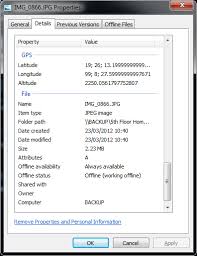
If you have a photo of a seat, you can find its coordinated GPS by following these steps:
- Open the photo on your device.
- Look for the metadata section, which contains information about the photo, including its geographic location.
- Select “Copy coordinates” from the menu.
- The coordinates GPS will be copied to your clipboard.
How to Find Address of Coordinates Gps
If you have the coordinated GPS of a seat, you can find its address by following these steps:
- Open Google Maps or Apple Maps on your device.
- Type in the coordinates GPS in the search bar.
- The address of the seat will appear on the map.
Browsers For Smartphone/tablet
There are several browsers available for smartphones and tablets that allow you to find coordinated GPS. Some popular options include:
- Waze: A free browser that provides real-time traffic information, prices of petrol, Autovelox, and other features.
- HERE WeGo: A service provided by some of the biggest companies in the automotive industry, including Audi, BMW, and Mercedes-Benz.
- TomTom GO Mobile: A freemium app that allows you to find coordinated GPS using standard format.
Browsers For Auto
If you have a car with a built-in browser, you can use it to find coordinated GPS. Some popular options include:
- TomTom GO Expert Browser: A satellite navigation system specifically designed for trucks, buses, vans, and other large vehicles.
- Garmin DriveSmart 76 MT-D: A GPS navigator that provides turn-by-turn directions and other features.
- NavRuf Browser Truck Camper: A GPS browser that allows you to find coordinated GPS using standard format.
Conclusion
Finding coordinated GPS of a seat is a relatively simple process, whether you’re using Google Maps, Apple Maps, Bing Maps, or another service. By following these steps, you can easily find the coordinates GPS of any seat and use them for navigation, mapping, or other purposes.
Faqs
- What Are Coordinates Gps?
Coordinates GPS refer to the geographic position of a location on Earth, expressed in terms of latitude and longitude. - How do I find coordinated GPS with Google Maps?
Open Google Maps on your computer or mobile device, type in the address of the seat you’re looking for in the search bar, click on the red pin that appears on the map, and then click on the “Menu” button. - How do I find coordinated GPS with Apple Maps?
Open Apple Maps on your iPhone or iPad, type in the address of the seat you’re looking for in the search bar, click on the red pin that appears on the map, and then click on the “Info” button. - How do I find coordinated GPS with Bing Maps?
Open Bing Maps on your computer or mobile device, type in the address of the seat you’re looking for in the search bar, click on the black pin that appears on the map, and then click on the “Info” button. -
Can I find the coordinates GPS of a photo?
Yes, if you have a photo of a seat, you can find its coordinated GPS by opening the photo on your device, looking for the metadata section, selecting “Copy coordinates” from the menu, and copying the coordinates to your clipboard. -
How do I find the address of coordinates GPS?
Open Google Maps or Apple Maps on your device, type in the coordinates GPS in the search bar, and the address of the seat will appear on the map. -
What are some popular browsers for smartphones/tablets that allow me to find coordinated GPS?
Some popular options include Waze, HERE WeGo, TomTom GO Mobile, and others. -
Can I use a car’s built-in browser to find coordinated GPS?
Yes, if your car has a built-in browser, you can use it to find coordinated GPS using services like TomTom GO Expert Browser, Garmin DriveSmart 76 MT-D, and NavRuf Browser Truck Camper.


