
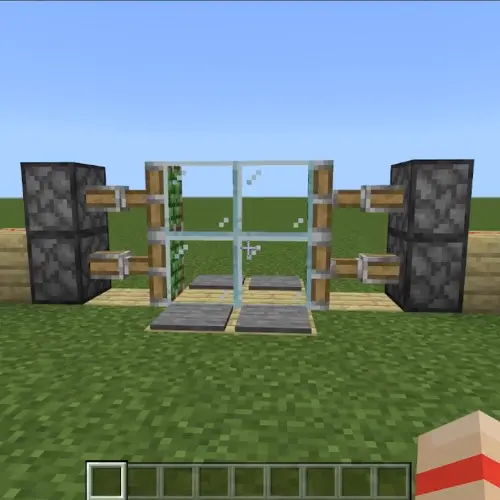
How to Create an Automatic Door on Minecraft
Are you tired of manually opening and closing doors in Minecraft? Do you want to add a touch of automation to your game? Look no further! In this article, we’ll show you how to create an automatic door on Minecraft using Java or Bedrock.
Automatic Doors 101
Before we dive into the tutorial, let’s talk about what makes an automatic door. An automatic door is a mechanism that can open and close automatically when triggered by a player or other events in the game. This can be achieved using redstone, which is Minecraft’s electrical system.
Materials Needed
To create an automatic door on Minecraft, you’ll need the following materials:
- Wooden planks (for the door frame)
- Redstone dust (for the circuit)
- A lever or pressure plate (optional)
Step-by-step Guide (Java)
If you’re playing the Java version of Minecraft, follow these steps to create an automatic door:
- Gather Materials: Make sure you have enough wooden planks to build a 2×2 frame.
- Build The Door Frame: Place the wooden planks in a 2×2 grid to form the door frame.
- Add Redstone Dust: Add redstone dust around the edges of the door frame, making sure to connect it to a power source (e.G., A torch).
- Create a Circuit: Create a circuit using the redstone dust that will trigger when a player presses a lever or pressure plate.
- Add a Lever or Pressure Plate: Place a lever or pressure plate near the door frame, so players can interact with it.
Step-by-step Guide (Bedrock)
If you’re playing the Bedrock version of Minecraft, follow these steps to create an automatic door:
- Gather Materials: Make sure you have enough wooden planks to build a 2×2 frame.
- Build The Door Frame: Place the wooden planks in a 2×2 grid to form the door frame.
- Add Redstone Dust (Redstone Blocks): Add redstone blocks around the edges of the door frame, making sure to connect it to a power source (e.G., A torch).
- Create a Circuit: Create a circuit using the redstone blocks that will trigger when a player presses a lever or pressure plate.
- Add a Lever or Pressure Plate: Place a lever or pressure plate near the door frame, so players can interact with it.
Tips And Variations
- To create a more complex door system, you can use multiple levers or pressure plates to control different aspects of the door’s behavior (e.G., Opening and closing).
- You can also add sensors to detect specific events, such as daylight or nighttime.
- Experiment with different designs and mechanisms to create unique automatic doors.
Conclusion
Creating an automatic door on Minecraft is a fun and rewarding experience. With these step-by-step guides, you’ll be able to automate your doors in no time! Remember to experiment and get creative with your design – the possibilities are endless!
Frequently Asked Questions (FAQs)
Q: What materials do I need to create an automatic door on Minecraft?
A: You’ll need wooden planks, redstone dust (or blocks), and a lever or pressure plate.
Q: Can I use different materials for my automatic door?
A: Yes! You can experiment with other materials, such as iron or stone, to create unique doors.
Q: How do I add sensors to my automatic door?
A: You can add sensors using redstone dust or blocks to detect specific events, such as daylight or nighttime.
Q: Can I make my automatic door more complex?
A: Yes! Experiment with multiple levers or pressure plates to control different aspects of the door’s behavior.
Q: What version of Minecraft do I need for this tutorial?
A: This tutorial is compatible with both Java and Bedrock versions of Minecraft.
Q: How do I install mods on Minecraft?
A: Check out our dedicated guide on installing mods on Minecraft!


