
The Art of Digital Painting: A Comprehensive Guide
Are you an artist looking to explore the world of digital painting? Do you want to discover the best software and tools available in the market? Look no further! In this article, we will take you on a journey through the fascinating realm of digital painting, where creativity knows no bounds.
Understanding Digital Painting
Digital painting has become increasingly popular over the years, thanks to advancements in technology. It allows artists to create stunning artworks using various software and tools, without the need for physical mediums like paint or brushes. With digital painting, you can experiment with different techniques, styles, and effects, making it an exciting and liberating experience.
Software Options
When it comes to choosing the right software for digital painting, there are several options available. Here are some of the best programs in circulation:
Programmi Per la Pittura Digitale Gratuita (Free Digital Painting Software)
1. Krita
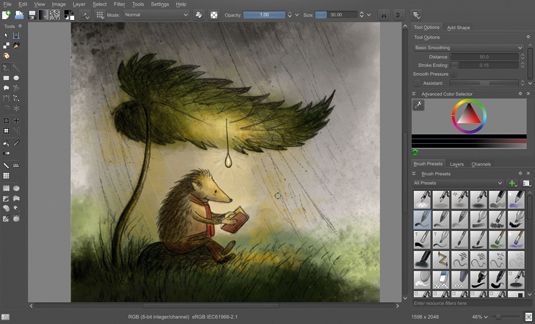
Krita is a free and open-source software that runs on Windows, macOS, and Linux. It’s an excellent option for beginners and experienced artists alike, offering a wide range of tools and features.
Key Features:
- A vast array of brushes and instruments to choose from
- Support for various file formats, including PSD and PNG
- Easy-to-use interface with customizable options
How to Use Krita:
- Download Krita on your computer by visiting the official website.
- Follow the installation process, which is straightforward and easy to navigate.
- Once installed, launch Krita and explore its intuitive interface.
Other Programs For Digital Painting
1. Gimp
GIMP (GNU Image Manipulation Program) is another free and open-source software that runs on Windows, macOS, and Linux. It’s a popular choice among digital artists, offering advanced features and tools.
Key Features:
- Support for various file formats, including PSD and XCF
- Advanced editing tools, such as layers and filters
- Easy-to-use interface with customizable options
How to Use Gimp:
- Download GIMP on your computer by visiting the official website.
- Follow the installation process, which is straightforward and easy to navigate.
- Once installed, launch GIMP and explore its user-friendly interface.
2. Adobe Photoshop
Adobe Photoshop is a professional-grade software that runs on Windows and macOS. It’s an industry-standard for digital painting, offering advanced features and tools.
Key Features:
- Support for various file formats, including PSD and PNG
- Advanced editing tools, such as layers and filters
- Easy-to-use interface with customizable options
How to Use Adobe Photoshop:
- Download the trial version of Adobe Photoshop on your computer.
- Follow the installation process, which is straightforward and easy to navigate.
- Once installed, launch Adobe Photoshop and explore its intuitive interface.
Programmi Per la Pittura Digitale Online (Online Digital Painting Software)
1. Sketchpad
Sketchpad is an online digital painting software that’s free to use. It offers a range of features and tools, making it an excellent option for beginners and experienced artists alike.
Key Features:
- A vast array of brushes and instruments to choose from
- Support for various file formats, including PNG and JPEG
- Easy-to-use interface with customizable options
How to Use Sketchpad:
- Visit the Sketchpad website and launch it in your browser.
- Follow the on-screen instructions to create a new canvas.
- Start painting using the available tools and features.
2. Photopea
Photopea is another online digital painting software that’s free to use. It offers advanced features and tools, making it an excellent option for experienced artists.
Key Features:
- Support for various file formats, including PSD and XCF
- Advanced editing tools, such as layers and filters
- Easy-to-use interface with customizable options
How to Use Photopea:
- Visit the Photopea website and launch it in your browser.
- Follow the on-screen instructions to create a new canvas.
- Start painting using the available tools and features.
App Per la Pittura Digitale (Mobile Digital Painting Apps)
1. Infinite Painter
Infinite Painter is a mobile digital painting app that’s available for Android, iOS, and iPadOS devices. It offers advanced features and tools, making it an excellent option for experienced artists.
Key Features:
- A vast array of brushes and instruments to choose from
- Support for various file formats, including PNG and JPEG
- Easy-to-use interface with customizable options
How to Use Infinite Painter:
- Download the Infinite Painter app on your mobile device.
- Follow the on-screen instructions to create a new canvas.
- Start painting using the available tools and features.
2. Adobe Draw
Adobe Draw is another mobile digital painting app that’s free to use. It offers advanced features and tools, making it an excellent option for experienced artists.
Key Features:
- Support for various file formats, including PSD and PNG
- Advanced editing tools, such as layers and filters
- Easy-to-use interface with customizable options
How to Use Adobe Draw:
- Download the Adobe Draw app on your mobile device.
- Follow the on-screen instructions to create a new canvas.
- Start painting using the available tools and features.
Conclusion
Digital painting has become an exciting and liberating experience, thanks to advancements in technology. With a wide range of software options available, you can choose the one that best suits your needs and preferences. Whether you’re a beginner or an experienced artist, digital painting offers endless possibilities for creativity and self-expression.


