
How to Find Lost Airpods: A Step-by-step Guide
Are you tired of searching everywhere for your lost AirPods? Do you wish there was an easier way to find them? Look no further! In this article, we will guide you through the process of finding your missing AirPods using various devices and methods.
Understanding The Requirements
Before we dive into the steps, it’s essential to understand that your AirPods must be associated with a device Apple, such as an iPhone or iPad, and have active location services enabled. If these conditions are met, you can follow the steps below to find your lost AirPods.
Using Your Iphone or Ipad
If you’re using an iPhone or iPad, the process is relatively straightforward:
- Open The Settings App: On your iPhone or iPad, go to the Settings app and tap on the “General” option.
- Tap on Location Services: In the General settings, tap on “Location Services” and ensure it’s turned on.
- Access The Find My App: Tap on the “Find My” app, which is usually located in the Dock or Home screen.
- Select Your Airpods: Tap on the “AirPods” option from the menu, followed by selecting your AirPods’ name and pattern.
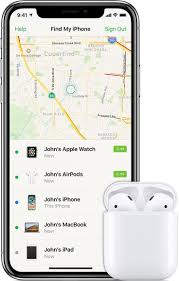
- View Your Airpods’ Location: On the next screen, you’ll see a map with your AirPods’ current location.
Using Your Computer
If you’re using a computer, follow these steps:
- Access Icloud.Com: Go to iCloud.Com and sign in with your Apple ID.
- Click on Find Iphone: Click on the “Find iPhone” option from the menu.
- Select Airpods: Select your AirPods’ name and pattern from the list of devices.
- View Your Airpods’ Location: On the next screen, you’ll see a map with your AirPods’ current location.
Using Your Mac
If you’re using a Mac, follow these steps:
- Open The Find My App: Open the Find My app on your Mac, which is usually located in the Dock or Launchpad.
- Select Your Airpods: Select your AirPods’ name and pattern from the menu.
- View Your Airpods’ Location: On the next screen, you’ll see a map with your AirPods’ current location.
What to Do If Your Airpods Are Offline
If your AirPods are offline or out of range, you can still use the Find My app to track their last known location. However, keep in mind that this method may not provide real-time updates.
Tips And Tricks
Here are some additional tips and tricks to help you find your lost AirPods:
- Make Sure You Have The Latest Software Update: Ensure your iPhone or iPad is running the latest software version.
- Enable Location Services: Make sure Location Services are enabled on your device.
- Use The Find My App Regularly: Regularly use the Find My app to track your AirPods’ location and ensure they’re still connected to your device.
- Consider Using a Third-party App: There are several third-party apps available that can help you find your lost AirPods.
Conclusion
Finding lost AirPods can be frustrating, but with these steps, you should be able to locate them easily. Remember to keep your devices and software up-to-date, enable Location Services, and use the Find My app regularly to minimize the chances of losing your AirPods again.
Frequently Asked Questions (FAQs)
- Q: Can I Find my Lost Airpods if They’re Not Connected to my Device?
A: Yes, you can still track their last known location using the Find My app. - Q: How Far Can my Airpods be From me And Still be Tracked?
A: The range of tracking depends on your device’s Bluetooth capabilities and the environment. - Q: Can I Use a Third-party App to Find my Lost Airpods?
A: Yes, there are several third-party apps available that can help you track your AirPods’ location. - Q: How do I Prevent Losing my Airpods in The Future?
A: Regularly check the Find My app and ensure Location Services are enabled on your device to minimize the chances of losing your AirPods. - Q: Can I Replace my Lost Airpods if They’re Damaged or Stolen?
A: Yes, you can contact Apple support to replace your lost AirPods if they’re damaged or stolen. - Q: How do I Update my Software to Ensure I Have The Latest Features And Security Patches?
A: Regularly check for software updates on your device and follow the instructions to update your software. - Q: Can I Use The Find My App to Track Other Apple Devices, Such as my Iphone or Ipad?
A: Yes, you can use the Find My app to track other Apple devices associated with your Apple ID. - Q: How do I Troubleshoot Issues With The Find My App?
A: Try restarting your device, checking for software updates, and ensuring Location Services are enabled on your device to resolve any issues with the Find My app.


