
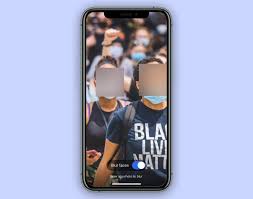
The Ultimate Guide to Concealing Faces in Videos And Photos
Are you tired of having your face or others’ faces visible in videos and photos? Do you want to add a touch of anonymity to your social media profiles or protect the identity of individuals in sensitive situations? Look no further! In this comprehensive guide, we will explore various apps and tools that can help you conceal faces in videos and photos.
Why Conceal Faces in Videos And Photos?
Before diving into the solutions, let’s understand why concealing faces might be necessary. Perhaps you’re a social media influencer who wants to maintain their online persona without revealing their face. Or maybe you’re a journalist who needs to protect the identity of sources or witnesses. Whatever your reason, we’ve got you covered.
Top Apps For Concealing Faces in Videos And Photos
- Blur Video & Image (Android): This app allows you to add manual blur effects to faces in videos and photos. It’s free, easy to use, and offers various options to customize the effect.
- Download: Link
- Editor Video of Sfocatura Partial (Android): This app is specifically designed for Android devices and allows you to add automatic face blur effects to videos. It’s free, but a watermark will be added unless you upgrade to the Pro version.
- Download: Link
- Video Mosaic App (iOS/iPadOS): This app is perfect for iPhone and iPad users who want to conceal faces in videos. It’s free, easy to use, and offers various options to customize the effect.
- Download: Link
- Movstash (iOS/iPadOS): This app allows you to add face tracking effects to videos, making it perfect for concealing faces in motion.
- Download: Link
- Pixlr (Android/iOS/iPadOS): This photo editing app offers a range of filters and effects, including face concealment options.
- Point Blur (Android): This app allows you to manually blur faces in photos, making it perfect for quick editing jobs.
- Download: Link
- Animal Face (Android): This app is specifically designed for Android devices and allows you to replace human faces with animal faces in photos.
- Download: Link
How to Use These Apps
Each app has its unique features and user interface. Here’s a brief guide on how to use them:
- Blur Video & Image: Open the app, select the “Sfoca video” option, choose your video or photo, and customize the blur effect as desired.
- Editor Video of Sfocatura Partial: Open the app, select the “New project” option, choose your video, and add face blur effects using the available options.
- Video Mosaic App: Open the app, record a new video or select an existing one, and customize the face tracking effect as desired.
- Movstash: Open the app, select the “Face tracking Fashion” option, choose your video, and customize the face tracking effect as desired.
- Pixlr: Open the app, select the photo editing mode, add filters or effects, and use the face concealment options to blur faces in photos.
- Point Blur: Open the app, select the “Edit” option, choose your photo, and manually blur faces using the available tools.
- Animal Face: Open the app, select the “Chamber” option, record a new photo or choose an existing one, and replace human faces with animal faces.
Conclusion
Concealing faces in videos and photos is now easier than ever, thanks to these amazing apps and tools. Whether you’re a social media influencer, journalist, or just someone who wants to add a touch of anonymity to their online presence, we hope this guide has been helpful. Remember to always use these tools responsibly and with respect for others’ privacy.
Faqs
- Q: Can I Use These Apps on my Iphone?
A: Yes! Most of the mentioned apps are available for iOS devices. - Q: Are These Apps Free?
A: Some apps offer free versions, while others may require a subscription or in-app purchases. - Q: How do I Customize The Blur Effect in These Apps?
A: Each app has its unique customization options, but most allow you to adjust the intensity and size of the blur effect. - Q: Can I Use These Apps For Commercial Purposes?
A: Please check the terms and conditions of each app before using them for commercial purposes. - Q: How do I Share Edited Videos or Photos on Social Media?
A: Each app has its own sharing options, but most allow you to share directly to platforms like Instagram, Facebook, and Twitter.
We hope this guide has been helpful! If you have any further questions or concerns, please don’t hesitate to ask.


