
The Ultimate Guide to Gps Technology
What is Gps?
GPS stands for Global Positioning System, a technology that provides location information anywhere on Earth, at any time, and under any weather conditions.
How Does Gps Work?
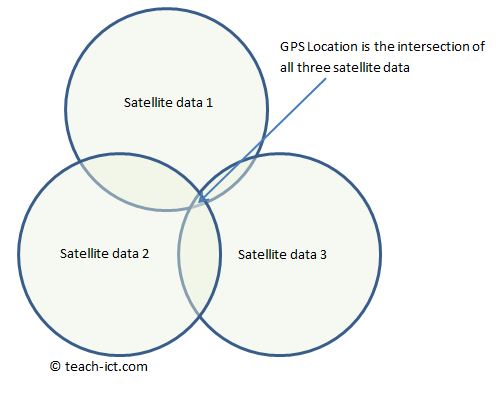
GPS works by using a network of 31 artificial satellites orbiting the Earth, which transmit signals to GPS receivers on the ground. These receivers use this information to calculate their own position in three dimensions (latitude, longitude, and altitude).
The History of Gps
GPS was developed in the 1970s by the US Department of Defense as a military navigation system. It was originally called NAVSTAR GPS, standing for Navigation Satellite Timing And Ranging Global Positioning System. In 1991, the US government opened GPS to civilians, but with some limitations. These limitations were abolished in 2000, making GPS available to anyone.
How Does Gps Work on Devices?
GPS technology is used in various devices such as smartphones, tablets, computers, and even cars. These devices have a GPS chip that receives signals from the satellites and uses them to determine their location. The data is then displayed on the device’s screen, showing the user’s position on a map.
How to Activate Gps on Android And Iphone
Activating GPS on Android and iPhone is easy. On Android, go to Settings > Location, and toggle the switch to turn it on. On iPhone, go to Settings > Privacy & Security > Location Services, and toggle the switch to turn it on.
Gps For Cars
GPS technology can be used in cars to track their location, speed, and direction. This is especially useful for fleet management and vehicle tracking.
Gps Trackers For Pets
GPS trackers are available for pets, allowing owners to track their pet’s location, even when they’re not with them.
Improving Gps Reception
To improve GPS reception, make sure there are no obstacles between the device and the satellites. You can also use an external antenna or a GPS app that provides additional location information.
Conclusion
GPS technology is a powerful tool that provides location information anywhere on Earth, at any time, and under any weather conditions. It has many applications, from navigation to fleet management and pet tracking. By understanding how GPS works and how it can be used on various devices, you can take advantage of its benefits.
Frequently Asked Questions
- Q: What is The Accuracy of Gps?
A: The accuracy of GPS depends on the device and the quality of the signal received. It can range from 10-20 meters to several kilometers. - Q: Can I Use Gps in Areas With no Cell Phone Coverage?
A: Yes, GPS can be used in areas with no cell phone coverage, as it relies solely on satellite signals. - Q: How do I Activate Gps on my Device?
A: To activate GPS on your Android device, go to Settings > Location, and toggle the switch to turn it on. On iPhone, go to Settings > Privacy & Security > Location Services, and toggle the switch to turn it on. - Q: Can I Use Gps For Tracking Purposes?
A: Yes, GPS can be used for tracking purposes, such as fleet management or pet tracking. - Q: How do I Improve Gps Reception?
A: To improve GPS reception, make sure there are no obstacles between the device and the satellites. You can also use an external antenna or a GPS app that provides additional location information. - Q: Is Gps Secure?
A: Yes, GPS is considered to be a secure technology, as it uses encryption and other security measures to protect user data. - Q: Can I Use Gps For Navigation Purposes?
A: Yes, GPS can be used for navigation purposes, such as finding your way around or tracking your location. - Q: How do I Turn Off Gps on my Device?
A: To turn off GPS on your Android device, go to Settings > Location, and toggle the switch to turn it off. On iPhone, go to Settings > Privacy & Security > Location Services, and toggle the switch to turn it off.


