
How to Change Your Vodafone Modem Password: A Step-by-step Guide
Are you tired of using the same old password to access your Vodafone modem? Do you want to increase the security of your internet connection? Look no further! In this article, we will guide you through the process of changing your Vodafone modem password in a simple and easy-to-follow manner.
What is My Vodafone Modem Password?
Your Vodafone modem password is the key that grants access to your modem’s management panel. This password is used to protect your internet connection from unauthorized access. By default, this password is set by your internet service provider (ISP), but you can change it to a more secure and personalized one.
Why Change My Vodafone Modem Password?
Changing your Vodafone modem password is essential for maintaining the security of your internet connection. Here are some reasons why:
- Protection From Unauthorized Access: A strong password will prevent unauthorized individuals from accessing your modem’s management panel, which could lead to data breaches or other malicious activities.
- Improved Online Safety: By changing your Vodafone modem password regularly, you can ensure that your online presence is secure and protected from potential threats.
- Enhanced Overall Security: A strong password will also protect your internet connection from various types of cyber attacks, such as hacking and phishing.
How to Change Your Vodafone Modem Password: Step-by-step Guide
Changing your Vodafone modem password is a straightforward process that can be completed in a few simple steps. Here’s how:
Step 1: Access The Vodafone Modem Management Panel
To change your Vodafone modem password, you first need to access the modem’s management panel. This can be done by typing the address http://Vodafone.Station/ or 192.168.1.1 In your web browser.
Step 2: Log In to The Modem Management Panel
Once you’ve accessed the modem’s management panel, you’ll need to log in using your current password. If you don’t remember your password, you can reset it by following these steps:
- Click on the “Forgot Password” link.
- Enter your username and email address associated with your account.
- Follow the instructions provided to reset your password.
Step 3: Change Your Vodafone Modem Password
After logging in, you can change your Vodafone modem password by following these steps:
- Click on the “Change Password” button.
- Enter your current password and confirm it.
- Create a new password that meets the security requirements (at least 8 characters long, containing uppercase letters, lowercase letters, numbers, and special characters).
- Confirm the new password.
Step 4: Save Your Changes
After changing your Vodafone modem password, make sure to save your changes by clicking on the “Save” button.
How to Change Your Vodafone Modem Password Using The Vodafone App
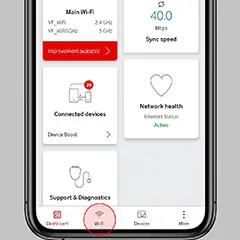
If you have a Vodafone app installed on your device, you can also change your modem password using the app. Here’s how:
- Open the Vodafone app.
- Tap on the “Wi-Fi” option.
- Select the Wi-Fi network you want to modify.
- Tap on the “Configure” button.
- Enter a new password and confirm it.
Tips For Choosing a Strong Password
When choosing a strong password, keep these tips in mind:
- Use a Combination of Characters: Use uppercase letters, lowercase letters, numbers, and special characters to create a unique and secure password.
- Avoid Easily Guessable Words: Avoid using names, birthdays, or other easily guessable information as your password.
- Keep it Confidential: Keep your Vodafone modem password confidential and avoid sharing it with anyone.
Conclusion
Changing your Vodafone modem password is an essential step in maintaining the security of your internet connection. By following these simple steps, you can ensure that your online presence is secure and protected from potential threats. Remember to choose a strong and unique password that meets the security requirements, and always keep it confidential.
Frequently Asked Questions (FAQs)
Here are some frequently asked questions related to changing your Vodafone modem password:
Q: How Often Should I Change my Vodafone Modem Password?
A: It’s recommended to change your Vodafone modem password every 3-6 months or whenever you notice any suspicious activity.
Q: Can I Use The Same Password For Multiple Devices?
A: No, it’s not recommended to use the same password for multiple devices. Use a unique password for each device connected to your Wi-Fi network.
Q: How do I Reset my Vodafone Modem Password if I Forget It?
A: If you forget your Vodafone modem password, you can reset it by following these steps:
- Click on the “Forgot Password” link.
- Enter your username and email address associated with your account.
- Follow the instructions provided to reset your password.
Q: Can I Change my Vodafone Modem Password Using The Vodafone App?
A: Yes, you can change your Vodafone modem password using the Vodafone app by following these steps:
- Open the Vodafone app.
- Tap on the “Wi-Fi” option.
- Select the Wi-Fi network you want to modify.
- Tap on the “Configure” button.
- Enter a new password and confirm it.
Q: What if I Have Multiple Wi-fi Networks Set Up? Do I Need to Change The Password For Each One?
A: Yes, if you have multiple Wi-Fi networks set up, you’ll need to change the password for each one individually.
Q: Can I Use a Password Manager to Store my Vodafone Modem Passwords?
A: Yes, you can use a password manager to store your Vodafone modem passwords. However, make sure to keep it confidential and avoid sharing it with anyone.


