
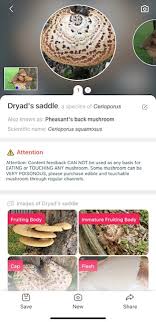
The Fascinating World of Fungus Identification: A Guide to The Best Apps
As we venture into the world of mycology, the study of fungi, it’s essential to have a reliable tool at our disposal. The thrill of discovery, combined with the responsibility of identifying edible from toxic species, makes the process both exciting and intimidating. In this article, we’ll delve into the realm of fungus identification apps, exploring the best options available for Android and iOS devices.
Why Use Fungus Identification Apps?
Before we dive into the world of apps, let’s discuss why they’re essential for fungus enthusiasts. These tools provide a comprehensive database of fungal species, featuring detailed descriptions, high-quality images, and expert opinions from mycologists. By utilizing these apps, you’ll gain confidence in your ability to identify fungi, reducing the risk of mistakenly consuming toxic species.
Top Fungus Identification Apps For Android And Ios
- Inaturalist
- A powerful platform that connects users with a vast community of naturalists, scientists, and experts.
- Features over 400,000 registered members, ensuring accurate and up-to-date information.
- Available on Android, iOS, and iPadOS.
- Ifunch
- A user-friendly app that provides detailed descriptions of common fungi species.
- Offers a free version with limited access to the database, as well as a paid subscription for full access.
- Available on Android and iOS/iPadOS.
- Riconoscere Fungus
- An innovative app that utilizes AI-powered identification, allowing users to scan fungi photos and receive instant results.
- Features a vast library of images and expert opinions from mycologists.
- Available on Android, iOS, and iPadOS.
Other Notable Apps For Fungus Identification
- Acknowledge Funguses
- A comprehensive app featuring over 100 species of fungi, with detailed descriptions and high-quality images.
- Offers a free version with limited access to the database, as well as a paid subscription for full access.
- Available on Android and iOS/iPadOS.
- Myco Free
- An application that provides detailed descriptions of over 50 types of fungi, featuring helpful images for identification.
- Offers a free version with limited access to the database, as well as a paid subscription for full access.
- Available on Android, iOS, and iPadOS.
- Google Lens
- A versatile app that can identify various objects, including fungi, using AI-powered technology.
- While not specifically designed for fungus identification, it’s still a valuable tool in this context.
Conclusion
The world of fungus identification is both fascinating and complex. With the help of these top-rated apps, you’ll be well-equipped to explore the realm of mycology with confidence. Remember to always verify your findings with expert opinions from mycologists and follow proper protocols for handling and consumption.
Frequently Asked Questions (FAQs)
- Q: What Are The Primary Risks Associated With Fungus Identification?
A: The primary risk is consuming toxic fungi, which can be fatal. - Q: How do I Ensure Accurate Fungus Identification?
A: Utilize reputable apps, consult expert opinions from mycologists, and verify findings through multiple sources. - Q: Can I Use These Apps to Identify Fungi in The Wild?
A: Yes, but always exercise caution when handling and consuming wild fungi. - Q: Are These Apps Suitable For Beginners?
A: Absolutely! These apps are designed to be user-friendly and provide a comprehensive introduction to fungus identification. - Q: Can I Use These Apps on Non-google Devices?
A: Yes, many of these apps are available on alternative stores, such as the Amazon Appstore or Apple’s App Store. - Q: Do These Apps Require Internet Access For Operation?
A: Some apps may require internet access to function, while others can operate offline with downloaded databases. - Q: Can I Use These Apps to Identify Other Types of Organisms?
A: While primarily designed for fungus identification, some apps can be used to identify other organisms, such as plants and animals. - Q: Are These Apps Available in my Language?
A: Most apps are available in multiple languages, including English, but it’s always best to check the app store description or developer website for specific language support.


