
Creating Safe Passwords: Tips And Tricks For a Secure Online Experience
As we increasingly rely on digital services, securing our online presence has become essential. One crucial aspect of online security is creating safe passwords. In this article, we will explore the importance of password safety, provide tips for crafting secure passwords, and introduce you to password managers that can help safeguard your credentials.
Why Password Security Matters
Password security may seem like a trivial concern, but it’s essential for protecting your personal data and preventing identity theft. Weak or easily guessable passwords can be exploited by hackers, leading to unauthorized access to sensitive information. A safe password is one that’s long, complex, and unique, making it difficult for malicious actors to crack.
Characteristics of a Secure Password
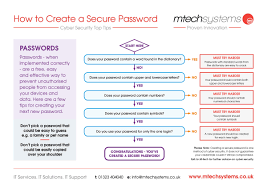
A secure password should have the following characteristics:
- Length: Aim for 15-20 characters or more.
- Complexity: Include uppercase letters, numbers, symbols, and special characters.
- Uniqueness: Avoid using the same password across multiple accounts.
Tips For Creating Safe Passwords
Here are some tips to help you create safe passwords:
- Avoid Using Easily Guessable Information, such as your name, birthdate, or common words.
- Use a Password Manager to generate and store unique passwords for each account.
- Don’t Reuse Passwords across multiple accounts.
- Keep Your Password Management Software Up-to-date.
Password Managers: A Safer Way to Manage Passwords
Password managers are tools that securely store and generate complex passwords for you. They can also help you manage and share access to sensitive information with trusted individuals.
Some popular password manager options include:
- Nordpass: Offers advanced security features, such as AI-powered password generation and automatic password sharing.
- 1Password: Provides a user-friendly interface and robust security features, including password generation and storage.
- Bitwarden: A free and open-source password manager that offers a range of security features, including password generation and storage.
Conclusion
Creating safe passwords is crucial for protecting your online presence and preventing identity theft. By following the tips outlined in this article and using a reputable password manager, you can significantly improve the security of your digital life.
Frequently Asked Questions
Here are some additional questions related to creating safe passwords:
- Q: How Often Should I Change my Password?
A: It’s recommended to change your password every 60-90 days. - Q: Can I Use a Password Manager For All of my Devices?
A: Yes, most password managers offer cross-platform compatibility. - Q: What Are Some Common Mistakes People Make When Creating Passwords?
A: Common mistakes include using easily guessable information, reusing passwords, and failing to update password management software.
Creating Safe Passwords: Conclusion
In conclusion, creating safe passwords is essential for protecting your online presence and preventing identity theft. By following the tips outlined in this article and using a reputable password manager, you can significantly improve the security of your digital life.
Feel free to ask if there’s anything else I can help with.


