
How to Create a Pinterest Account: A Step-by-step Guide
Are you curious about joining the world’s largest visual discovery and planning website, Pinterest? With over 322 million monthly active users, Pinterest is an ideal platform for discovering new ideas, saving inspiration, and connecting with like-minded individuals. In this article, we’ll guide you through the process of creating a Pinterest account, exploring various access options, and highlighting essential features.
Why Create a Pinterest Account?
Before diving into the setup process, let’s explore the benefits of having a Pinterest account:
- Access Exclusive Content: As a registered user, you’ll gain access to an extensive library of ideas, inspiration, and tutorials.
- Save Your Favorite Content: Organize and save images, videos, and boards that resonate with your interests.
- Connect With Others: Join communities, participate in discussions, and engage with fellow users who share similar passions.
Accessing Pinterest
You can access Pinterest using various methods:
1. Desktop Access
To access Pinterest on your computer:
- Open a web browser (e.G., Google Chrome, Mozilla Firefox) and navigate to the Pinterest website (www.Pinterest.Com).
- Click on the “Sign up” button located at the top right corner of the page.
- Fill out the registration form with your email address, password, date of birth, and other required information.
2. Mobile App Access
To access Pinterest using a mobile app:
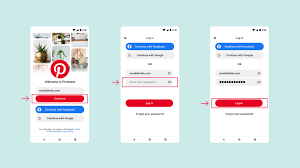
- Download and install the Pinterest app from the Google Play Store (for Android devices) or the Apple App Store (for iOS devices).
- Open the app and tap on “Sign up” to create an account.
- Follow the same registration process as outlined above.
3. Accessing Pinterest Without an Account
While having a Pinterest account offers many benefits, you can still access the platform without registering:
- Visit the Pinterest website or open the mobile app.
- Click on “Explore” at the top of the page to view popular content and browse through various categories (e.G., Animals, art, beauty, design).
- Use the search bar to find specific content.
- Share content by clicking the “Share” button.
Registration Process
If you decide to create a Pinterest account:
- Fill out the registration form with your email address, password, date of birth, and other required information.
- You can choose to sign up using your Facebook or Google account.
- Verify your account through an email sent by Pinterest.
Additional Access Options
You can also access Pinterest using various other methods:
- Facebook: Sign in with your Facebook account to link your profile and access Pinterest features.
- Google: Use your Google account to sign up for a Pinterest account and integrate your Google services.
- ID Apple: If you have an iPhone or iPad, you can use your ID Apple to access Pinterest.
Conclusion
Creating a Pinterest account offers numerous benefits, from discovering new ideas to connecting with like-minded individuals. By following the step-by-step guide outlined above, you’ll be able to create an account and explore the various features of this visual discovery and planning website.
Frequently Asked Questions (FAQs)
Here are some additional questions and answers:
- Q: Do I Need a Pinterest Account to Access Exclusive Content?
A: Yes, having a Pinterest account is required to access exclusive content. - Q: Can I Access Pinterest Without Registering?
A: Yes, you can access Pinterest without registering, but your experience will be limited compared to registered users. - Q: How do I Sign up For a Pinterest Account?
A: You can sign up for a Pinterest account by filling out the registration form on the website or using the mobile app. - Q: Can I Use my Facebook or Google Account to Sign up For Pinterest?
A: Yes, you can use your Facebook or Google account to sign up for Pinterest and link your profile. - Q: How do I Access Pinterest Using an ID Apple?
A: You can access Pinterest using your ID Apple by following the instructions outlined above.
Sources
- Pinterest Official Website: Www.Pinterest.Com
- Pinterest Mobile App (Android): Available on Google Play Store
- Pinterest Mobile App (iOS): Available on Apple App Store


