
How to See People You’ve Blocked on Instagram: A Step-by-step Guide
Are you curious about seeing people you’ve blocked on Instagram? Well, you’re not alone! Many users have wondered how to do this without making a mistake or violating the platform’s policies. In this article, we’ll provide a comprehensive guide on how to see people you’ve blocked on Instagram using your smartphone and computer.
Why Would You Want to See People You’ve Blocked on Instagram?
Before we dive into the steps, let’s discuss why you might want to see people you’ve blocked on Instagram. There could be various reasons for this, such as:
- You want to unblock someone who has apologized or changed their behavior.
- You’re curious about someone’s profile without wanting to interact with them.
- You need to confirm whether someone has blocked you in return.
Whatever your reason might be, we’ll provide you with the steps to follow safely and correctly.
How to See People You’ve Blocked on Instagram Using Your Smartphone
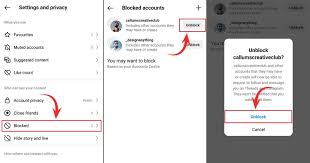
To see people you’ve blocked on Instagram using your smartphone, follow these steps:
- Open The Instagram App: Start by opening the Instagram app on your smartphone.
- Tap on The Profile Icon: Tap on the profile icon in the bottom right corner of the screen to access your profile page.
- Select “Settings”: Select the “Settings” option from the menu.
- Choose “Users Blocked”: Choose the “Users blocked” section from the settings menu.
- View The List of Blocked Users: You’ll now see a list of people you’ve blocked on Instagram.
How to See People You’ve Blocked on Instagram Using Your Computer
To see people you’ve blocked on Instagram using your computer, follow these steps:
- Go to The Instagram Website: Open the Instagram website in your computer’s web browser.
- Log in to Your Account: Log in to your Instagram account using your credentials.
- Click on The Profile Icon: Click on the profile icon in the top right corner of the screen to access your profile page.
- Select “Settings”: Select the “Settings” option from the menu.
- Choose “Who Can See Your Content”: Choose the “Who can see your content” section from the settings menu.
- View The List of Blocked Users: You’ll now see a list of people you’ve blocked on Instagram.
How to Unblock Someone on Instagram
If you want to unblock someone, simply tap or click on their name in the list of blocked users and select “Unblock.” Make sure you’re certain about this decision, as blocking someone is a reciprocal process.
Can You See Who’s Blocked You on Instagram?
Unfortunately, Instagram doesn’t provide an official way to see who’s blocked you. However, if you suspect that someone has blocked you, try accessing their profile using another account. If it loads normally, but you can’t see their posts or follow them, it’s likely that they’ve blocked you.
Conclusion
In conclusion, seeing people you’ve blocked on Instagram is a relatively simple process, whether you’re using your smartphone or computer. Remember to exercise caution and consider the consequences of unblocking someone if you’re unsure about their behavior.
Frequently Asked Questions (FAQs)
- Can I See Who’s Blocked me on Instagram?
Unfortunately, no, Instagram doesn’t provide an official way to see who’s blocked you. - How do I Unblock Someone on Instagram?
To unblock someone, simply tap or click on their name in the list of blocked users and select “Unblock.” - Will Unblocking Someone Notify Them?
Yes, unblocking someone will notify them that they’ve been unblocked. - Can I Block Someone Multiple Times?
No, blocking someone is a one-time process, and you can’t block them again after unblocking them. - How do I Know if Someone Has Blocked me in Return?
If someone has blocked you in return, you won’t be able to see their posts or follow them using another account. - Can I See Who’s Blocked me on Instagram Business?
Unfortunately, no, Instagram doesn’t provide an official way to see who’s blocked you on Instagram Business. - How do I Report Someone Who’s Blocked me Unfairly?
To report someone who’s blocked you unfairly, go to the Instagram help center and follow their guidelines for reporting a blocked account.
I hope this article has provided you with the information you needed! If you have any further questions or concerns, please don’t hesitate to reach out.


