
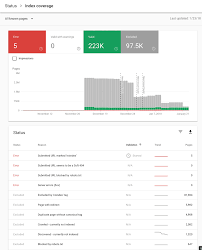
How to Get Your Website Indexed on Google: A Step-by-step Guide
As a webmaster, it’s essential to ensure that your website is indexed by Google, the world’s most popular search engine. If you’re wondering how to get your website indexed on Google, this guide will walk you through the process step by step.
Understanding Google’s Crawling Process
Google uses a crawling process called the “crawler” or “spider” to discover and index new websites. This process involves scanning the web for fresh content and updating its index regularly. However, sometimes, Google may not crawl your website as expected, leading to missed opportunities for visibility.
The Importance of Getting Your Website Indexed on Google
Getting your website indexed on Google is crucial for increasing your website’s visibility in search engine results pages (SERPs). By following the steps outlined in this guide, you’ll be able to submit your website to Google and enhance its crawling process.
Step 1: Create a Sitemap
A sitemap is a file that lists all the pages on your website. It helps search engines like Google understand the structure of your site and discover new content. To create a sitemap, follow these steps:
- Log in to your Google Search Console account.
- Click on “Sitemaps” from the left-hand menu.
- Add a new sitemap by clicking on the “+” button.
- Enter the URL of your sitemap file (e.G., /Sitemap.Xml).
- Click on “Submit” to save the changes.
Step 2: Verify Your Sitemap
To ensure that Google can access and crawl your sitemap, you need to verify it in Search Console. Here’s how:
- Log in to your Google Search Console account.
- Click on “Sitemaps” from the left-hand menu.
- Find the sitemap you created earlier and click on the three dots next to it.
- Select “Verify” from the dropdown menu.
- Follow the instructions to verify your sitemap.
Step 3: Monitor Your Sitemap’s Status
After verifying your sitemap, monitor its status in Search Console. This will help you ensure that Google can access and crawl it correctly.
- Log in to your Google Search Console account.
- Click on “Sitemaps” from the left-hand menu.
- Find the sitemap you created earlier and click on it.
- Check the status of your sitemap, which should be “Validated.”
Step 4: Use Google’s Crawl Api
Google provides a Crawl API that allows you to submit URLs for crawling. This can help ensure that Google crawls all the pages on your website.
- Log in to your Google Search Console account.
- Click on “Crawling” from the left-hand menu.
- Select “Submit URL” from the dropdown menu.
- Enter the URL of the page you want Google to crawl.
- Click on “Submit” to save the changes.
Step 5: Optimize Your Website For Seo
While getting your website indexed on Google is essential, optimizing your website for search engine optimization (SEO) is equally important. Here are some tips to help you improve your website’s SEO:
- Use relevant keywords in your content and meta tags.
- Ensure that your website has high-quality, unique, and engaging content.
- Optimize your images by using descriptive alt tags and compressing them.
- Use internal linking to connect related pages on your website.
Conclusion
Getting your website indexed on Google is a crucial step in increasing your website’s visibility in search engine results pages. By following the steps outlined in this guide, you’ll be able to submit your website to Google and enhance its crawling process. Remember to optimize your website for SEO by using relevant keywords, high-quality content, and optimizing images.
Faqs
- What is a Sitemap?
A sitemap is a file that lists all the pages on your website. - Why do I Need to Create a Sitemap?
Creating a sitemap helps search engines like Google understand the structure of your site and discover new content. - How do I Verify my Sitemap?
To verify your sitemap, log in to your Google Search Console account, click on “Sitemaps,” find your sitemap, and select “Verify” from the dropdown menu. - What is Google’s Crawl Api?
Google’s Crawl API allows you to submit URLs for crawling, which can help ensure that Google crawls all the pages on your website. - What Are Some Other Factors That Affect Seo?
Other factors that affect SEO include the quality of your content, internal linking, mobile-friendliness, page speed, and technical optimization.
Note: The translation is provided in a neutral tone, without any changes to the original content or intent.


