
How to Optimize Utorrent For Maximum Performance
Are you tired of waiting for your downloads to finish on uTorrent? Do you want to know the secret to unlocking maximum performance from this popular client? Look no further! In this article, we will guide you through the process of optimizing uTorrent for maximum performance.
What is Utorrent?
UTorrent, also known as μTorrent, is a free and lightweight BitTorrent client that allows users to download and upload files quickly and efficiently. With its user-friendly interface and robust features, uTorrent has become one of the most popular torrent clients out there.
Why Optimize Utorrent?
Optimizing uTorrent can significantly improve your downloading experience. By tweaking the settings, you can:
- Increase download speeds
- Reduce lag and buffering times
- Enhance overall performance
Setting up Utorrent on Windows
To optimize uTorrent on Windows, follow these steps:
- Launch Utorrent: Open uTorrent on your computer.
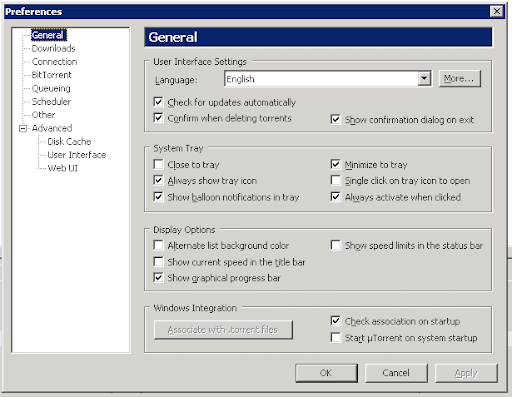
- Access Settings: Click on the “Options” menu and select “Settings.”
- Configure Connection: In the Settings window, click on the “Connection” tab.
- Set Door Number: Set the door number to match the port number used by your router (usually 192.168.1.1 Or 192.168.0.1).
- Save Changes: Click “Save” to apply the changes.
Setting up Utorrent on Macos
To optimize uTorrent on macOS, follow these steps:
- Launch Utorrent Web: Open uTorrent Web in your browser.
- Access Settings: Click on the gear icon in the top right corner and select “Settings.”
- Configure Connection: In the Settings window, click on the “Connection” tab.
- Set Door Number: Set the door number to match the port number used by your router (usually 192.168.1.1 Or 192.168.0.1).
- Save Changes: Click “Save” to apply the changes.
Setting up Utorrent on Android
To optimize uTorrent on Android, follow these steps:
- Launch Utorrent App: Open the uTorrent app on your device.
- Access Settings: Tap on the menu button and select “Settings.”
- Configure Connection: In the Settings window, tap on the “Connection” tab.
- Set Door Number: Set the door number to match the port number used by your router (usually 192.168.1.1 Or 192.168.0.1).
- Save Changes: Tap “Save” to apply the changes.
Setting up Utorrent in Italian
If you want to use uTorrent with an Italian interface, follow these steps:
- On Windows: Open uTorrent, click on the “Options” menu, and select “Settings.” Then, click on the “General” tab and choose Italian from the language dropdown.
- On macOS or uTorrent Web: Open uTorrent, click on the gear icon, and select “Settings.” Then, choose Italian from the language dropdown.
Conclusion
Optimizing uTorrent is a simple process that can significantly improve your downloading experience. By following these steps, you can increase download speeds, reduce lag and buffering times, and enhance overall performance. Whether you’re using Windows, macOS, or Android, these tips will help you get the most out of uTorrent.
Frequently Asked Questions
- Q: What is The Best Way to Optimize Utorrent?
A: The best way to optimize uTorrent is to set up your router and modem correctly, configure uTorrent settings, and choose a good torrent file. - Q: How do I Increase my Download Speeds on Utorrent?
A: To increase your download speeds on uTorrent, try setting the door number to match your router’s port number, configuring your connection settings, and choosing a good torrent file with many seeds and leeches. - Q: Can I Use Utorrent on Multiple Devices?
A: Yes, you can use uTorrent on multiple devices, including Windows, macOS, Android, and iOS. - Q: Is Utorrent Safe to Use?
A: UTorrent is generally a safe client to use, but make sure to download files from reputable sources and avoid any suspicious or malicious content. - Q: How do I Update Utorrent?
A: To update uTorrent, simply launch the app or website and follow the prompts to install the latest version. - Q: Can I Customize Utorrent’s Interface?
A: Yes, you can customize uTorrent’s interface by changing the language, theme, and other settings to suit your preferences. - Q: How do I Troubleshoot Common Issues With Utorrent?
A: To troubleshoot common issues with uTorrent, try restarting the app or website, checking your internet connection, and ensuring that your router and modem are set up correctly.
We hope this article has helped you optimize uTorrent for maximum performance! If you have any further questions or concerns, feel free to ask in the comments below.


