
How to Connect Sky Link to Your Decoder And Internet
Are you tired of dealing with complicated internet connections? Look no further! In this article, we’ll guide you through the process of connecting your Sky Link to your decoder and internet in a simple and easy-to-follow manner.
What is Sky Link?
Sky Link is a wireless device that allows you to connect your Sky decoder to the internet without the need for cables. It’s a convenient solution for those who want to enjoy their favorite Sky shows and movies without the hassle of complicated connections.
Types of Sky Link
There are two types of Sky Link: Single Band and Dual Band. The Single Band version is ideal for small homes or apartments where the decoder and router are in close proximity. The Dual Band version, on the other hand, is perfect for larger homes or those with multiple floors.
How to Connect Sky Link to Your Decoder
To connect your Sky Link to your decoder, follow these simple steps:
- Power up Your Sky Link: Plug in your Sky Link device and make sure it’s turned on.
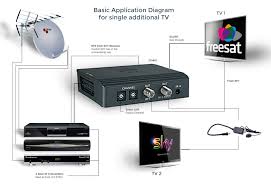
- Connect The Cables: Connect the Ethernet cable from the Sky Link to the decoder. Make sure the other end of the cable is securely plugged into the router or modem.
- Power up Your Decoder: Turn on your decoder and select the correct input channel for Sky Link.
- Configure Your Connection: Go to the menu on your Sky remote control and navigate to the “Network” section. Select the option to configure your network and follow the prompts.
How to Connect Sky Link to Your Internet
To connect your Sky Link to your internet, you’ll need to configure your router or modem to recognize the Sky Link device. Here’s how:
- Check Your Router Settings: Make sure your router is set up to allow wireless connections.
- Connect to Your Network: Select the option to connect to your network from the Sky remote control menu.
- Enter Your Network Credentials: Enter your router or modem password and select the correct network name (SSID).
- Save Your Changes: Save your changes and wait for the connection to establish.
Troubleshooting Tips
If you’re experiencing issues connecting your Sky Link to your decoder or internet, here are some troubleshooting tips:
- Check Your Cables: Make sure all cables are securely connected and not damaged.
- Restart Your Devices: Try restarting your Sky Link, decoder, and router to see if that resolves the issue.
- Contact Technical Support: If none of the above solutions work, contact Sky’s technical support team for assistance.
Conclusion
Connecting your Sky Link to your decoder and internet is a straightforward process that can be completed with ease. By following these simple steps, you’ll be able to enjoy your favorite Sky shows and movies without any hassle. Remember to troubleshoot any issues that may arise, and don’t hesitate to contact technical support if needed.
Faqs
- What is The Cost of Sky Link?
The cost of Sky Link Single Band is 39 euros, while the Dual Band version costs 49.50 Euros. - How do I Configure my Sky Link?
To configure your Sky Link, follow the instructions provided in this article or contact technical support for assistance. - What if I’m Having Trouble Connecting my Sky Link to my Internet?
If you’re experiencing issues connecting your Sky Link to your internet, try restarting your devices and checking your cables. If none of these solutions work, contact technical support for assistance. - Can I Use Sky Link With a Modem or Router That Has Wi-fi Protected Setup (WPS)?
Yes, you can use Sky Link with a modem or router that has WPS enabled. Simply press the WPS button on your router and then press the WPS button on your Sky Link device. - What if I Need Technical Support?
If you need technical support, contact Sky’s customer service team by calling 199.100.400 Or visiting their website for assistance. - Can I Purchase Sky Link Through Sky’s Website?
Yes, you can purchase Sky Link through Sky’s website or visit one of their retail partners to acquire the device. - What if I Have Multiple Devices to Connect to my Sky Link?
If you have multiple devices to connect to your Sky Link, consider purchasing a Dual Band version to ensure stable connections for all your devices.
Additional Resources
For more information on how to connect your Sky Link to your decoder and internet, visit the official Sky website or contact their customer service team for assistance.


