
Creating a Collage Photo: A Step-by-step Guide
Are you looking for a creative way to express yourself through photography? Do you want to create a beautiful collage photo without breaking the bank? Look no further! In this article, we will explore various options for creating a collage photo, from free software to online services and mobile apps.
What is a Collage Photo?
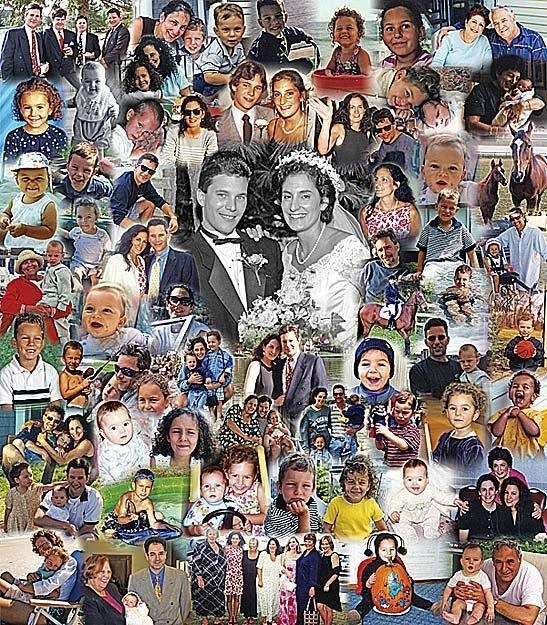
A collage photo is a digital image composed of multiple photos or images arranged together in a single frame. It’s a great way to tell a story, highlight a memory, or simply create something visually appealing.
Software Options For Creating a Collage Photo
If you’re looking for free software to create a collage photo on your computer, here are some options:
Shape Collage (Windows/Mac/Linux)
The first software option we’ll discuss is Shape Collage. This free program allows you to create a collage photo in just a few clicks. It’s compatible with Windows, Mac, and Linux operating systems.
To download Shape Collage, simply visit their website and click on the “Download” button. Follow the installation instructions, and you’ll be ready to start creating your collage photo.
Once installed, launch Shape Collage and select the photos you want to include in your collage. You can choose from various templates, shapes, and sizes to create a unique design.
To finalize your collage, click on the “Create” button, and Shape Collage will arrange the images for you. If you’re satisfied with the outcome, save the collage as an image file.
Collagerator (Windows/Mac)
Another excellent software option is Collagerator. This free program allows you to create a collage photo in just a few clicks, and it’s compatible with Windows and Mac operating systems.
To download Collagerator, visit their website and click on the “Download” button. Follow the installation instructions, and you’ll be ready to start creating your collage photo.
Once installed, launch Collagerator and select the photos you want to include in your collage. You can choose from various templates and shapes to create a unique design.
To finalize your collage, click on the “Export” button, and Collagerator will arrange the images for you. If you’re satisfied with the outcome, save the collage as an image file.
Online Services For Creating a Collage Photo
If you don’t want to download any software or prefer to create a collage photo online, here are some excellent options:
Canva
Canva is one of the most popular online services for creating a collage photo. This free platform offers a wide range of templates, shapes, and sizes to choose from.
To get started with Canva, visit their website and sign up for an account. Once you’re logged in, click on the “Create a design” button and select the “Collage” option.
Choose your template, add your photos, and customize the design to your liking. When you’re finished, save the collage as an image file or share it directly on social media.
Fotor
Another online service for creating a collage photo is Fotor. This free platform offers various templates, shapes, and sizes to choose from.
To get started with Fotor, visit their website and sign up for an account. Once you’re logged in, click on the “Create a design” button and select the “Collage” option.
Choose your template, add your photos, and customize the design to your liking. When you’re finished, save the collage as an image file or share it directly on social media.
Photopea
If you’re looking for another online service for creating a collage photo, consider Photopea. This free platform offers various templates, shapes, and sizes to choose from.
To get started with Photopea, visit their website and sign up for an account. Once you’re logged in, click on the “Create a design” button and select the “Collage” option.
Choose your template, add your photos, and customize the design to your liking. When you’re finished, save the collage as an image file or share it directly on social media.
Mobile Apps For Creating a Collage Photo
If you prefer to create a collage photo on your mobile device, here are some excellent options:
Pic Stitch (Android/iOS/iPadOS)
One of the most popular mobile apps for creating a collage photo is Pic Stitch. This free app allows you to create beautiful compositions of images, applying various styles.
To get started with Pic Stitch, download and install the app on your device. Once installed, launch the app and select the photos you want to include in your collage.
Choose from various templates, shapes, and sizes to create a unique design. To finalize your collage, tap on the “Save” button, and Pic Stitch will arrange the images for you.
Picsart (Android/iOS/iPadOS)
Another excellent mobile app for creating a collage photo is PicsArt. This free app offers various templates, shapes, and sizes to choose from.
To get started with PicsArt, download and install the app on your device. Once installed, launch the app and select the photos you want to include in your collage.
Choose from various filters, shapes, and sizes to create a unique design. To finalize your collage, tap on the “Save” button, and PicsArt will arrange the images for you.
Photo Collage Editor (Android)
If you’re looking for another mobile app for creating a collage photo, consider Photo Collage Editor. This free app is specifically designed for creating collages and is available for Android devices only.
To get started with Photo Collage Editor, download and install the app on your device. Once installed, launch the app and select the photos you want to include in your collage.
Choose from various templates, shapes, and sizes to create a unique design. To finalize your collage, tap on the “Save” button, and Photo Collage Editor will arrange the images for you.
Conclusion
Creating a collage photo is easier than ever with the numerous software options, online services, and mobile apps available. Whether you’re looking for free software or prefer to create a collage photo online or on your mobile device, there’s an option for everyone.
Remember to have fun and experiment with different templates, shapes, and sizes to create a unique design that reflects your personality.
Frequently Asked Questions
- What is the best software for creating a collage photo?
- The best software for creating a collage photo depends on your personal preferences. Shape Collage and Collagerator are excellent free options for Windows and Mac users.
- Can I create a collage photo online?
- Yes, you can create a collage photo online using services like Canva, Fotor, or Photopea.
- Are there any mobile apps for creating a collage photo?
- Yes, there are several mobile apps available for creating a collage photo, including Pic Stitch, PicsArt, and Photo Collage Editor.
References
- Shape Collage website
- Collagerator website
- Canva website
- Fotor website
- Photopea website
- Pic Stitch website
- PicsArt website
- Photo Collage Editor website


