
How to Control Your Iphone’s Imei Number: A Comprehensive Guide
Are you worried about your iPhone being stolen or blocked? Do you want to ensure that your device is safe and secure? In this article, we’ll show you how to control your iPhone’s IMEI number, a unique identifier that can be used to track down your device if it’s lost or stolen.
What is an Imei Number?
An IMEI (International Mobile Equipment Identity) number is a 15-digit code that identifies your iPhone and other cellular devices. It’s like a serial number for your phone, and it can be used to verify the device’s authenticity and prevent unauthorized use.
Why Should You Control Your Iphone’s Imei Number?
Controlling your iPhone’s IMEI number can provide an extra layer of security against theft or loss. If your device is stolen or lost, you can report the IMEI number to your carrier and law enforcement agencies, making it harder for the thief to sell or use the device.
How to Access Your Iphone’s Imei Number
There are several ways to access your iPhone’s IMEI number:
Method 1: Using Your Iphone
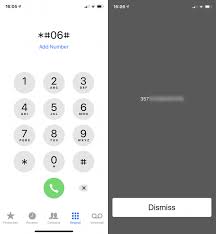
To find your iPhone’s IMEI number using your device, follow these steps:
- Go to the Home screen and tap on the “Phone” app.
- Tap on the “i” icon in the top-right corner of the screen.
- Scroll down to the “About” section.
- Look for the IMEI number listed under the “IMEI” or “MEID” label.
Method 2: Using Itunes And Finder
You can also find your iPhone’s IMEI number using iTunes or Finder on your computer:
- Connect your iPhone to your computer using a USB cable.
- Open iTunes (on Windows) or Finder (on Mac).
- Select your iPhone from the list of connected devices.
- Click on the “Summary” tab and look for the IMEI number listed under the “IMEI” or “MEID” label.
Method 3: Using Your ID Apple Account
You can also access your iPhone’s IMEI number by logging into your ID Apple account:
- Go to the Apple ID website and sign in with your Apple ID.
- Click on the “Devices” tab and select your iPhone from the list of connected devices.
- Look for the IMEI number listed under the device information.
How to Control Your Iphone’s Imei Number
Once you have accessed your iPhone’s IMEI number, you can control it by:
Reporting a Stolen or Lost Iphone
If your iPhone is stolen or lost, report the incident to your carrier and law enforcement agencies. Provide them with the IMEI number, and they will be able to track down your device.
Blocking Your Iphone Remotely
You can also block your iPhone remotely using the “Find My” app:
- Open the “Find My” app on another iOS device.
- Tap on the “Devices” tab and select your iPhone from the list of connected devices.
- Tap on the “Erase iPhone” button to erase all data on the device.
Other Ways to Control Your Iphone’s Imei Number
In addition to the methods mentioned above, you can also control your iPhone’s IMEI number by:
Using a Third-party App
There are several third-party apps available that allow you to track and locate your iPhone using its IMEI number. Some popular options include Find My iPhone and Prey.
Contacting Apple Support
If you’re experiencing issues with your iPhone or need help controlling its IMEI number, contact Apple support for assistance.
Conclusion
Controlling your iPhone’s IMEI number can provide an extra layer of security against theft or loss. By following the methods outlined in this article, you can access and control your device’s IMEI number, ensuring that it remains safe and secure.
Frequently Asked Questions (FAQs)
Q: What is an IMEI number?
A: An IMEI (International Mobile Equipment Identity) number is a 15-digit code that identifies your iPhone and other cellular devices.
Q: Why should I control my iPhone’s IMEI number?
A: Controlling your iPhone’s IMEI number can provide an extra layer of security against theft or loss. If your device is stolen or lost, you can report the IMEI number to your carrier and law enforcement agencies.
Q: How do I access my iPhone’s IMEI number?
A: You can access your iPhone’s IMEI number using your device, iTunes, Finder, or by logging into your ID Apple account.
Q: What happens if my iPhone is stolen or lost?
A: If your iPhone is stolen or lost, report the incident to your carrier and law enforcement agencies. Provide them with the IMEI number, and they will be able to track down your device.
Q: Can I block my iPhone remotely?
A: Yes, you can block your iPhone remotely using the “Find My” app.
Q: Are there any third-party apps that allow me to control my iPhone’s IMEI number?
A: Yes, there are several third-party apps available that allow you to track and locate your iPhone using its IMEI number.


