
How to Sign a Document Pdf: A Step-by-step Guide
Are you wondering how to sign a document PDF? Look no further! In this article, we will guide you through the process of signing a PDF document using various methods.
Why is Electronic Signature Important?
In today’s digital age, electronic signatures have become an essential part of our daily lives. They allow us to sign documents digitally, making it easier and more convenient for people to access and manage their documents. However, it’s essential to understand that not all electronic signatures are created equal.
Types of Electronic Signatures
There are three types of electronic signatures:
- Simple Electronic Signature: This type of signature is a basic graphic representation of the signatory’s name or initials.
- Advanced Electronic Signature: This type of signature is more complex and is created using specific software. It has full legal validity, except for immovable contracts.
- Qualified Electronic Signature or Digital Signature: This type of signature is the most advanced and is created using a specific kit of signature in sale by entities certifiers acknowledged.
How to Sign a Document Pdf With Digital Signature
To sign a document PDF with digital signature, you need to acquire a suitable kit from a provider. One such service is Aruba, which offers two types of kits: The classic physical signature kit and the digital signature kit.
For example, if you want to sign a document PDF on your computer using Windows, you can use the software called ArubaSign. You can also use it on your smartphone or tablet by downloading the respective application.
How to Sign a Document Pdf For Free
If you don’t want to spend money on software, you can still sign a document PDF for free. One such method is using Adobe Reader DC. This software allows you to add an electronic signature to a PDF document.
To do this, download and install the software on your computer. Then, open the PDF document in Adobe Reader DC and click on the “Fill & Sign” tool. Choose the type of signature you want to use (e.G., Handwritten or typed) and follow the prompts to add your signature to the document.
How to Sign a Document Pdf With Mac
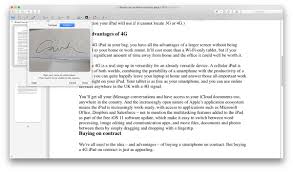
If you’re using a Mac, you can sign a document PDF without installing any software. Simply open the PDF document in Preview, which is the default application for viewing and editing images and documents on a Mac.
To sign a document PDF, click on the “Tools” menu and select “Sign”. Choose the type of signature you want to use (e.G., Handwritten or typed) and follow the prompts to add your signature to the document.
How to Sign a Document Pdf Online
If you don’t have access to a computer or prefer not to install software, you can sign a document PDF online using various services. One such service is PDFCandy.
To use this service, upload your PDF document and select the “Add Signature” tool. You can then add your signature by typing it, drawing it with your mouse or touchpad, or uploading an image of your signature. Once you’ve added your signature, save the modified PDF document.
Other Solutions to Sign a Document Pdf Online
If you’re looking for other solutions to sign a document PDF online, consider the following services:
- ILovePDF: This service allows you to edit and manage PDF documents, including adding electronic signatures.
- Sejda: This service offers various tools to edit and manage PDF documents, including adding electronic signatures.
- PDF24: This service also allows you to add electronic signatures to your PDF documents.
How to Sign a Document Pdf With Android
If you’re using an Android device, you can sign a document PDF using the Adobe Fill & Sign app. To do this:
- Download and install the app from the Google Play Store.
- Open the app and select the “Create Signature” tool.
- Type or draw your signature as desired.
- Select the document you want to sign and add your signature.
How to Sign a Document Pdf With Iphone And Ipad
If you’re using an iOS device, you can sign a document PDF using the Adobe Fill & Sign app. To do this:
- Download and install the app from the App Store.
- Open the app and select the “Create Signature” tool.
- Type or draw your signature as desired.
- Select the document you want to sign and add your signature.
Conclusion
Signing a document PDF has become an essential part of our daily lives. With various methods available, including digital signatures, Adobe Reader DC, Mac’s Preview app, online services like PDFCandy, iLovePDF, Sejda, and PDF24, and mobile apps for Android and iOS devices, you can easily sign a document PDF without breaking the bank.
Frequently Asked Questions (FAQs)
- Q: What is an electronic signature?
- A: An electronic signature is a digital representation of a person’s name or initials that is used to authenticate documents.
- Q: How do I sign a document PDF with digital signature?
- A: To sign a document PDF with digital signature, you need to acquire a suitable kit from a provider and follow the instructions provided.
- Q: Can I sign a document PDF for free?
- A: Yes, you can sign a document PDF for free using services like Adobe Reader DC or online services like PDFCandy.
- Q: How do I sign a document PDF on my Android device?
- A: You can use the Adobe Fill & Sign app to sign a document PDF on your Android device.
- Q: How do I sign a document PDF on my iPhone or iPad?
- A: You can use the Adobe Fill & Sign app to sign a document PDF on your iOS device.
References
- Aruba
- Adobe Reader DC
- Mac’s Preview app
- PDFCandy
- ILovePDF
- Sejda
- PDF24


