
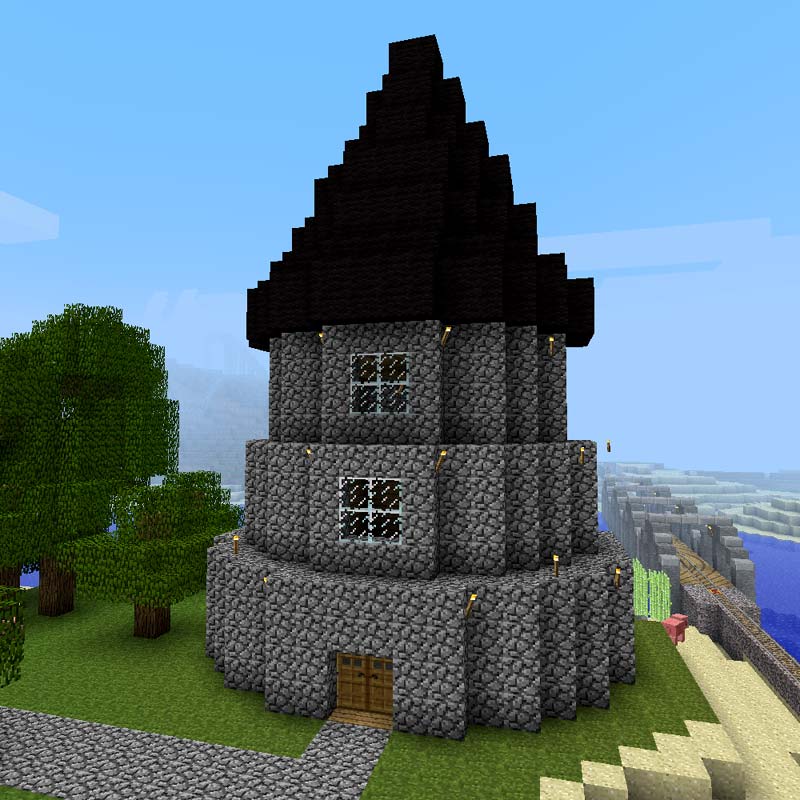
How to Build a Tower on Minecraft: A Step-by-step Guide
Are you ready to build your dream tower on Minecraft? With this comprehensive guide, you’ll learn how to construct a medieval-style tower that will be the envy of all your fellow players.
Getting Started
Before we dive into the details, let’s take a look at what you’ll need to get started. Building a tower on Minecraft requires some essential materials, which we’ll cover in the next section.
Materials Needed
To build a medieval-style tower, you’ll need the following materials:
- Trunks of fir
- Diorite blocks
- Oak logs
- Fir planks
- Acacia logs
- Petrified wood
- Red mushroom blocks
Don’t worry if you’re not sure what these materials look like – we’ll explain each one in detail below.
Step 1: Prepare The Site
Before you start building, make sure you’ve got a clear space to work with. If your Minecraft world is cluttered with trees and other obstacles, it’s time to clean up.
Step 2: Gather Your Materials
Head out into the wilderness (or use the Creative mode) and gather all the materials listed above. You’ll need a good amount of each type, so make sure you’ve got enough space to store them.
How to Build a Tower on Minecraft: A Step-by-step Guide
Now that we’ve covered the basics, let’s get started with the tower itself!
Medieval-style Tower Tutorial
Here’s a step-by-step guide to building a medieval-style tower:
- Start by placing 9 trunks of fir in a circular shape, leaving two blocks free on either side and top.
- Next, place a high column of 10 trunks of fir in the center.
- Place a square base made up of diorite blocks to create an intermediate floor.
- Add a floor using oak logs and break the terrain block underneath.
- Extend all the blocks around you, reaching up to the height of 10 blocks from the central column.
- Alternate the trunks of fir around the tower to create a unique design.
- Fill in any gaps with acacia logs.
- Use petrified wood to surround the top of the tower and add some flair.
Step 5: Add Finishing Touches
Now that your tower is taking shape, it’s time to add some finishing touches!
- Place a “ring” around the base using blocks of petrified wood.
- Create an arch at the top of the tower for added visual appeal.
- Use red mushroom blocks to create a flag or other decorative element.
Step 6: Add Some Personal Touches
While our medieval-style tower is complete, you might want to add some personal touches to make it truly unique. Here are a few ideas:
- Create internal staircases for added functionality.
- Build a moat around the tower to create a defensive barrier.
- Use different materials or colors to create a personalized design.
Step 7: Show Off Your Masterpiece
Once you’ve finished building your tower, show it off to the world!
- Share screenshots on social media or Minecraft forums.
- Create a YouTube video showcasing your build skills.
- Host a Minecraft party and invite friends over to admire your creation.
How to Build a Tower of The Clock on Minecraft
If you’re looking for an even more unique challenge, try building a tower of the clock!
Step 1: Download a Schematic File
To build a tower of the clock, you’ll need a schematic file. You can download one from the PlanetMinecraft website.
- Search for “Steampunk Clock Tower” or similar keywords.
- Choose a version compatible with your Minecraft edition and platform.
Step 2: Install Worldedit Mod
To use the schematic file, you’ll need to install the WorldEdit mod. This will allow you to load and edit the file within Minecraft.
- Visit the CurseForge website and download the latest version of WorldEdit.
- Follow the installation instructions to add the mod to your Minecraft game.
Step 3: Load The Schematic File
Once you’ve installed the WorldEdit mod, it’s time to load the schematic file!
- Open Minecraft in Creative mode.
- Press the ‘T’ key and type “/schematic load Tower” (or whatever name you saved the file as).
- Hit enter and watch as your tower of the clock appears before your very eyes!
Conclusion
Building a tower on Minecraft is an exciting challenge that requires creativity, patience, and practice. Whether you’re building a medieval-style tower or a tower of the clock, remember to have fun and be creative.
Don’t forget to show off your masterpiece to the world by sharing screenshots or creating a YouTube video. Happy building!
Faqs
Here are some frequently asked questions about building towers on Minecraft:
- Q: What materials do I need to build a medieval-style tower?
A: You’ll need trunks of fir, diorite blocks, oak logs, fir planks, acacia logs, petrified wood, and red mushroom blocks. - Q: How do I download a schematic file for the tower of the clock?
A: Visit the PlanetMinecraft website and search for “Steampunk Clock Tower” or similar keywords. Choose a version compatible with your Minecraft edition and platform. - Q: Can I use this guide to build other types of towers?
A: Absolutely! While this guide focuses on medieval-style towers, you can adapt the techniques to create any type of tower you like.
I hope this guide has been helpful in showing you how to build a tower on Minecraft. Don’t hesitate to reach out if you have any further questions or need additional guidance. Happy building!


