
How to Use OK Google: A Comprehensive Guide
Are you tired of typing away on your phone or computer? Do you want to make things easier and more convenient? Look no further than OK Google! This powerful tool allows you to use voice commands to perform a wide range of tasks, from simple searches to complex calculations. In this article, we’ll show you how to use OK Google on various devices, including Android smartphones, iPhones, and PCs.
What is OK Google?
OK Google, also known as Hey Google, is a virtual assistant developed by Google. It’s designed to make your life easier by allowing you to perform tasks with just your voice. With OK Google, you can search the web, send messages, make calls, set reminders, and more.
Requirements For Using OK Google
Before you can use OK Google, you’ll need to meet certain requirements. Here are the minimum specs:
- Android device: Android 5.0 (Lollipop) or higher
- Storage space: At least 1 GB of available storage space
- Google app: Updated to version 6.13 Or higher
- Google Play Services installed
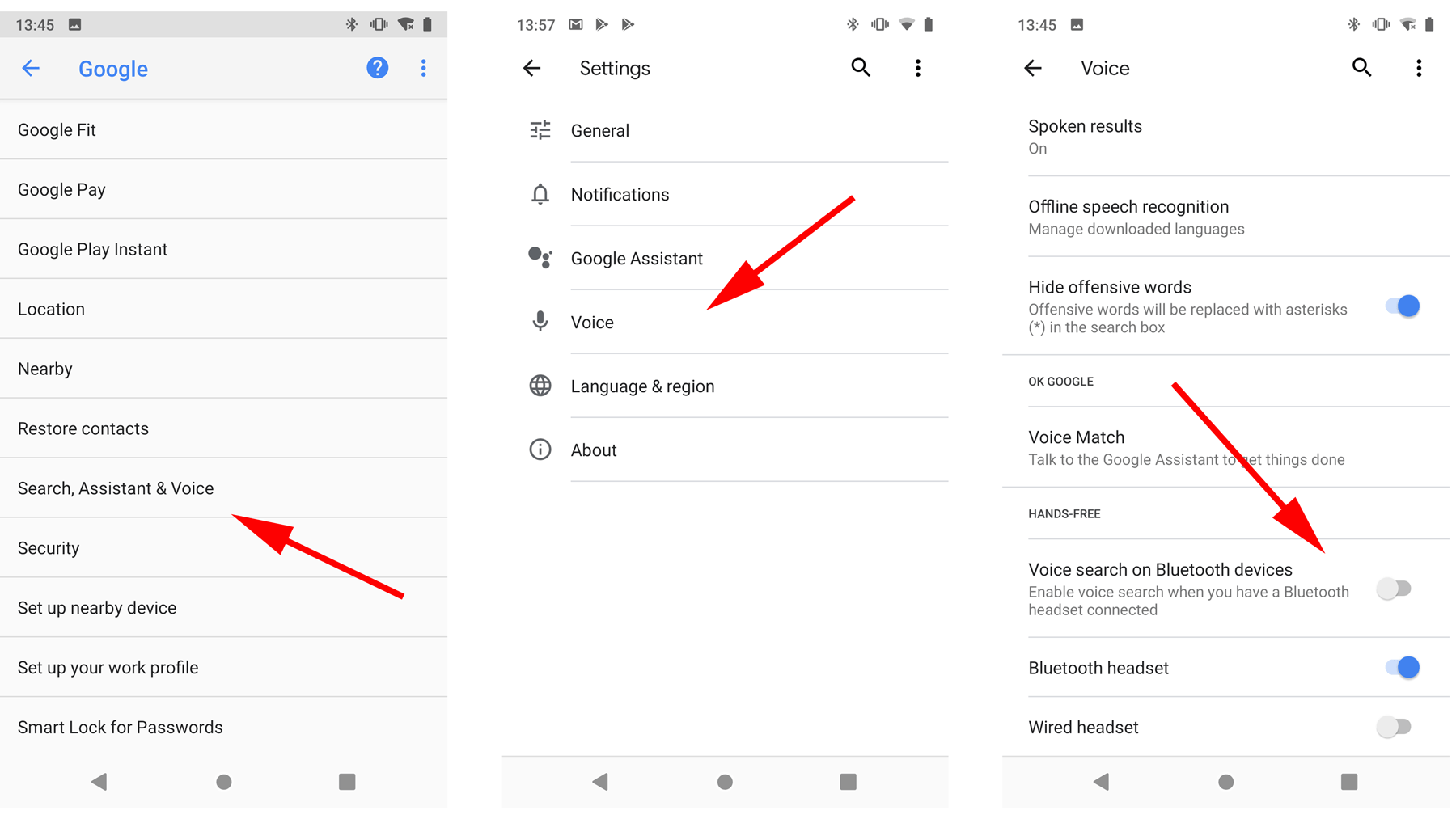
How to Use OK Google on Android
Using OK Google on Android is a breeze. Here’s how:
- Open the Google app and tap on the icon (the “G” logo)
- Tap on the three horizontal lines in the top left corner and select Settings
- Scroll down to Voice & Search and tap on it
- Select Voice Match and toggle ON the button beside Hey Google
- Pronounce three times the phrase “OK Google” followed by “Hey Google”
- You’ll hear a confirmation message, and OK Google will be active
How to Use OK Google on Iphone
Using OK Google on iPhone is similar to using it on Android, but with some additional steps:
- Download and install the Google app from the App Store
- Open the Google app and tap on the icon (the “G” logo)
- Tap on the three horizontal lines in the top left corner and select Settings
- Scroll down to Voice & Search and tap on it
- Select Hotword and toggle ON the button beside Hey Google
- You’ll hear a confirmation message, and OK Google will be active
How to Use OK Google With Phone Turned Off
To use OK Google even when your phone is turned off, follow these steps:
- Ensure that your device meets the requirements for using OK Google (above)
- Open the settings app and go to Voice & Search
- Select Research, Assistant, and vocal functions
- Scroll down to Assistant Google and select it
- Tap on Enable assistant while screen off
How to Use OK Google on PC
Using OK Google on your computer is a bit different from using it on mobile devices:
- Ensure that you have Google Chrome installed and updated
- Open Google Chrome and go to the leading page of the engine of search
- Click on the microphone icon and select Consent
- Pronounce the terms of your enquiry (e.G., “How to use OK Google vocal”)
- You’ll hear a response, and OK Google will be active
Using OK Google: Tips And Tricks
Now that you know how to use OK Google, here are some tips and tricks to get the most out of it:
- Use voice commands like “Ok Google” or “Hey Google” to activate the assistant
- Ask for information on the weather, traffic, or news
- Send messages or make calls using voice commands
- Set reminders or alarms with voice commands
- Perform calculations or conversions with voice commands
Conclusion
OK Google is an incredibly powerful tool that can simplify your life and make things more convenient. With this guide, you should be able to use OK Google on various devices, including Android smartphones, iPhones, and PCs. Remember to follow the requirements for using OK Google and take advantage of its many features and capabilities.
Frequently Asked Questions
- What is OK Google?
OK Google is a virtual assistant developed by Google that allows you to perform tasks with just your voice. - How do I Use OK Google on Android?
To use OK Google on Android, open the Google app, tap on Settings, select Voice & Search, and toggle ON the button beside Hey Google. - How do I Use OK Google on Iphone?
To use OK Google on iPhone, download and install the Google app, open it, and follow the same steps as for Android. - Can I Use OK Google Even When my Phone is Turned Off?
Yes, but only if your device meets the requirements for using OK Google. - How do I Use OK Google on Pc?
To use OK Google on PC, open Google Chrome, go to the leading page of the engine of search, and click on the microphone icon. - What Can I do With OK Google?
You can perform a wide range of tasks with OK Google, including searching the web, sending messages, making calls, setting reminders, and more. - How do I Activate OK Google?
To activate OK Google, say “Ok Google” or “Hey Google” out loud. - Can I Customize OK Google to my Preferences?
Yes, you can adjust settings for voice commands, language, and more in the OK Google app.


