
How to Capsize Your Account on Clash of Clans: A Step-by-step Guide
Are you tired of playing Clash of Clans with a limited account? Do you want to start fresh with a new village, but don’t know how to capsize your old account? Look no further! In this article, we’ll guide you through the process of capsizing your account on Clash of Clans, whether you’re using an Android device or an iOS/iPadOS device.
Why Capsize Your Account?
Before we dive into the steps, let’s talk about why you might want to capsize your account. Perhaps you’ve reached a plateau and need to start fresh with new upgrades and strategies. Maybe you’re tired of playing with the same old village and want to try out a new one. Whatever the reason, capsizing your account is a great way to breathe new life into your Clash of Clans experience.
Capsize Your Account on Android
If you’re using an Android device, here’s how to capsize your account:
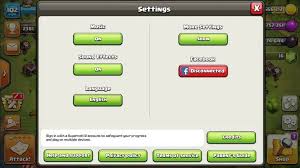
- Disconnect From Google Play Gamings: First, make sure you’ve disconnected from Google Play Gamings by going to the settings menu and tapping on “Connected under Google Play.” Tap on the “Disconnected” button to complete the process.
- Connect a New Account: Now it’s time to connect a new account to your Clash of Clans game. You can use Facebook or SuperCell ID as an alternative to Google Play Gamings. If you want to connect another Google Play Gamings account, follow these instructions:
- Tap on the gear icon in the top-right corner of the screen.
- Tap on “Connected under Google Play.”
- Tap on the “Disconnected” button.
- Tap on “Connect Another Account.” You can choose to use Facebook or SuperCell ID as your new account.
- Access Your New Village: Once you’ve connected a new account, tap on the “OK” button to confirm and access your new village.
Capsize Your Account on Ios/ipados
If you’re using an iOS/iPadOS device, here’s how to capsize your account:
- Disconnect From Game Center: First, make sure you’ve disconnected from Game Center by going to the settings menu and tapping on “Game Center.” Tap on the toggle switch to disable Game Center.
- Connect a New Account: Now it’s time to connect a new account to your Clash of Clans game. You can use Facebook or SuperCell ID as an alternative to Game Center. If you want to connect another Game Center account, follow these instructions:
- Go to the settings menu and tap on “Game Center.”
- Tap on the toggle switch to enable Game Center.
- Tap on “Connect Another Account.” You can choose to use Facebook or SuperCell ID as your new account.
- Access Your New Village: Once you’ve connected a new account, tap on the “OK” button to confirm and access your new village.
Capsize Your Account With Supercell ID
If you’re using SuperCell ID to play Clash of Clans, here’s how to capsize your account:
- Disconnect From Supercell ID: First, make sure you’ve disconnected from SuperCell ID by going to the settings menu and tapping on “SuperCell ID.” Tap on the toggle switch to disable SuperCell ID.
- Connect a New Account: Now it’s time to connect a new account to your Clash of Clans game. You can use Facebook or Game Center as an alternative to SuperCell ID. If you want to connect another SuperCell ID, follow these instructions:
- Tap on the gear icon in the top-right corner of the screen.
- Tap on “SuperCell ID.”
- Tap on the toggle switch to enable SuperCell ID.
- Tap on “Connect Another Account.” You can choose to use Facebook or Game Center as your new account.
- Access Your New Village: Once you’ve connected a new account, tap on the “OK” button to confirm and access your new village.
Conclusion
Capsizing your account on Clash of Clans is a simple process that can help you start fresh with a new village. Whether you’re using an Android device or an iOS/iPadOS device, we hope this guide has been helpful in walking you through the steps. Remember to always disconnect from any accounts before connecting a new one to avoid losing your progress.
Frequently Asked Questions
- What is Capsizing my Account on Clash of Clans?
Capsizing your account means starting fresh with a new village and disconnecting from any previous accounts. - Why do I Need to Capsize my Account?
You may want to capsize your account if you’ve reached a plateau or are tired of playing with the same old village. - How do I Disconnect From Google Play Gamings on Android?
To disconnect from Google Play Gamings, go to the settings menu and tap on “Connected under Google Play.” Tap on the “Disconnected” button to complete the process. - How do I Connect a New Account on Ios/ipados?
To connect a new account, go to the settings menu and tap on “Game Center.” Tap on the toggle switch to enable Game Center, then tap on “Connect Another Account.” - Can I Use Supercell ID to Capsize my Account?
Yes, you can use SuperCell ID to capsize your account by disconnecting from it first, then connecting a new account.
We hope this guide has been helpful in answering any questions you may have had about capsizing your account on Clash of Clans!


