
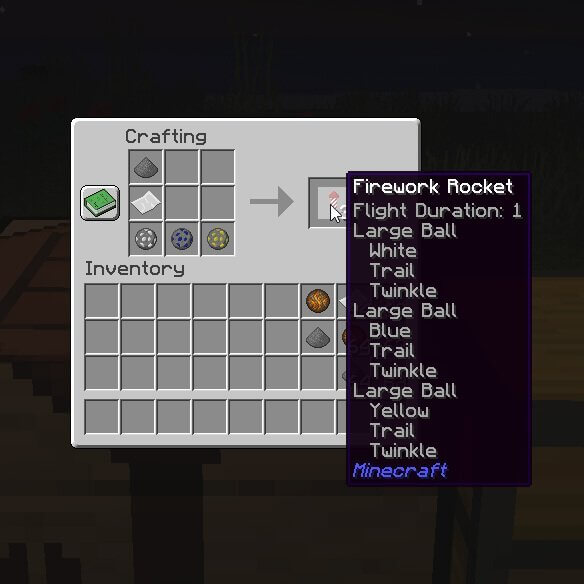
How to Create Fireworks And Rockets in Minecraft: A Step-by-step Guide
Are you ready to add some excitement to your Minecraft experience? Look no further! In this article, we’ll show you how to create fireworks and rockets in the game.
Understanding The Basics
Before we dive into the details, it’s essential to understand the basics of creating fireworks and rockets in Minecraft. You’ll need to gather specific materials and craft them using a crafting table. Don’t worry; we’ll guide you through each step.
Materials Needed
To create fireworks and rockets, you’ll need the following materials:
- Gunpowder (can be found in chests or crafted from sugar, water, and other ingredients)
- Colorants (such as dyes, which can be found in various colors)
Crafting Fireworks
To craft fireworks, follow these steps:
- Open your crafting table.
- Place a gunpowder block in the top-left square of the grid.
- Add a colorant block to the bottom-right square of the grid.
- Drag the resulting item to your inventory.
That’s it! You’ve now created a basic firework. You can customize it by adding more colorants or experimenting with different combinations.
Crafting Rockets
To craft rockets, follow these steps:
- Open your crafting table.
- Place a gunpowder block in the top-left square of the grid.
- Add a stick to the bottom-right square of the grid.
- Drag the resulting item to your inventory.
You now have a basic rocket. You can customize it by adding more colorants or experimenting with different combinations.
Using Fireworks And Rockets
To use fireworks and rockets, follow these steps:
- Open your crafting table.
- Place a firework block in your hand.
- Right-click on an empty space to launch the firework.
- Watch as it explodes into a colorful display!
Similarly, to use rockets:
- Open your crafting table.
- Place a rocket block in your hand.
- Right-click on an empty space to launch the rocket.
- Watch as it soars through the air and explodes!
Modding Your Game
If you want more advanced fireworks and rockets, consider using mods. Mods can add new features, effects, and capabilities to your game.
Minecraft Bedrock Edition
The steps for creating fireworks and rockets in Minecraft Bedrock Edition are similar to those in Java Edition. You’ll need to gather the same materials and follow the same crafting recipes.
However, be aware that mods may not work as seamlessly in Bedrock Edition as they do in Java Edition.
Conclusion
Creating fireworks and rockets in Minecraft is a fun and creative way to add excitement to your game. By following these steps, you can craft basic fireworks and rockets and experiment with different combinations. Remember to consider using mods if you want more advanced features and capabilities. Happy crafting!
Faqs
- Q: What Materials do I Need to Create Fireworks And Rockets?
A: You’ll need gunpowder and colorants (such as dyes). - Q: How do I Craft Fireworks And Rockets?
A: Follow the steps outlined in this article. - Q: Can I Customize my Fireworks And Rockets?
A: Yes! You can experiment with different combinations of materials to create unique effects. - Q: Are Mods Available For Minecraft Bedrock Edition?
A: Yes, but they may not work as seamlessly as they do in Java Edition. - Q: How do I Use my Fireworks And Rockets?
A: Simply right-click on an empty space to launch them! - Q: Can I Create More Advanced Fireworks And Rockets Using Mods?
A: Yes! Mods can add new features, effects, and capabilities to your game. - Q: What Are The Differences Between Creating Fireworks And Rockets in Minecraft Java Edition And Bedrock Edition?
A: The crafting recipes and materials required are similar, but mods may not work as seamlessly in Bedrock Edition. - Q: Can I Share my Custom Fireworks And Rockets With Friends?
A: Yes! Share your creations with fellow Minecraft enthusiasts and enjoy the excitement together!


