
How to Find Your Sim Serial Number: A Step-by-step Guide
Are you tired of searching for your SIM serial number? Do you want to know how to find it on different devices, operating systems, and platforms? Look no further! In this article, we will guide you through the process of finding your SIM serial number on various devices and platforms.
What is a Sim Serial Number?
A SIM (Subscriber Identity Module) serial number, also known as an ICCID (Integrated Circuit Card ID), is a unique 19-digit code that identifies your SIM card. It’s essential to know this number for various reasons, such as switching phone operators, reporting lost or stolen phones, and more.
Finding Your Sim Serial Number on Android Devices
If you have an Android device, finding your SIM serial number is relatively easy. Here’s how:
- Go to your device’s Settings app.
- Scroll down and select About Phone (or About Device).
- Tap on Status or Sim Status.
- Look for the Iccid section, which will display your SIM serial number.
Finding Your Sim Serial Number on Samsung Devices
Unfortunately, Samsung devices do not display the SIM serial number in their settings app. However, you can find it by:
- Extracting the SIM card from your device.
- Looking at the SIM card itself for the printed ICCID code.
Some phone operators may also have an app that allows you to check your SIM serial number.
Finding Your Sim Serial Number on Xiaomi Devices
Xiaomi devices make it easy to find your SIM serial number:
- Go to your device’s Settings app.
- Scroll down and select About Phone (or About Device).
- Tap on Info System > State.
- Look for the Iccid section, which will display your SIM serial number.
Finding Your Sim Serial Number on Huawei Devices
Huawei devices do not display the SIM serial number in their settings app. However, you can find it by:
- Extracting the SIM card from your device.
- Looking at the SIM card itself for the printed ICCID code.
Some phone operators may also have an app that allows you to check your SIM serial number.
Finding Your Sim Serial Number on Iphone Devices
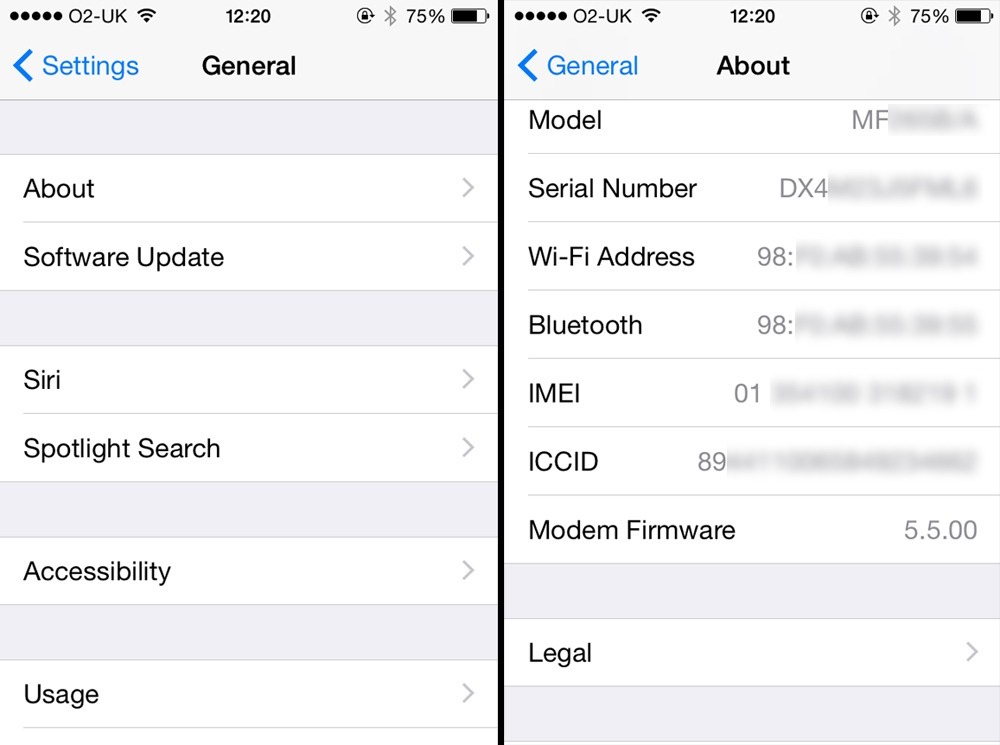
If you’re using an iPhone (or iPad with cellular support), finding your SIM serial number is straightforward:
- Go to your device’s Settings app.
- Tap on General.
- Select About.
- Look for the Iccid section, which will display your SIM serial number.
Alternatively, you can use iTunes or Finder (on macOS) to find your SIM serial number:
- Connect your iPhone to your computer using a USB cable.
- Open iTunes or Finder.
- Select your device from the top-left menu.
- Look for the Iccid section, which will display your SIM serial number.
Finding Your Sim Serial Number Without a Phone
If you don’t have access to your phone or tablet, you can still find your SIM serial number:
- Extract the SIM card from your device (if it’s removable).
- Look at the SIM card itself for the printed ICCID code.
- Check your phone operator’s website or app for any available information.
Conclusion
Finding your SIM serial number is a relatively simple process, depending on your device and operating system. We hope this guide has helped you locate your SIM serial number on various devices and platforms. Remember to keep your SIM serial number handy for future reference!


