
How to Cancel a Shein Order: A Step-by-step Guide
Are you wondering how to cancel a SHEIN order? Look no further! In this article, we’ll walk you through the process of cancelling an order on SHEIN, whether you’re using their mobile app or computer.
Why Cancel a Shein Order?
Before we dive into the steps, let’s talk about why you might want to cancel a SHEIN order. Maybe you’ve changed your mind about a particular item, or perhaps you’ve received a notification that an item is out of stock. Whatever the reason, cancelling an order on SHEIN can be done easily and quickly.
Canceling a Shein Order on Mobile
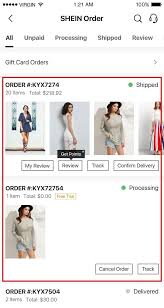
If you’re using the SHEIN mobile app, cancelling an order is a straightforward process. Here’s how to do it:
- Open The Shein App: First, open the SHEIN app on your mobile device.
- Log In: Log in to your SHEIN account by entering your username and password.
- Go to My Orders: Tap on the “My Orders” tab at the bottom of the screen.
- Find The Order You Want to Cancel: Scroll through your orders until you find the one you want to cancel.
- Tap on The Order: Tap on the order you want to cancel.
- Select The Command Option: Select the “Command” option from the menu.
- Choose Erase The Article: Choose the “Erase the Article” option.
- Confirm Your Choice: Confirm your choice by tapping on the “Yes” button.
Canceling a Shein Order on Computer
If you’re using a computer to shop on SHEIN, cancelling an order is also easy. Here’s how to do it:
- Log In to Your Account: First, log in to your SHEIN account by entering your username and password.
- Go to My Commands: Click on the “My Commands” tab at the top of the page.
- Find The Order You Want to Cancel: Scroll through your orders until you find the one you want to cancel.
- Click on The Order: Click on the order you want to cancel.
- Select The Command Option: Select the “Command” option from the menu.
- Choose Erase The Article: Choose the “Erase the Article” option.
- Confirm Your Choice: Confirm your choice by clicking on the “Yes” button.
Getting a Refund
After you’ve cancelled an order, you might be wondering how to get a refund. Here’s what you need to know:
- If you choose to cancel an order and receive a refund, the refund will be credited back to your SHEIN portfolio within 24 hours.
- If you prefer to have the refund sent directly to your bank account, this option is also available.
Tips For Cancelling a Shein Order
Here are some additional tips to keep in mind when cancelling an order on SHEIN:
- Only Cancel Orders That Have Not Been Shipped: You can only cancel orders that have not been shipped yet. If an order has already been dispatched, you’ll need to contact customer service.
- Make Sure to Choose The Correct Reason For Cancellation: When choosing a reason for cancellation, make sure to select the correct one. This will help SHEIN understand why you’re cancelling the order.
Troubleshooting Common Issues
If you encounter any issues while trying to cancel an order on SHEIN, here are some troubleshooting tips:
- Try Refreshing The Page: If you’re having trouble accessing your orders or cancelling an order, try refreshing the page.
- Contact Customer Service: If you’re still experiencing issues after trying these steps, contact customer service for assistance.
Conclusion
Cancelling a SHEIN order is a straightforward process that can be completed quickly and easily. Whether you’re using the mobile app or computer, just follow the steps outlined above to cancel your order and get a refund if needed. Happy shopping!


