
Creating a Server Deprived on Roblox: A Step-by-step Guide
If your dream is to create a video game or play personalized experiences with minimum details, you’ve likely delved into the platform Roblox that provides its users with a powerful instrument, called Roblox Studio, to create original video game experiences.
Understanding The Concept of Server Deprived on Roblox
If, however, you’re here and reading this tutorial because you’d like to play with your friends in a room on Roblox that goes beyond those classic and somewhat unappealing situations, then we’re here to help. We’ll guide you through creating a server deprived on Roblox, a feature that lets you start fresh with new friends inside a private game world.
Why Create a Server Deprived on Roblox?
You might wonder why someone would want to create such a scenario. The reason is simple: Sometimes online communities can include characters that aren’t exactly nice, and starting fresh with your closest friends sounds like an appealing option. This way, you get to enjoy gaming without any external distractions or unwanted interactions.
How to Create a Server Deprived on Roblox
To create such a server deprived on Roblox, follow these steps carefully:
- Check Compatibility: Before proceeding, ensure that the game you’re interested in supports this feature. Not all games on Roblox have the option for a server deprived mode.
- Choose Your Game: Select a game that is compatible with the server deprived mode. For example, Adopt Me, Super Striker League, and Piggy are popular titles that allow for private rooms without requiring a payment.
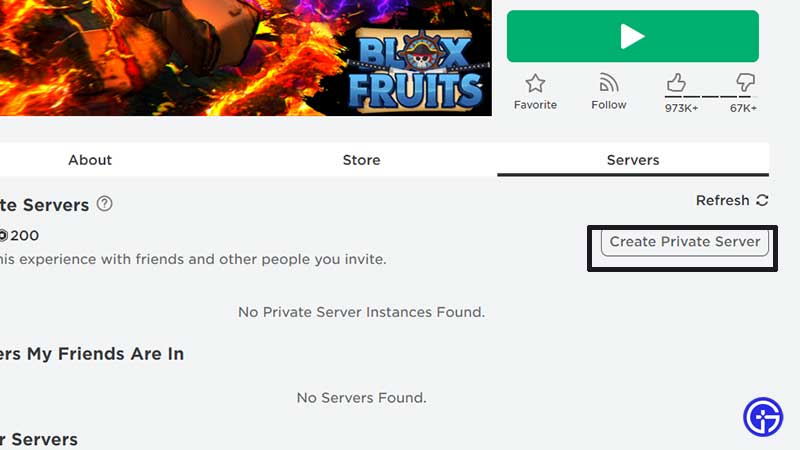
- Access Server Settings: Log in to Roblox, navigate to the page of your chosen game, and click on the “Server” tab. If you see the “Create Server Deprived” button, proceed with creating your server deprived.
- Configure Your Server: Once you’ve clicked on “Create Server Deprived,” follow the instructions that appear. This includes giving a name to your server, setting up permissions (if required), and configuring any other settings as needed.
- Invite Friends: After your server has been set up, use the link provided or share it with friends you wish to invite.
Important Reminders
- Roblox’s Official Policy on Server Deprived: Keep in mind that creating a server deprived can sometimes be limited by game-specific settings. Not all games will allow for this feature.
- Safety First: Be cautious when clicking links from strangers, as they might lead to unauthorized access or malicious content.
Is Creating a Server Deprived on Roblox Free?
The good news is that some games on Roblox offer the server deprived mode for free. However, others might require a payment in Robux, the game’s currency. Be cautious of any sites claiming to offer free Robux as this could be misleading or even malicious.
Conclusion
Creating a server deprived on Roblox can provide an enjoyable gaming experience with your friends without external distractions. Always check compatibility and follow official instructions for setting up such a server. Remember that safety is paramount, especially when interacting with online communities or sharing links with others.
Frequently Asked Questions (FAQs)
- Q: Is Creating a Server Deprived on Roblox Free?
A: It depends on the game you choose. Some games allow for a server deprived mode without payment, while others may require a subscription. - Q: How do I Check if my Chosen Game Supports Server Deprived Mode?
A: Go to the game’s page in Roblox and click on the “Server” tab. If it says this experience does not support server deprived, then that game doesn’t allow for private rooms. - Q: Can I Invite Friends From Outside Roblox?
A: Yes, but ensure you share the correct link provided by the platform to avoid security risks. - Q: What Happens if Someone Tries to Join my Server Without Permission?
A: Always ensure that your game is set up to require permissions or follow official guides for setting up private servers on Roblox.
Sources And References
For more detailed information, visit www.Roblox.Com and explore the “Server” section of your preferred game.


