
Recovering Deleted Photos: A Comprehensive Guide
Are you among the countless individuals who have accidentally deleted photos from their devices? Losing cherished memories can be disheartening, but fortunately, there are solutions to recover them.
In this article, we will delve into the world of photo recovery software, providing an in-depth look at the top programs for recovering deleted photos on both PC and mobile devices. Whether you’re using a Windows, macOS, or Android/iOS device, we’ve got you covered.
Understanding Photo Recovery
Before diving into the software, it’s essential to grasp how photo recovery works. When you delete a file from your device, it doesn’t actually disappear; instead, the operating system marks the space on the hard drive as available for new data. If no new files are written over the deleted one within a certain time frame (typically several hours or days), the original file remains intact.
This is where photo recovery software comes in – they can scan your device’s storage and recover the deleted files, including photos.
Top Programs For Photo Recovery on PC
1. Photorec (Windows/macOS/Linux)
PhotoRec is a free, open-source program that supports all major operating systems, including Windows, macOS, and Linux. Its user-friendly interface makes it accessible to users of all skill levels.
To recover deleted photos using PhotoRec:
- Download the software from their official website
- Follow the installation instructions for your operating system
- Launch PhotoRec and select the drive or partition where you lost your photos
- Choose the file format (e.G., JPEG, PNG) and click on “Search”
- Select the recovered files and choose a destination folder to save them
2. Disk Drill (Windows/macOS)
Disk Drill is another popular photo recovery software available for Windows and macOS devices. It offers an easy-to-use interface and supports various file formats.
To recover deleted photos using Disk Drill:
- Download and install the software from their official website
- Launch Disk Drill and select the drive or partition where your photos were lost
- Choose the desired file format and click on “Scan”
- Select the recovered files and choose a destination folder to save them
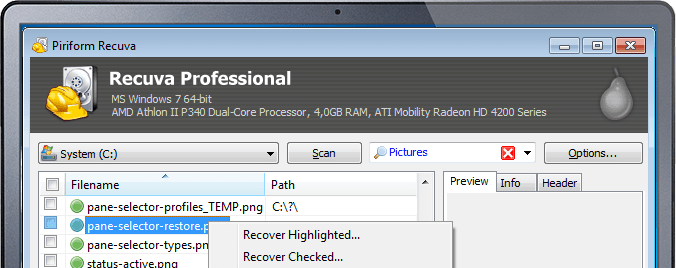
3. Recuva (Windows)
Recuva is a user-friendly photo recovery software specifically designed for Windows devices. It supports various file formats, including JPEG and PNG.
To recover deleted photos using Recuva:
- Download and install the software from their official website
- Launch Recuva and select the drive or partition where your photos were lost
- Choose the desired file format and click on “Scan”
- Select the recovered files and choose a destination folder to save them
Mobile Devices: Photo Recovery For Android And Iphone
For Android:
Google Photos (pre-installed) offers an automatic backup feature, saving deleted photos for up to 60 days. To recover deleted photos using Google Photos:
- Open Google Photos
- Tap on the “Trash” icon at the bottom of the screen
- Select the desired photo and tap on “Restore”
- The recovered photo will be saved back to its original location
If you’re not using Google Photos, there are specialized recovery apps available for Android devices.
For Iphone:
Apple’s built-in Photos app has an automatic album called “Recently Deleted,” where deleted photos are stored for 30 days. To recover deleted photos on an iPhone:
- Open the Photos app
- Tap on “Albums” and then select “Recently Deleted”
- Choose the desired photo and tap on “Edit”
- Select the option to restore the photo
If you’ve exceeded the 30-day time frame, there are third-party recovery apps available for iOS devices.
Conclusion:
Losing cherished memories can be distressing, but with these top-notch photo recovery software options, you can breathe a sigh of relief. Whether it’s PhotoRec, Disk Drill, Recuva, or mobile app-based solutions like Google Photos (for Android) and the built-in Photos app on iPhones, there are plenty of resources to recover deleted photos.
Frequently Asked Questions:
-
Can I Recover Photos That Have Been Permanently Deleted?
Unfortunately, not always. Photo recovery software can only recover files that were deleted within a certain time frame before new data was written over the original file. If you’ve exceeded this timeframe, there’s no guarantee of successful recovery. -
Do These Programs Work on External Storage Devices Like Usb Drives or SD Cards?
Yes! Most photo recovery software supports various types of storage media, including external hard drives, flash drives, and memory cards. -
Can I Recover Photos From my Computer’s Recycle Bin?
Sometimes. If the files were deleted before they reached the recycle bin, it might not be possible to recover them using your computer’s built-in functions or standard recovery software. However, some specialized programs can scan for recoverable data in such situations. -
Do These Programs Cost Money?
Some do! PhotoRec is free and open-source, but Disk Drill has a free version with limitations on the amount of recovered data (2 GB). Recuva offers both free and paid versions. Mobile app-based solutions like Google Photos are generally free to use. -
Will Using These Recovery Programs Void my Device’s Warranty?
Generally, no! Most photo recovery software is safe to use without compromising your device’s warranty status. However, if you’re unsure about compatibility or the potential risks involved, it’s always best to consult with a professional. -
Can I Recover Photos That Were Deleted Using Other Devices’ Photo Recovery Apps?
Not directly. While some third-party recovery programs might claim to be able to retrieve data from other devices, this is often not possible without specialized hardware and software. Stick to the built-in recovery features or certified software for your specific device. -
How Long Does it Take to Recover Deleted Photos Using These Programs?
The duration of photo recovery depends on factors like storage capacity, file size, and the quality of the recovered images. Be prepared to spend some time scanning your device’s storage, but successful recovery should be achievable within a few minutes or hours. -
Will I Get my Original Files Back if I Use These Programs?
Yes! The photo recovery software will restore your original files in their entirety, including metadata and any modifications made before deletion.


