
Unlocking The Power of Wi-fi Direct: A Comprehensive Guide
Are you curious about the capabilities of Wi-Fi Direct, a technology that enables wireless communication between devices without the need for a router? Look no further! In this article, we’ll delve into the world of Wi-Fi Direct and explore its features, benefits, and practical applications.
What is Wi-fi Direct?
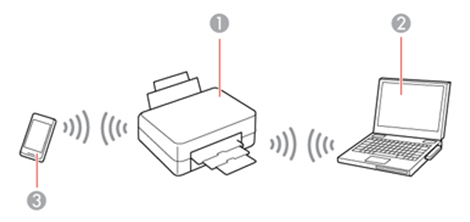
Wi-Fi Direct is a technology that allows two or more devices to connect directly to each other using Wi-Fi, without the need for a router. This means you can transfer files, mirror screens, and even print documents wirelessly between compatible devices.
History of Wi-fi Direct
Wi-Fi Direct was first introduced in 2010 as a way to facilitate file sharing and device-to-device communication. Since then, it has become increasingly popular, especially with the rise of smartphones and tablets.
How Does Wi-fi Direct Work?
Wi-Fi Direct uses a wireless connection to communicate between devices. When you connect two or more devices using Wi-Fi Direct, they form a network that allows for seamless data transfer.
Practical Applications of Wi-fi Direct
- File Sharing: Transfer files between devices wirelessly, making it easy to share documents, photos, and videos.
- Screen Mirroring: Mirror your device’s screen onto another compatible device, perfect for presentations or sharing content with others.
- Printing: Print documents directly from your device to a printer, eliminating the need for cables.
How to Use Wi-fi Direct
- Enable Wi-fi Direct on Your Device: Go to Settings > Wi-Fi and enable Wi-Fi Direct on both devices you want to connect.
- Connect Devices: Select the device you want to connect to from the list of available devices.
- Transfer Files or Print Documents: Once connected, you can transfer files or print documents wirelessly.
Benefits of Wi-fi Direct
- Convenience: No need for cables or routers, making it easy to share files and content between devices.
- Flexibility: Can be used in a variety of scenarios, from file sharing to screen mirroring and printing.
- Easy Setup: Simple setup process, with most devices automatically detecting each other.
Limitations of Wi-fi Direct
- Range Limitations: Range is limited, making it less reliable for large-scale file transfers or remote printing.
- Compatibility Issues: Not all devices are compatible with Wi-Fi Direct, so be sure to check compatibility before using.
Wi-fi Direct Vs. Other Wireless Technologies
While Wi-Fi Direct offers many benefits, other wireless technologies like Bluetooth and AirDrop also offer similar functionality. However, Wi-Fi Direct provides a more robust connection for file transfers and screen mirroring.
Conclusion
Wi-Fi Direct is a powerful technology that enables wireless communication between devices without the need for a router. With its ease of use, flexibility, and convenience, it’s no wonder why many people are embracing this technology. While there are some limitations to consider, Wi-Fi Direct remains an excellent choice for those looking to simplify their device-to-device connections.
Frequently Asked Questions
- Q: What Devices Are Compatible With Wi-fi Direct?
A: Most modern smartphones, tablets, and laptops support Wi-Fi Direct. - Q: Can I Use Wi-fi Direct For Large-scale File Transfers?
A: While possible, range limitations may affect transfer speeds and reliability. - Q: How do I Enable Wi-fi Direct on my Device?
A: Go to Settings > Wi-Fi and enable Wi-Fi Direct. - Q: Can I Print Documents Using Wi-fi Direct?
A: Yes, printing is one of the many features supported by Wi-Fi Direct. - Q: Is Wi-fi Direct Secure?
A: Like any wireless technology, security risks exist. Be sure to use strong passwords and keep your devices updated. - Q: Can I Use Wi-fi Direct For Video Streaming?
A: While possible, range limitations and compatibility issues may affect video quality and reliability. - Q: How do I Troubleshoot Wi-fi Direct Connection Issues?
A: Check device compatibility, restart devices, and ensure both devices are in close proximity. - Q: Can I Use Wi-fi Direct For Gaming?
A: While not ideal for real-time gaming, Wi-Fi Direct can be used for non-realtime gaming applications.
**Bold the Title and all headings of the article
Wi-fi Direct: A Comprehensive Guide
What is Wi-fi Direct?
Wi-Fi Direct is a technology that allows two or more devices to connect directly to each other using Wi-Fi, without the need for a router. This means you can transfer files, mirror screens, and even print documents wirelessly between compatible devices.
History of Wi-fi Direct
Wi-Fi Direct was first introduced in 2010 as a way to facilitate file sharing and device-to-device communication. Since then, it has become increasingly popular, especially with the rise of smartphones and tablets.
How Does Wi-fi Direct Work?
Wi-Fi Direct uses a wireless connection to communicate between devices. When you connect two or more devices using Wi-Fi Direct, they form a network that allows for seamless data transfer.
Practical Applications of Wi-fi Direct
- File Sharing: Transfer files between devices wirelessly, making it easy to share documents, photos, and videos.
- Screen Mirroring: Mirror your device’s screen onto another compatible device, perfect for presentations or sharing content with others.
- Printing: Print documents directly from your device to a printer, eliminating the need for cables.
How to Use Wi-fi Direct
- Enable Wi-fi Direct on Your Device: Go to Settings > Wi-Fi and enable Wi-Fi Direct on both devices you want to connect.
- Connect Devices: Select the device you want to connect to from the list of available devices.
- Transfer Files or Print Documents: Once connected, you can transfer files or print documents wirelessly.
Benefits of Wi-fi Direct
- Convenience: No need for cables or routers, making it easy to share files and content between devices.
- Flexibility: Can be used in a variety of scenarios, from file sharing to screen mirroring and printing.
- Easy Setup: Simple setup process, with most devices automatically detecting each other.
Limitations of Wi-fi Direct
- Range Limitations: Range is limited, making it less reliable for large-scale file transfers or remote printing.
- Compatibility Issues: Not all devices are compatible with Wi-Fi Direct, so be sure to check compatibility before using.
Wi-fi Direct Vs. Other Wireless Technologies
While Wi-Fi Direct offers many benefits, other wireless technologies like Bluetooth and AirDrop also offer similar functionality. However, Wi-Fi Direct provides a more robust connection for file transfers and screen mirroring.
Conclusion
Wi-Fi Direct is a powerful technology that enables wireless communication between devices without the need for a router. With its ease of use, flexibility, and convenience, it’s no wonder why many people are embracing this technology. While there are some limitations to consider, Wi-Fi Direct remains an excellent choice for those looking to simplify their device-to-device connections.
Frequently Asked Questions
- Q: What Devices Are Compatible With Wi-fi Direct?
A: Most modern smartphones, tablets, and laptops support Wi-Fi Direct. - Q: Can I Use Wi-fi Direct For Large-scale File Transfers?
A: While possible, range limitations may affect transfer speeds and reliability. - Q: How do I Enable Wi-fi Direct on my Device?
A: Go to Settings > Wi-Fi and enable Wi-Fi Direct. - Q: Can I Print Documents Using Wi-fi Direct?
A: Yes, printing is one of the many features supported by Wi-Fi Direct. - Q: Is Wi-fi Direct Secure?
A: Like any wireless technology, security risks exist. Be sure to use strong passwords and keep your devices updated. - Q: Can I Use Wi-fi Direct For Video Streaming?
A: While possible, range limitations and compatibility issues may affect video quality and reliability. - Q: How do I Troubleshoot Wi-fi Direct Connection Issues?
A: Check device compatibility, restart devices, and ensure both devices are in close proximity. - Q: Can I Use Wi-fi Direct For Gaming?
A: While not ideal for real-time gaming, Wi-Fi Direct can be used for non-realtime gaming applications.


