
Transferring Pokémon From Pokémon GO to Pokémon Home: A Step-by-step Guide
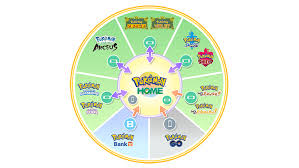
Are you tired of keeping your favorite Pokémon on two separate platforms? Do you want to keep them all in one place, where you can easily access them whenever you want? Look no further! In this article, we’ll show you how to transfer your Pokémon from Pokémon GO to Pokémon HOME, making it easier for you to manage and enjoy your Pokémon collection.
Why Transfer Pokémon From Pokémon GO to Pokémon Home?
Before we dive into the step-by-step guide, let’s talk about why transferring your Pokémon from Pokémon GO to Pokémon HOME is a great idea. With Pokémon HOME, you can collect and store all your Pokémon in one place, making it easier for you to keep track of them. You’ll also be able to trade Pokémon with other trainers, participate in events, and enjoy other features that come with the app.
Prerequisites For Transferring Pokémon
Before we begin, make sure you meet these prerequisites:
- Have a Nintendo Account: To transfer Pokémon from Pokémon GO to Pokémon HOME, you need to have a Nintendo account.
- Install Pokémon Home on Your Mobile Device: You can download Pokémon HOME on your Android or iOS device through the Play Store or App Store.
- Have a Pokémon GO Account: Make sure you have an active Pokémon GO account with a valid email address and password.
Step 1: Install Pokémon Home And Link Your Nintendo Account
To start transferring your Pokémon, first install Pokémon HOME on your mobile device. Once installed, follow these steps:
- Open Pokémon HOME and click on the “Link Nintendo Account” button.
- Enter your Nintendo account credentials to link them with Pokémon HOME.
- Confirm that you want to link your accounts.
Step 2: Transfer Your Pokémon From Pokémon GO to Pokémon Home
Now that you have linked your Nintendo account, follow these steps:
- Open Pokémon GO and click on the “Settings” icon (three horizontal lines).
- Scroll down to the bottom of the menu and select “Pokémon HOME”.
- Select “Link Nintendo Account” and confirm that you want to link it.
- Enter your Nintendo account credentials again to confirm the linking process.
Step 3: Choose Your Pokémon to Transfer
Once linked, you’ll see a list of all your Pokémon. To transfer them from Pokémon GO to Pokémon HOME:
- Select the Pokémon you want to transfer.
- Click on the “Transfer” button.
- Confirm that you want to transfer the selected Pokémon.
What Happens After Transferring Your Pokémon?
After transferring your Pokémon, they will be stored in your Pokémon HOME account. You can view them by opening Pokémon HOME and selecting the “Pokémon” tab.
Tips And Precautions
Keep in mind these tips and precautions:
- Use Up All Your Energy: Make sure you have enough energy to transfer all the Pokémon you want.
- No Going Back: Once transferred, there’s no going back. You can’t transfer your Pokémon from Pokémon HOME back to Pokémon GO.
Conclusion
Transferring your Pokémon from Pokémon GO to Pokémon HOME is a great way to centralize your collection and make it easier to manage. By following these simple steps, you’ll be able to enjoy all the features that come with Pokémon HOME and make the most out of your Pokémon experience.
Frequently Asked Questions (FAQs)
Q: Why Can’t I Transfer my Pokémon From Pokémon GO to Pokémon Home?
A: Make sure you have linked your Nintendo account with Pokémon HOME and have enough energy to transfer them.
Q: What Happens if I Transfer a Pokémon by Mistake?
A: Unfortunately, there’s no going back. Once transferred, the Pokémon will be moved permanently.
Q: Can I Trade my Pokémon With Other Trainers on Pokémon Home?
A: Yes! With Pokémon HOME, you can exchange your Pokémon with other trainers and even participate in events.


