
How to Configure a Wi-fi Repeater: A Step-by-step Guide
Are you tired of weak Wi-Fi signals in your home or office? Do you struggle with dropped connections and slow internet speeds? A Wi-Fi repeater is the solution you need! In this article, we will guide you through the process of configuring a Wi-Fi repeater to extend your wireless network’s coverage and improve its performance.
What is a Wi-fi Repeater?
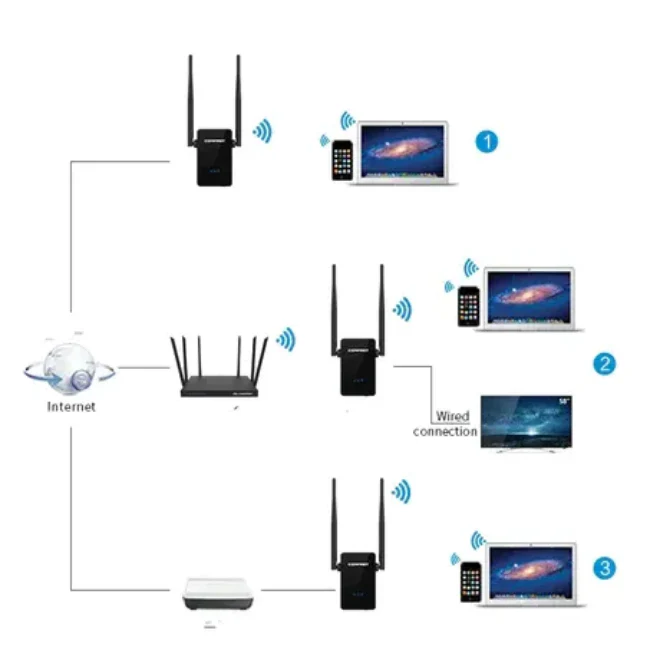
A Wi-Fi repeater, also known as a Wi-Fi extender or booster, is a device that amplifies weak Wi-Fi signals, allowing you to access the internet from areas with poor reception. It works by receiving the existing Wi-Fi signal, amplifying it, and then retransmitting it to extend the coverage area.
Types of Wi-fi Repeaters
There are several types of Wi-Fi repeaters available in the market:
- Range Extenders: These are the most common type of Wi-Fi repeaters. They receive the existing Wi-Fi signal, amplify it, and then retransmit it to extend the coverage area.
- Access Points (APs): These devices connect to a wired network and provide a wireless access point for devices to connect to.
- Powerline Wi-fi Repeaters: These repeaters use your home’s electrical wiring to create a network, eliminating the need for cables.
- Mesh Wi-fi Systems: These systems consist of multiple nodes that work together to provide a strong and reliable wireless network.
How to Choose a Wi-fi Repeater
When choosing a Wi-Fi repeater, consider the following factors:
- Range: Look for a repeater with a long range to ensure coverage in your desired area.
- Speed: Opt for a repeater that supports fast speeds, such as 802.11Ac or 802.11Ax.
- Compatibility: Ensure the repeater is compatible with your existing router and devices.
- Price: Wi-Fi repeaters range from under $20 to over $100, so set a budget and choose a device that meets it.
How to Configure a Wi-fi Repeater
Configuring a Wi-Fi repeater is relatively simple:
- Connect The Repeater: Connect the repeater to your existing router using an Ethernet cable.
- Power On The Repeater: Turn on the repeater and allow it to boot up.
- Access The Repeater’s Interface: Access the repeater’s interface through a web browser or mobile app, depending on the device’s manufacturer instructions.
- Configure The Repeater: Configure the repeater by following the manufacturer’s instructions, which may include setting up the network name (SSID), password, and other settings.
Specific Configuration Instructions For Popular Wi-fi Repeaters
Here are specific configuration instructions for some popular Wi-Fi repeaters:
- Tenda Wi-fi Repeater
- Connect to the repeater’s network using a web browser.
- Go to the repeater’s interface (http://192.168.10.1).
- Follow the on-screen instructions to configure the repeater.
- Netgear Wi-fi Repeater
- Download and install the Netgear Nighthawk app.
- Connect to the repeater’s network using a web browser.
- Go to the repeater’s interface (http://Mywifi.Net).
- Follow the on-screen instructions to configure the repeater.
- Tp-link Wi-fi Repeater
- Download and install the TP-Link Tether app.
- Connect to the repeater’s network using a web browser.
- Go to the repeater’s interface (http://192.168.0.254).
- Follow the on-screen instructions to configure the repeater.
Tips And Tricks
Here are some tips and tricks to keep in mind when configuring a Wi-Fi repeater:
- Place The Repeater Strategically: Place the repeater in an area where it can receive the strongest signal from your existing router.
- Update Firmware Regularly: Update the firmware on your repeater regularly to ensure you have the latest features and bug fixes.
- Use a Strong Password: Use a strong password for your network to prevent unauthorized access.
Conclusion
Configuring a Wi-Fi repeater is relatively simple, but it requires some technical know-how. By following these step-by-step instructions, you can extend your wireless network’s coverage and improve its performance. Remember to choose the right type of Wi-Fi repeater for your needs, configure it correctly, and use it strategically to ensure optimal results.
Frequently Asked Questions
Here are some frequently asked questions about Wi-Fi repeaters:
- Q: What is a Wi-fi Repeater?
A: A Wi-Fi repeater is a device that amplifies weak Wi-Fi signals, allowing you to access the internet from areas with poor reception. - Q: How Does a Wi-fi Repeater Work?
A: A Wi-Fi repeater receives the existing Wi-Fi signal, amplifies it, and then retransmits it to extend the coverage area. - Q: What Are The Different Types of Wi-fi Repeaters?
A: There are several types of Wi-Fi repeaters, including range extenders, access points, powerline Wi-Fi repeaters, and mesh Wi-Fi systems. -
Q: How do I Choose a Wi-fi Repeater?
A: Consider factors such as range, speed, compatibility, and price when choosing a Wi-Fi repeater. -
What Are The Benefits of Using a Wi-fi Repeater?
Using a Wi-Fi repeater can improve your wireless network’s coverage and performance, reducing dropped connections and slow internet speeds.
- Can I Use a Wi-fi Repeater With Any Router?
Most Wi-Fi repeaters work with most routers, but it’s essential to ensure compatibility before purchasing a repeater.
- Do I Need Technical Expertise to Configure a Wi-fi Repeater?
While some technical know-how is required to configure a Wi-Fi repeater, the process is relatively simple and can be completed by following manufacturer instructions or seeking help from online resources.
- Can I Use a Wi-fi Repeater With my Smartphone?
Yes, you can use a Wi-Fi repeater with your smartphone to access the internet from areas with poor reception.


