
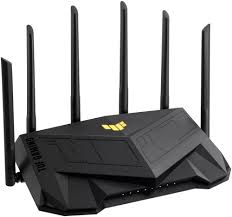
The Ultimate Guide to Choosing a Gaming Router: A Comprehensive Review
Are you a hardcore gamer or an online gaming enthusiast? Do you need a stable and fast internet connection to enjoy lag-free gaming sessions? If so, then choosing the right gaming router is crucial for an unparalleled gaming experience.
In this guide, we will walk you through the essential features to consider when selecting a gaming router. From doors and connections to Wi-Fi classes, speed, and chipset, we’ve got you covered. Our comprehensive review will help you make an informed decision and find the perfect gaming router that meets your needs.
Doors And Connections: The Foundation of a Great Gaming Experience
When it comes to gaming routers, doors and connections are essential for a seamless online experience. A good gaming router should have multiple Ethernet ports (RJ-45) for stable wired connections. These ports provide a direct link between your device and the internet, reducing latency and ensuring smooth gameplay.
Fast Ethernet Ports (100 Mbps): Suitable for basic online gaming needs
Gigabit Ethernet Ports (1 Gbps): Ideal for demanding gaming sessions with multiple devices connected
*10 Gigabit Ethernet Ports: Rare but ideal for extreme gaming enthusiasts
Wi-fi Classes: The Key to a Fast And Stable Connection
Wi-Fi classes have evolved significantly over the years, offering faster speeds and better stability. Here’s a brief overview:
Wi-Fi 4 (802.11N): Suitable for basic online needs with a speed of up to 150 Mbps
Wi-Fi 5 (802.11Ac): Ideal for demanding gaming sessions with a speed of up to 3.5 Gbps
*Wi-Fi 6 (802.11Ax): The latest standard, offering speeds up to 9.6 Gbps and improved stability
Chipset, Ram, Cpu, Antennas, And Mesh Networking: The Heart of Your Gaming Router
A gaming router’s chipset, RAM, CPU, antennas, and mesh networking capabilities all play a crucial role in determining its performance.
Broadcom Chipset: Known for their high-quality chipsets that ensure stable connections
Infineon Chipset: Offers excellent stability and speed in demanding situations
Adequate RAM (at least 512 MB): Essential for smooth gaming sessions with multiple devices connected
CPU: A powerful CPU ensures fast processing and reduced latency
Conclusion
Choosing the right gaming router can be a daunting task, but our guide has provided you with essential information to make an informed decision. From doors and connections to Wi-Fi classes, chipsets, RAM, CPUs, antennas, and mesh networking, we’ve covered everything you need to know.
Remember, your gaming experience depends on a stable and fast internet connection. With the right gaming router, you’ll be able to enjoy seamless online sessions with minimal latency and maximum fun!
Faqs
-
What is The Best Wi-fi Class For Gaming?
The latest Wi-Fi 6 (802.11Ax) standard offers the fastest speeds and improved stability. -
How Many Ethernet Ports Should my Gaming Router Have?
At least four Gigabit Ethernet ports are recommended for demanding gaming sessions with multiple devices connected. -
What is Mesh Networking, And How Does it Benefit Me?
Mesh networking provides a stable and fast internet connection by using dedicated channels to communicate between devices. -
What is The Importance of Ram in my Gaming Router?
Adequate RAM ensures smooth gaming sessions with multiple devices connected, reducing latency and improving overall performance. -
Can I Use a Gaming Router as a Modem?
Yes, many modern gaming routers come with built-in modems, making them a convenient option for those without separate modems. -
What is The Difference Between a Wi-fi 6 (802.11Ax) And a Wi-fi 5 (802.11Ac) Router?
Wi-Fi 6 offers faster speeds (up to 9.6 Gbps) and improved stability compared to Wi-Fi 5 (up to 3.5 Gbps). -
How Can I Optimize my Gaming Router’s Performance?
Update your firmware regularly, use Quality of Service (QoS) settings to prioritize gaming traffic, and ensure adequate RAM and CPU power. -
Can I Connect Multiple Devices to my Gaming Router For Online Gaming Sessions?
Yes, most modern gaming routers support multiple device connections, making it ideal for households with multiple gamers.


