
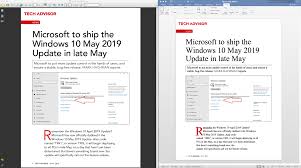
Convert Pdf to Word Free: A Step-by-step Guide
Are you tired of manually converting PDF files to Word documents? Do you wish there was a way to do it for free, without compromising on quality? Look no further! In this article, we’ll show you how to convert PDF to Word free using various tools and software.
What is The Best Way to Convert Pdf to Word Free?
The best way to convert PDF to Word free depends on your operating system and personal preferences. Here are some of the most popular options:
- Microsoft Word: If you have Microsoft Office installed on your computer, you can use Word to open and edit PDF files directly.
- Adobe Acrobat DC: Adobe’s official software for creating and editing PDFs is also capable of converting PDFs to Word documents.
- Doxillion Document Converter: This free software allows you to convert various document formats, including PDF, to Word and other popular formats.
How to Convert Pdf to Word Free Using Online Tools
If you don’t want to install any software on your computer, there are several online tools that can help you convert PDFs to Word documents. Here are a few options:
- Online2pdf: This web-based service allows you to upload and convert PDF files to Word documents.
- Pdfcandy: Another online tool that uses OCR technology to convert scanned or image-based PDFs to editable Word documents.
- Docspal: A free online service that can help you convert various document formats, including PDF, to Word.
How to Convert Pdf to Word Free on Mobile Devices
If you’re using a mobile device, there are also several options available for converting PDFs to Word documents. Here are a few:
- Microsoft Office: If you have Microsoft Office installed on your Android or iOS device, you can use the app to open and edit PDF files directly.
- Converter Pdf to Word: A free app that allows you to convert PDFs to Word documents using OCR technology.
- Pdf Conversion Suite: Another mobile app that can help you convert PDFs to various document formats, including Word.
Conclusion
Converting PDFs to Word documents doesn’t have to be a hassle anymore. With the tools and software mentioned above, you can easily do it for free, without compromising on quality. Whether you’re using Windows or macOS, or mobile devices like Android or iOS, there’s an option available for everyone.
Faqs
Here are some frequently asked questions about converting PDFs to Word documents:
- Q: What is the best way to convert PDFs to Word?
A: The best way to convert PDFs to Word depends on your operating system and personal preferences. You can use Microsoft Word, Adobe Acrobat DC, or online tools like Online2PDF. - Q: Can I convert scanned or image-based PDFs to editable Word documents?
A: Yes, you can use online tools like PDFCandy or DocsPal that employ OCR technology to convert scanned or image-based PDFs to editable Word documents. - Q: Are there any mobile apps available for converting PDFs to Word documents?
A: Yes, there are several mobile apps available, such as Microsoft Office and Converter PDF to Word.
References
If you’re interested in learning more about converting PDFs to Word documents, here are some references you might find useful:
- Microsoft Word User Guide: A comprehensive guide on using Microsoft Word for converting PDFs to Word documents.
- Adobe Acrobat DC User Guide: A detailed guide on using Adobe Acrobat DC for creating and editing PDFs.
- Online2pdf User Guide: A simple guide on using the Online2PDF service for converting PDFs to Word documents.


